---
title: Blog - 0110.be
canonical: https://0110.be/Blog?page=7
markdown_url: https://0110.be/Blog.md?page=7
page: 7
posts_per_page: 30
total_posts: 261
filters:
content_page: Blog
tags:
- 0110 concerten
- 0110.be
- ARIP
- Code
- Collaborative Filtering
- Command Line Application
- Computational ethnomusicology
- Computational musicology
- Cultuur
- Dutch
- Film
- Folk Music Analysis (FMA) conference
- Hackerspace Ghent
- Harde waren
- HoGent
- ISMIR
- JNMR
- Java
- Jazz
- Jongleren
- Joren In Halmstad
- LaTeX
- Mac OS X
- Music Information Retrieval
- Muziek
- PeachNote Piano
- Poging tot humor
- Portfolio
- Presentation
- Projecten
- Reizen
- Research papers
- School
- Schoolwijs
- Tarsos
- TarsosDSP
- TarsosTranscoder
- Thesis
- UGent
- Vooruit
- WSOLA
- featured
- français
previous: https://0110.be/Blog.md?page=6
next: https://0110.be/Blog.md?page=8
---
# Blog - 0110.be
## [ Digital Music Research Network Workshop - Queen Mary University London](https://0110.be/posts/_Digital_Music_Research_Network_Workshop_-_Queen_Mary_University_London.md)
- Published: 2010-12-22T14:00:56Z
- Updated: 2013-12-05T18:19:15Z
- Author: Joren
- ID: 366
- Canonical: https://0110.be/posts/_Digital_Music_Research_Network_Workshop_-_Queen_Mary_University_London
- Tags: [Computational ethnomusicology](https://0110.be/tags/Computational%20ethnomusicology.md), [Computational musicology](https://0110.be/tags/Computational%20musicology.md), [HoGent](https://0110.be/tags/HoGent.md), [Research papers](https://0110.be/tags/Research%20papers.md), [featured](https://0110.be/tags/featured.md)
Monday the 20th and Tuesday the 21th of December I attended two workshops at The Queen Mary University of London: [The Machine Listening Workshop](http://www.eecs.qmul.ac.uk/events/mlw/mlw2010/) and [Digital Music Research Network One-day Workshop 2010](http://www.elec.qmul.ac.uk/dmrn/events/dmrnp5/)
At the workshop I had an interesting meeting with Dan Tidhar. He researches harpsichord temperament estimation at QMUL (Queen Mary University of London). Together they created the [Tempest web service](http://www.isophonics.net/sawa/tempest/) where you can upload harpsichord audio and let the system guess the temperament. The process is described in the paper "High precision frequency estimation for harpsichord tuning classification". Although Tarsos was not officially part of the programme I hijacked the poster sessions to show a live demo of Tarsos with Dan's dataset.
Another interesting talk was about [2032](http://www.dynamictonality.com/2032), a tunable synthesizer with definable Harmonics. It elaborates on the ideas of Sethares about tone scales .
---
## [Latex & Version Control Introduction](https://0110.be/posts/Latex__%26_Version_Control_Introduction.md)
- Published: 2010-11-30T08:56:17Z
- Updated: 2013-12-05T18:19:15Z
- Author: Joren
- ID: 365
- Canonical: https://0110.be/posts/Latex__%26_Version_Control_Introduction
- Tags: [HoGent](https://0110.be/tags/HoGent.md), [Presentation](https://0110.be/tags/Presentation.md)
Monday, I'll give a small presentation about Latex and Version Control for the research team at the [University College Gent, Faculty of Music](http://cons.hogent.be). The idea is to give a pragmatic overview of working with Latex and version control. The "presentation about Latex & Version control (in Dutch)":\[latex_svn_presentatie.pdf\] can be downloaded. The presentation itself is created using Latex and "the source of the presentation":\[latex_svn_presentatie.zip\] is also available. A good description of Latex can be found [here](http://swik.net/LaTeX):
> LaTeX (pronounced "latech") is a document preparation system for high-quality typesetting based on, and succeeding TeX formatting. It is a very popular format in academia, as it allows advanced document formatting capabilities not found in other common document formatting systems. Some of these capabilities include table figure notations, bibliography formatting (see BibTeX), and an advanced macro language.
Some useful references:
- [Practical Latex introduction course (in Dutch)](http://zeus.ugent.be/~gaspard/latex/)
- [UGent Latex website](http://latex.ugent.be)
- [WikiBook about Latex](http://en.wikibooks.org/wiki/Latex)
- [Eclipse](http://eclipse.org): an IDE (Integrated Development Environment) which can be used as Latex editor with version control by installing the [TeXclipse](http://texlipse.sourceforge.net/) and [Subclipse](http://subclipse.tigris.org/) plugins.
- [latex\_svn\_presentatie.zip](https://0110.be/files/attachments/365/latex_svn_presentatie.zip)
- [latex\_icon.png](https://0110.be/files/attachments/365/latex_icon.png)
- [latex\_svn\_presentatie.pdf](https://0110.be/files/attachments/365/latex_svn_presentatie.pdf)
---
## [Seminar - Research on Music History and Analysis](https://0110.be/posts/Seminar_-_Research_on_Music_History_and_Analysis.md)
- Published: 2010-11-26T14:39:40Z
- Updated: 2013-12-05T18:19:15Z
- Author: Joren
- ID: 364
- Canonical: https://0110.be/posts/Seminar_-_Research_on_Music_History_and_Analysis
- Tags: [Computational musicology](https://0110.be/tags/Computational%20musicology.md), [HoGent](https://0110.be/tags/HoGent.md), [Music Information Retrieval](https://0110.be/tags/Music%20Information%20Retrieval.md), [Presentation](https://0110.be/tags/Presentation.md)
This post contains links to genuinely useful software to do signal based audio analysis.
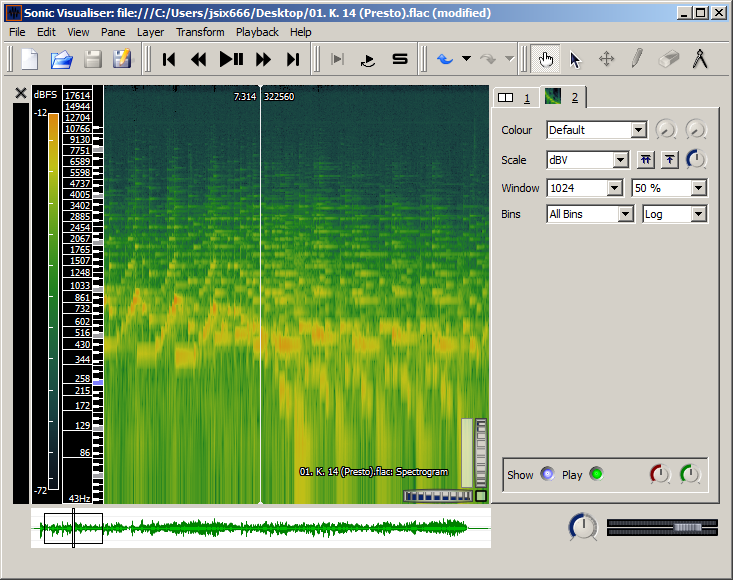
- [Sonic Visualizer](http://www.sonicvisualiser.org): As its name suggests Sonic Visualizer contains a lot different visualisations for audio. It can be used for analysis (pitch,beat,chroma,...) with [VAMP-plugins](http://vamp-plugins.org). To quote *"The aim of Sonic Visualiser is to be the first program you reach for when want to study a musical recording rather than simply listen to it"*. It is the swiss army knife of audio analysis.
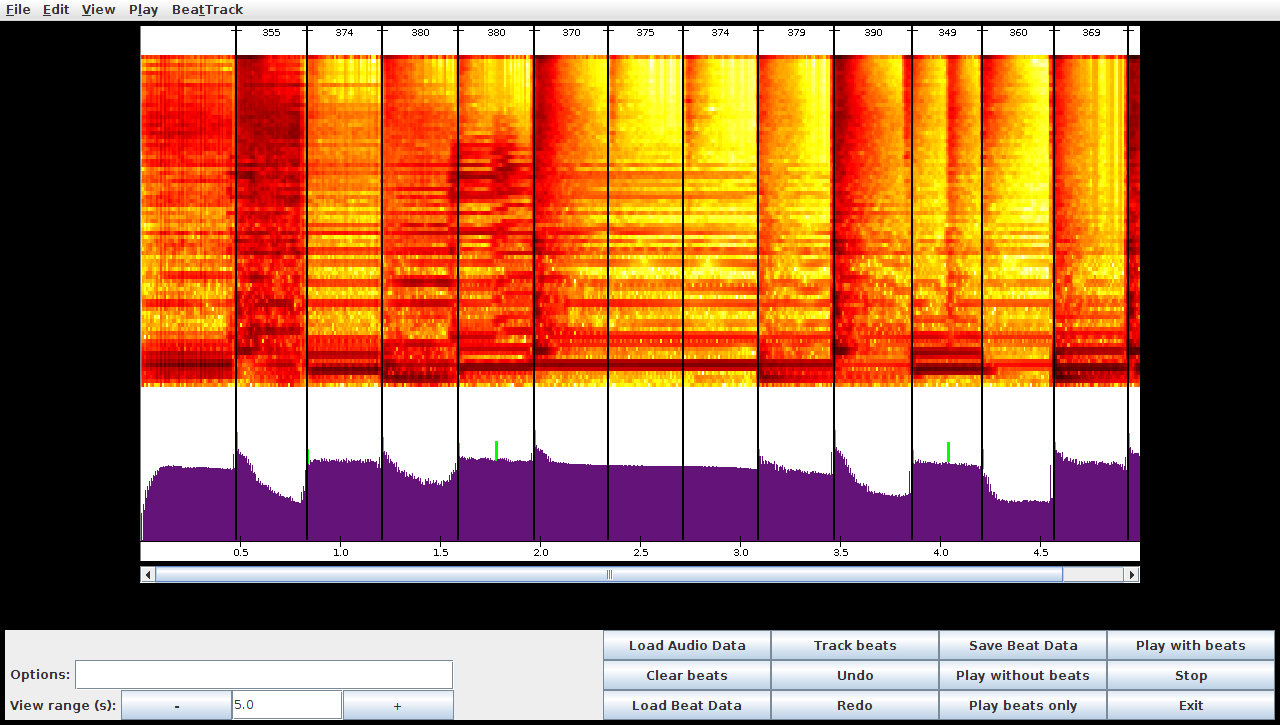
- [BeatRoot](http://www.eecs.qmul.ac.uk/~simond/beatroot/) is designed specifically for one goal: beat tracking. It can be used for e.g. comparing tempi of different performances of the same piece or to track tempo deviation within one piece.
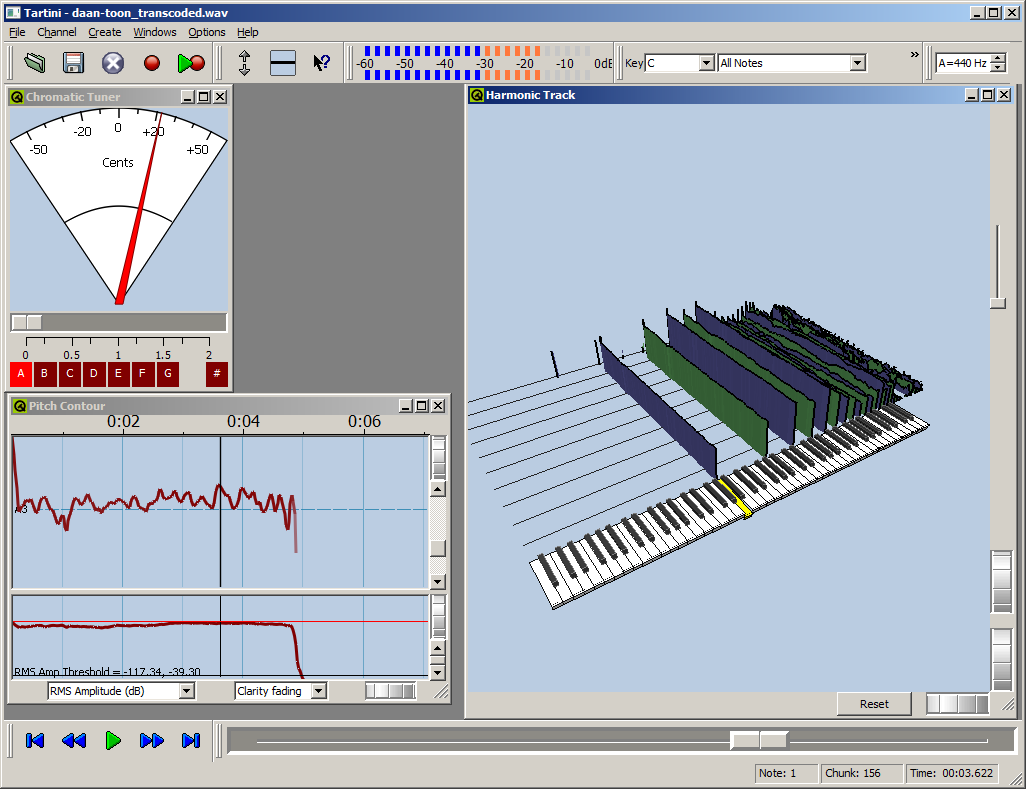
- [Tartini](http://tartini.net) is capable to do real-time pitch analysis of sound. You can e.g. play into a microphone with a violin and see the harmonics you produce and adapt you playing style based on visual feedback. It also contains a pitch deviation measuring apparatus to analyse vibrato.
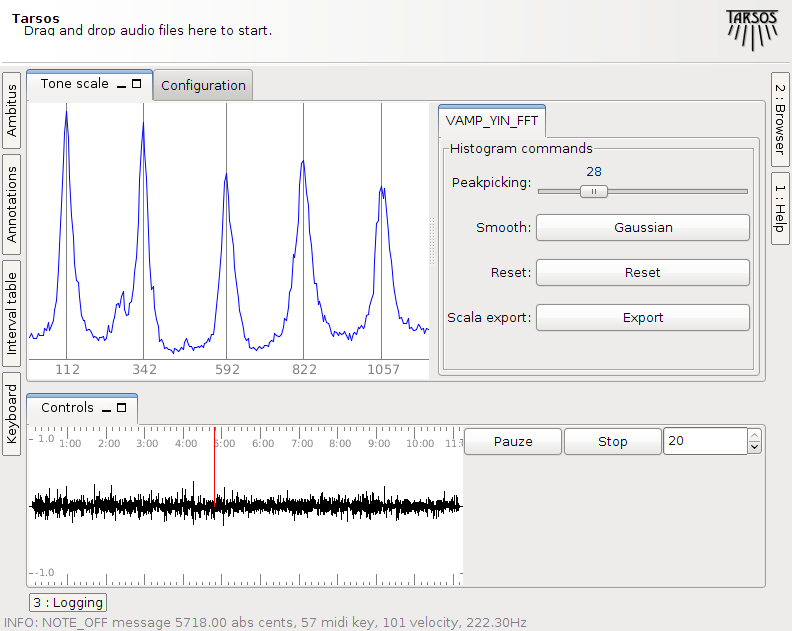
- [Tarsos](http://tarsos.0110.be) is software for tone scale analysis. It is useful to extract tone scales from audio. Different tuning systems can be seen, extracted and compared. It also contains the ability to play along with the original song with a tuned midi keyboard .
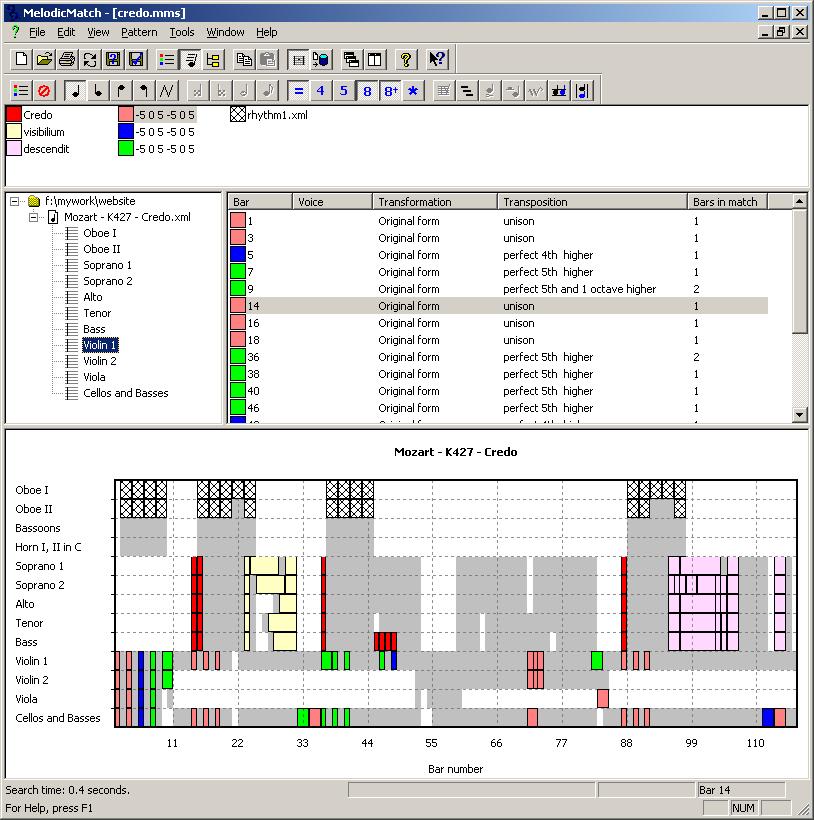
[Melodic Match](http://www.melodicmatch.com) is a different beast. It does not work on signal level but processes symbolic audio. More to the point it searches through MusicXML files - which can be created from MIDI-files. See its website for use cases. Melodic Match is only available for Windows.
During a lecture at the [University College Gent, Faculty of Music](http://cons.hogent.be) these tools were presented with some examples. "The slides (Slides in Dutch)":\[presentatie.pdf\] and "a zip-file with audio samples, slides and software":\[Tarsos-presentatie.zip\] are available for reference. Most of the time was given to Tarsos, the software we developed.
[Olmo Cornelis](http://webs.hogent.be/olmocornelis/) also gave a lecture about his own research and how Tarsos fits in the bigger picture. "His presentation (Slides in English)":\[lezing_Olmo_Cornelis_zonder_audio.ppt\] and "the presentation with audio":\[lezing_Olmo_Cornelis_met_audio.zip\] are also available here.
- [presentatie.pdf](https://0110.be/files/attachments/364/presentatie.pdf)
- [Tarsos-presentatie.zip](https://0110.be/files/attachments/364/Tarsos-presentatie.zip)
- [lezing\_Olmo\_Cornelis\_zonder\_audio.ppt](https://0110.be/files/attachments/364/lezing_Olmo_Cornelis_zonder_audio.ppt)
- [lezing\_Olmo\_Cornelis\_met\_audio.zip](https://0110.be/files/attachments/364/lezing_Olmo_Cornelis_met_audio.zip)
---
## [Groovy Tarsos Scripting](https://0110.be/posts/Groovy_Tarsos_Scripting.md)
- Published: 2010-11-09T00:00:00Z
- Updated: 2020-11-17T09:12:42Z
- Author: Joren
- ID: 346
- Canonical: https://0110.be/posts/Groovy_Tarsos_Scripting
- Tags: [Code](https://0110.be/tags/Code.md), [HoGent](https://0110.be/tags/HoGent.md), [Java](https://0110.be/tags/Java.md), [Tarsos](https://0110.be/tags/Tarsos.md), [featured](https://0110.be/tags/featured.md)
There is more to Tarsos then meets te eye. The graphical user interface only exposes some functionality; the API (Application Programmer Interface) exposes all of Tarsos' capabilities.
Tarsos is programmed in Java so the API is accessible trough Java and other programming languages targeting the JVM (Java Virtual Machine) like JRuby, Scala and Groovy. The following examples use [the Groovy programming language](http://groovy.codehaus.org/) because I find it the most aesthetically pleasing with regards to interoperability and it gets the job done without getting in your way.
To run the examples a copy of the [Tarsos JAR-file](http://0110.be/releases/Tarsos) needs to be added to the Classpath and the Groovy runtime must be installed correctly. I'll leave this as an exercise for the reader: godspeed to you, brave soul. Quick protip: placing a copy of the jar in the extensions directory seems to work best, e.g. see [important java directories on mac OS X.](http://developer.apple.com/library/mac/#qa/qa2001/qa1170.html)
The first example extracts pitch class histograms from a bunch of files and saves them as EPS (Encapsulated PostScript)-files. It iterates a directory recursively and handles each file that matches a given regular expression. In this example the regular expression matches all WAV-files. Batch processing is one of those things scripting is ideal for, doing the same thing with the user interface would be tedious or even mind-numbingly boring, not groovy at all indeed.
\`\`\`ruby\
import be.hogent.tarsos.\*\
import be.hogent.tarsos.util.\*\
import be.hogent.tarsos.util.histogram.ToneScaleHistogram\
import be.hogent.tarsos.sampled.pitch.Annotation\
import be.hogent.tarsos.sampled.pitch.PitchDetectionMode
dir = "/home/joren/audio"
FileUtils.glob(dir,".\*.wav",true).each { file -\>\
audioFile = new AudioFile(file)\
pitchDetector = PitchDetectionMode.TARSOS_YIN.getPitchDetector(audioFile)\
pitchDetector.executePitchDetection()\
//get some annotations\
annotations = pitchDetector.getAnnotations()\
//create an ambitus and tone scale histogram\
ambitusHistogram = Annotation.ambitusHistogram(annotations)\
toneScaleHisto = ambitusHistogram.toneScaleHistogram()\
//plot a smoothed version of the histogram\
p = new SimplePlot()\
p.addData 0, toneScaleHisto.gaussianSmooth(0.2)\
p.save FileUtils.basename( file) + ".eps"\
}\
\`\`\`
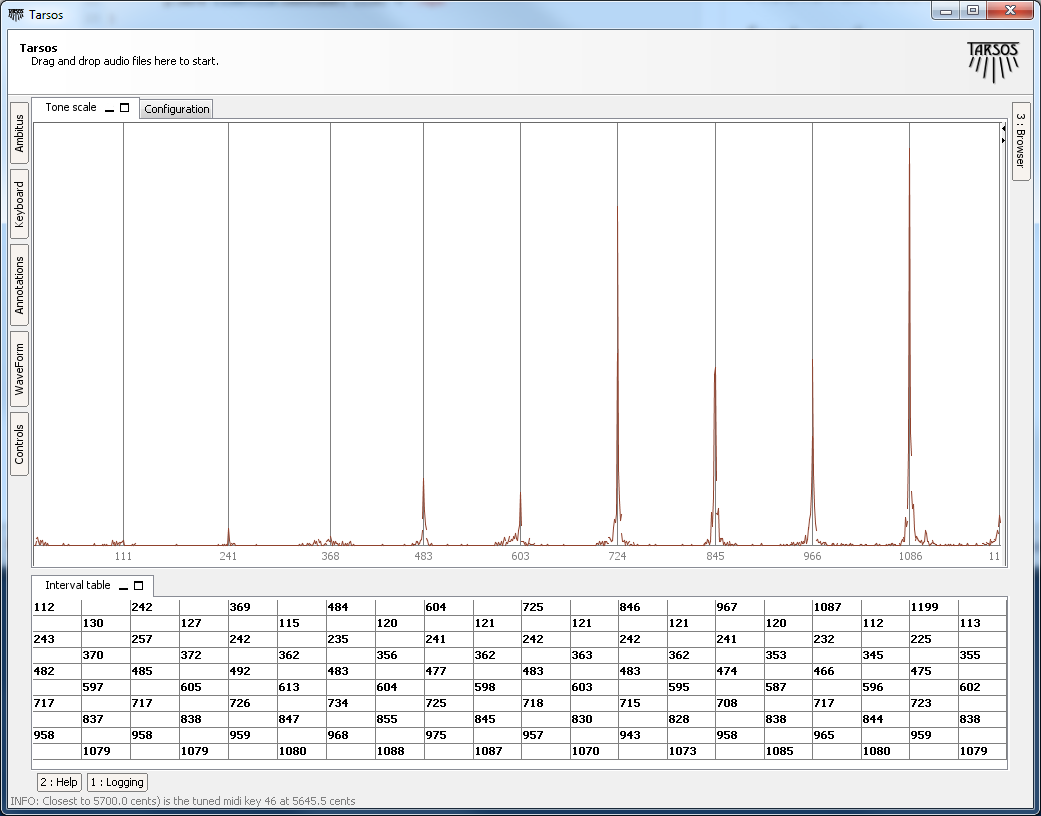
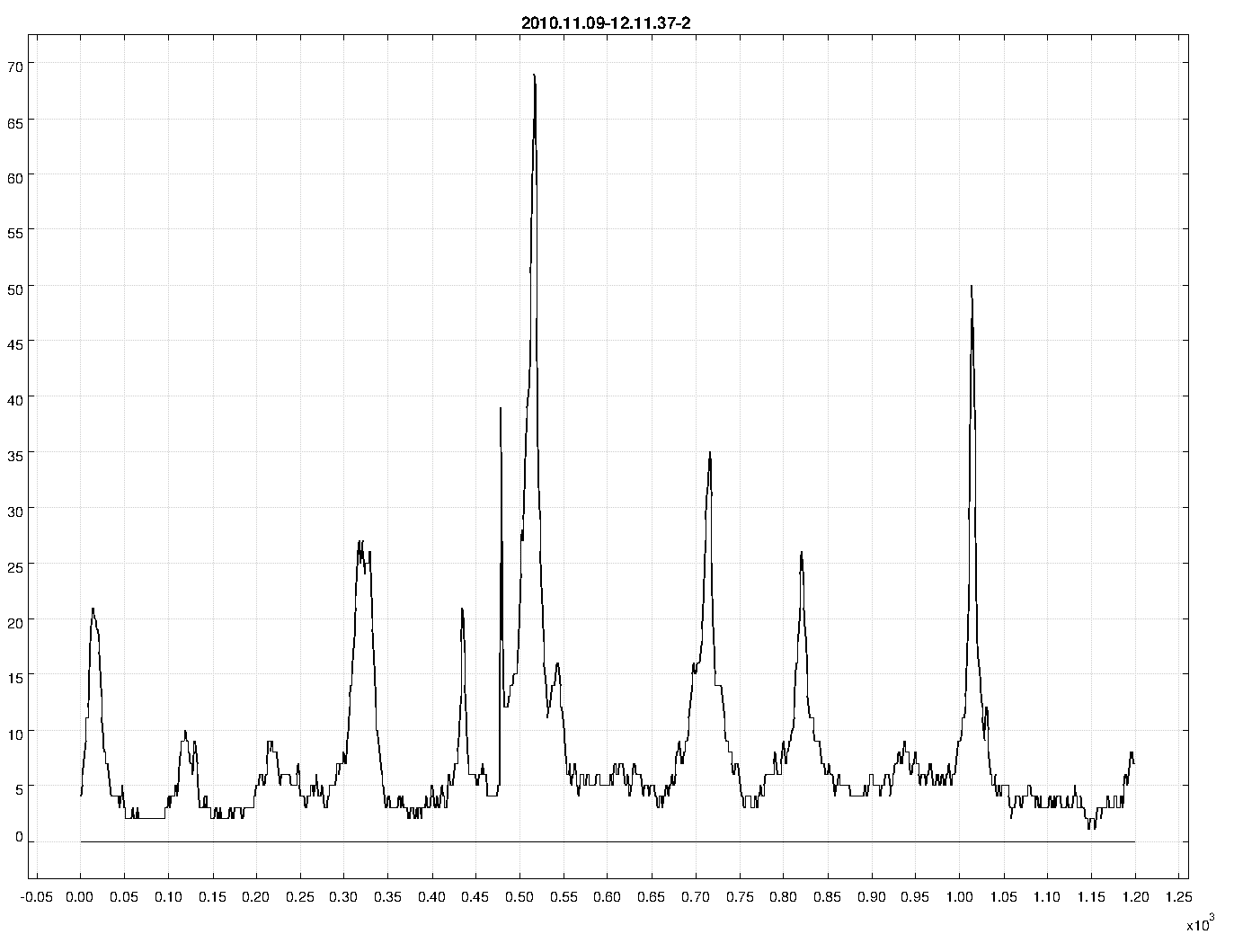
The second example uses functionality that is currently only available trough the API. It takes a MIDI-file and synthesizes it to a wave file using an arbitrary scale. In this case 10-TET. The heavy-work is done by the [Gervill synthesizer](https://gervill.dev.java.net/). The resulting file is available for download, micro---macro?---tonal Bach is great: "BWV 1013 in 10-TET":\[BWV_1013_10-TET.mp3\]. The result of "an analysis with Tarsos on the synthesized audio":\[120.png\] clearly shows an interval of 120 cents with some deviations.
\`\`\`ruby\
import java.io.File\
import be.hogent.tarsos.midi.MidiToWavRenderer\
import be.hogent.tarsos.util.ScalaFile
midiFile = new File("BWV_1013.mid")\
outFile = new File("out.wav")
tuning = \[0,120,240,360,480,600,720,840,960,1080\] as double \[\]
MidiToWavRenderer renderer\
renderer = new MidiToWavRenderer()\
renderer.setTuning(tuning)\
renderer.createWavFile(midiFile, outFile)\
\`\`\`
An extended version of this second example script could be used to generate a dataset with audio and corresponding tone scale information on the fly. The dataset could then be used as a baseline.
The API is not yet well documented and is still in flux or more correctly: superflux. Note to self: I will provide documentation and a number of useful examples when the dust settles down. I'm not even sure if I will stick with Groovy. Scala has a nice Lispy feel to it and seems more developed. Groovy has a less steep learning curve, especially if you have some experience with Ruby. JRuby is also nice but the interoperability with legacy Java looks like an ugly hack.
- [medium.png](https://0110.be/files/attachments/346/medium.png)
- [120.png](https://0110.be/files/attachments/346/120.png)
- [BWV\_1013\_10-TET.mp3](https://0110.be/files/attachments/346/BWV_1013_10-TET.mp3)
---
## [Tarsos Screencast](https://0110.be/posts/Tarsos_Screencast.md)
- Published: 2010-10-08T15:16:47Z
- Updated: 2013-12-05T18:19:15Z
- Author: Joren
- ID: 344
- Canonical: https://0110.be/posts/Tarsos_Screencast
- Tags: [Computational ethnomusicology](https://0110.be/tags/Computational%20ethnomusicology.md), [HoGent](https://0110.be/tags/HoGent.md), [Tarsos](https://0110.be/tags/Tarsos.md)
This afternoon I created [a screencast showing the main features of Tarsos](http://www.youtube.com/watch?v=nzDdYvqgcOo). If everything goes well it should be visible below.
To give Tarsos a try you can start Tarsos using JAVA WebStart or download the [executable Tarsos JAR-file](https://0110.be/attachment/tarsos.jar). A JAVA 1.5 runtime is required.
---
## [Tarsos Presented at the "Perspectives for Computational Musicology" Symposium](https://0110.be/posts/Tarsos_Presented_at_the_%22Perspectives_for_Computational_Musicology%22_Symposium.md)
- Published: 2010-10-06T14:42:01Z
- Updated: 2013-12-05T18:19:15Z
- Author: Joren
- ID: 341
- Canonical: https://0110.be/posts/Tarsos_Presented_at_the_%22Perspectives_for_Computational_Musicology%22_Symposium
- Tags: [Computational ethnomusicology](https://0110.be/tags/Computational%20ethnomusicology.md), [HoGent](https://0110.be/tags/HoGent.md), [Music Information Retrieval](https://0110.be/tags/Music%20Information%20Retrieval.md), [Presentation](https://0110.be/tags/Presentation.md), [featured](https://0110.be/tags/featured.md)
Yesterday Tarsos was publicly presented at the symposium [Perspectives for Computational Musicology](https://www.meertens.knaw.nl/cms/nl/agenda-othermenu-70/143334-5-oktober-2010) in Amsterdam. The first public presentation of Tarsos, excluding this website. The symposium was organized by [the Meertens Institute](https://www.meertens.knaw.nl/cms/en) on the occasion of Peter van Kranenburg's PhD defense.
The presentation included a live demo of a daily build of Tarsos (a Friday evening build) which worked, surprisingly, without hiccups. The presentation was done by [Olmo Cornelis](http://cons.hogent.be/nl/onderzoek/onderzoeksprojecten/olmo-cornelis/bio). This was the small introduction:
> **Tarsos - a Platform for Pitch Analysis of Ethnic Music** \
> Ethnic music is a vulnerable cultural heritage that has received only recently more attention within the Music Information Retrieval community. However, access to ethnic music remains problematic, as this music does not always correspond to the Western concepts of music and metadata that underlie the currently available content-based methods. During this lecture, we like to present our current research on pitch analysis of African music. TARSOS, a platform for analysis, will be presented as a powerful tool that can describe and compare scales with great detail.
To give Tarsos a try ou can start Tarsos using JAVA WebStart or download the [executable Tarsos JAR-file](https://0110.be/attachment/tarsos.jar). A JAVA 1.5 runtime is required.
---
## [How to Develop for LG GT540 Optimus on Ubuntu](https://0110.be/posts/How_to_Develop_for_LG_GT540_Optimus_on_Ubuntu.md)
- Published: 2010-09-17T00:00:00Z
- Updated: 2013-12-05T18:19:15Z
- Author: Joren
- ID: 312
- Canonical: https://0110.be/posts/How_to_Develop_for_LG_GT540_Optimus_on_Ubuntu
- Tags: [0110.be](https://0110.be/tags/0110.be.md), [Code](https://0110.be/tags/Code.md), [Hackerspace Ghent](https://0110.be/tags/Hackerspace%20Ghent.md)
This post describes a crucial aspect of how to connect an android phone, the LG GT540 Optimus, to an Ubunu Linux computer. The method is probably similar on different UNIX like platforms with different phones.
To recognize the phone when it is connected via usb you need to create an UDEV rule. Create the file `/etc/udev/rules.d/29.lg545.rules` with following contents:
\`\`\`ruby\
SUBSYSTEM\"usb\",ATTRS{idVendor}"1004",ATTRS{idProduct}=="61b4",MODE="0666"\
\`\`\`
On the phone you need to enable debugging using the settings and (this is rather important) make sure that the "mass storage only" setting is disabled.
[Rooting](http://android.modaco.com/content/lg-gt540-optimus-gt540-modaco-com/310737/how-to-root-your-lg-gt540/) the device makes sure you have superuser rights. Installing the android SDK is [well documented](http://developer.android.com/sdk/index.html).
Good luck!
---
## [Tarsos User Interface Prototype](https://0110.be/posts/Tarsos_User_Interface_Prototype.md)
- Published: 2010-08-30T13:33:20Z
- Updated: 2013-12-05T18:19:15Z
- Author: Joren
- ID: 345
- Canonical: https://0110.be/posts/Tarsos_User_Interface_Prototype
- Tags: [Computational ethnomusicology](https://0110.be/tags/Computational%20ethnomusicology.md), [HoGent](https://0110.be/tags/HoGent.md), [Java](https://0110.be/tags/Java.md), [Tarsos](https://0110.be/tags/Tarsos.md), [featured](https://0110.be/tags/featured.md)
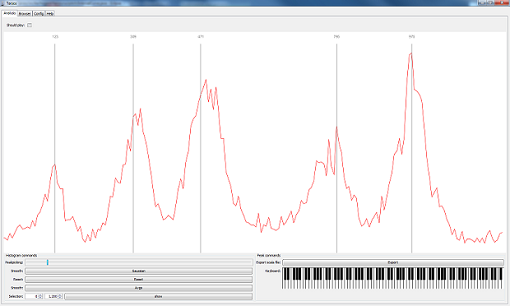
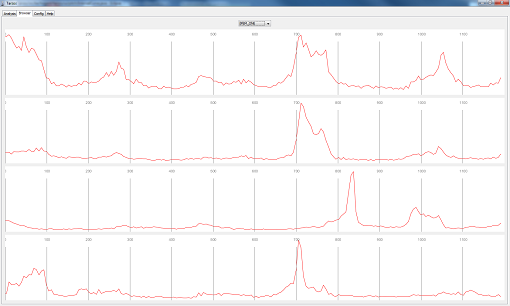
Tarsos now has an easy to use drag and drop User Interface. It can be used to extract tone scale information from audio files.
Start tarsos using JAVA WebStart.
Drag and drop works for scala tone scale files and different kinds of audio files. Audiofiles are transcoded automagically using an embedded ffmpeg binary which is platform dependend. It works on linux and windows, on other platforms only WAV files are supported.
Some of the current features:
- Scala file extraction from audio
- Real time pitch tracking
- Real time pitch class histogram visualization
- Alignment of pitch intervals with histogram using mouse dragging
- MIDI Tuning messages based on scala files.
- Histogram smoothing functions
- ... a lot more is available under the hood.
---
## [OpenRD - A Low Power Server Running Debian on ARM](https://0110.be/posts/OpenRD_-_A_Low_Power_Server_Running_Debian_on_ARM.md)
- Published: 2010-08-05T00:00:00Z
- Updated: 2013-12-05T18:19:15Z
- Author: Joren
- ID: 54
- Canonical: https://0110.be/posts/OpenRD_-_A_Low_Power_Server_Running_Debian_on_ARM
- Tags: [0110.be](https://0110.be/tags/0110.be.md), [Harde waren](https://0110.be/tags/Harde%20waren.md), [Projecten](https://0110.be/tags/Projecten.md)
\
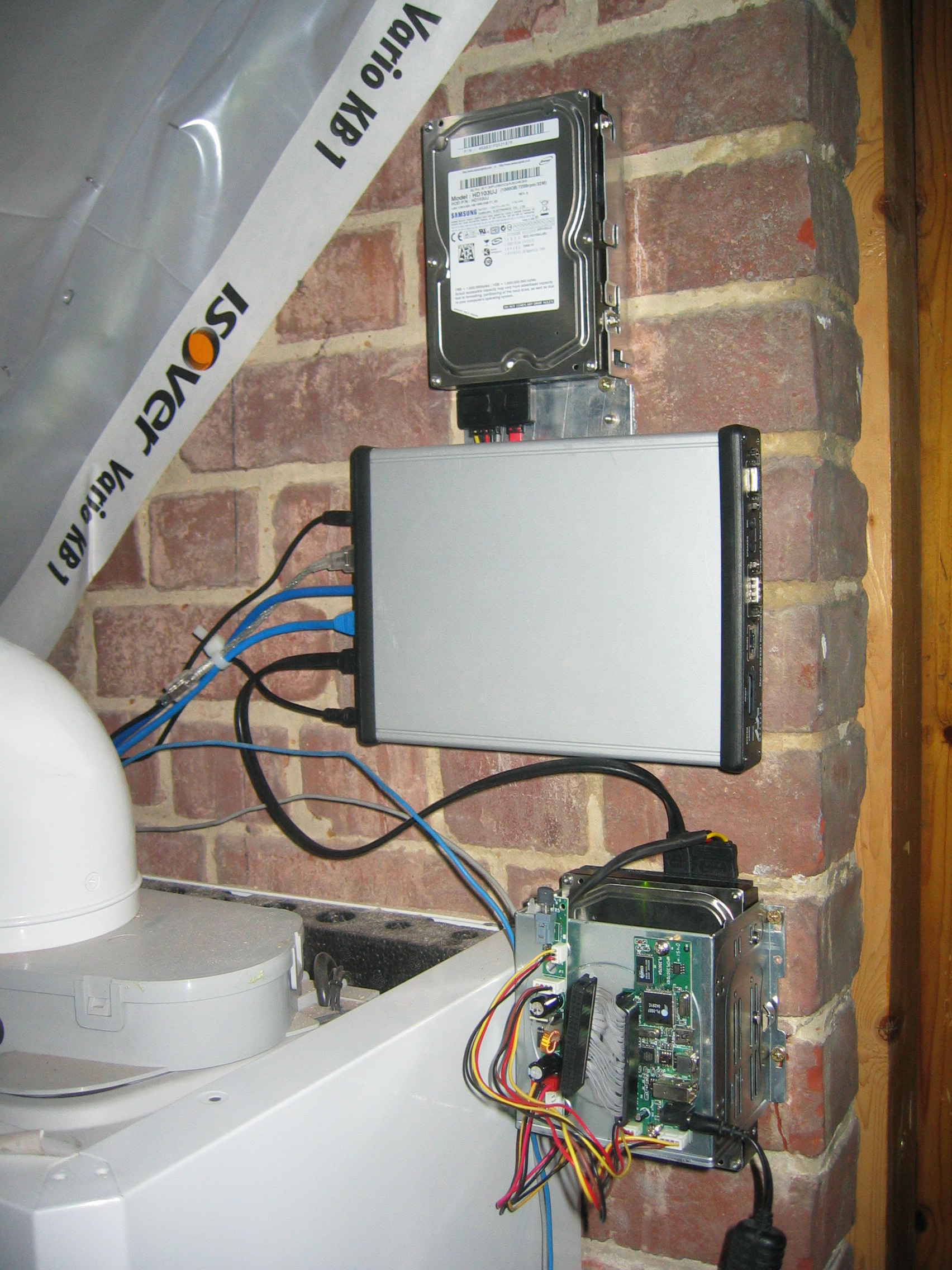
This blog post comments on using the Marvell OpenRD SoC(System on a Chip) as a low power multipurpose home server.
### The Hardware
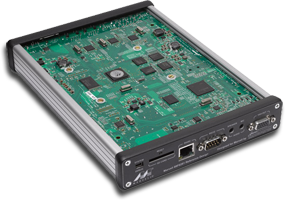
The specifications of the [OpenRD SoC](http://open-rd.org) are very similar to the better known [SheevaPlug](http://en.wikipedia.org/wiki/SheevaPlug) devices, so it has 512MB DDR2 RAM, an 1.2GHz ARM processor and 512MB internal flash. To be more precise the OpenRD SoC is essentially a SheevaPlug in a different form factor. The main advantage of this form factor is the number of available connections: 7xUSB, SATA, eSATA, 2xGb Ethernet, VGA, Audio, ... which make the device a lot more extendable and practical as a mulitpurpose home server.
### The Software
Thanks to the work of [Dr. Martin Michlmayr](http://www.cyrius.com) there is a Debian port for the Kirkwood platform readily available. He even wrote a tutorial on [how to install Debian on a SheevaPlug](http://www.cyrius.com/debian/kirkwood/sheevaplug/install.html). Installing Debian on an OpenRD is exactly the same except for one important detail: the `arcNumber` variable.
Once Debian is installed you can `apt-get` or `aptitude` almost all the software you are used to: webserver, samba, ruby, ...
### The Alternatives
- [Sheevaplug](http://en.wikipedia.org/wiki/SheevaPlug)
- [Beagle Board](http://beagleboard.org) or other [OMAP3 SoC's](http://processors.wiki.ti.com/index.php?title=OMAP3_Boards). The IGEPv2 e.g. has wireless and wired network connections.
- [Alix system Boards](http://www.pcengines.ch/alix.htm) are mostly x86 based.
- [NSLU2](http://en.wikipedia.org/wiki/NSLU2) An ARM platform.
---
## [Rendering MIDI Using Arbitrary Tone Scales](https://0110.be/posts/Rendering_MIDI_Using_Arbitrary_Tone_Scales.md)
- Published: 2010-06-29T12:58:41Z
- Updated: 2013-12-05T18:19:15Z
- Author: Joren
- ID: 334
- Canonical: https://0110.be/posts/Rendering_MIDI_Using_Arbitrary_Tone_Scales
- Tags: [Computational ethnomusicology](https://0110.be/tags/Computational%20ethnomusicology.md), [HoGent](https://0110.be/tags/HoGent.md), [Music Information Retrieval](https://0110.be/tags/Music%20Information%20Retrieval.md), [Tarsos](https://0110.be/tags/Tarsos.md), [featured](https://0110.be/tags/featured.md)
Tarsos can be used to render MIDI files to audio (WAV) files using arbitrary tone scales. This functionallity can be used to (automatically) verify tone scale extraction from audio files. Since I could not find a dataset with audio and corresponding tone scales creating one using MIDI seemed a good idea.
MIDI files can be found in spades, tone scales on the other hand are harder to find. Luckily there is one massive source, the [Scala Tone Scale Archive](http://www.huygens-fokker.org/scala/downloads.html#scales): *A large collection of over 3700 tone scales*.
Using Scala tone scale files and a midi files a *Tone Scale - Audio* dataset can be generated. The quality of the audio depends on the (software) synthesizer and the [SoundFont](http://en.wikipedia.org/wiki/SoundFont) used. Tarsos currently uses the [Gervill synthesizer](https://gervill.dev.java.net/). Gervill is a pure Java software synthesizer with support for 24bit SoundFonts and the MIDI tuning standard.\
### How To Render MIDI Using Arbitrary Tone Scales with Tarsos
A recent version of the JRE (Java Runtime Environment) needs to be installed on your system if you want to use Tarsos. Tarsos itself can be downloaded in the form of the "Tarsos JAR Package":\[tarsos.jar\].
Currently Tarsos has a Command Line Interface. An example with the files you can find attached:
\`\`\`ruby\
java -jar tarsos.jar ---midi BWV_1007.mid ---scala 120.scl ---out bach.wav\
\`\`\`
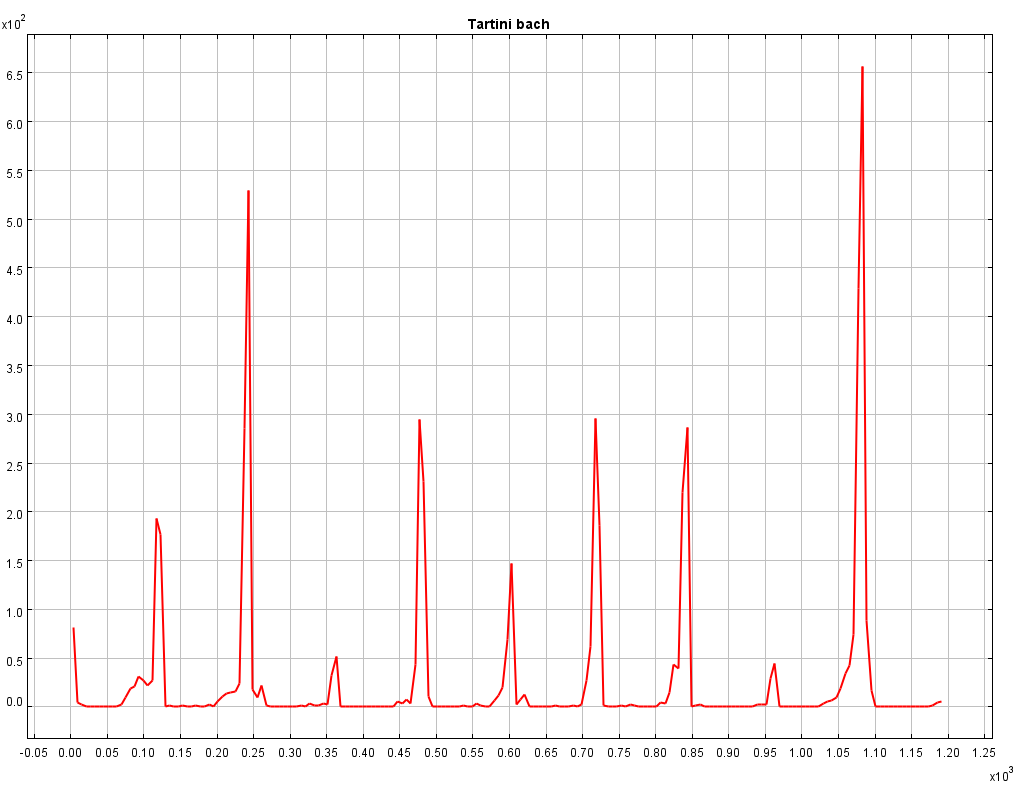
The result of this command should yield an audio file that sounds like "the cello suites of bach in a nonsensical tone scale with steps of 120 cents":\[bach_BWV_1007_120.mp3\]. Executing tone scale extraction on the generated audo yields the expected result. In the pich class histogram every 120 cents a peak can be found.
To summarize: by rendering audio with MIDI and Scala tone scale files a dataset with tone scale - audio information can be generated and tone scale extraction algorithms can be tested on the fly.
This method also has some limitations. Because audio is rendered there is no (background) noise, no fluctuations in pitch and timbre,... all of which are present in recorded audio. So testing testing tone scale extraction algorithms on recorded audio remains advised.
- [bach\_BWV\_1007\_120.mp3](https://0110.be/files/attachments/334/bach_BWV_1007_120.mp3)
- [120.scl.txt](https://0110.be/files/attachments/334/120.scl.txt)
- [BWV\_1007.mid](https://0110.be/files/attachments/334/BWV_1007.mid)
- [tarsos.jar](https://0110.be/files/attachments/334/tarsos.jar)
---
## [Reproduction of speech using MIDI](https://0110.be/posts/Reproduction_of_speech_using_MIDI.md)
- Published: 2010-06-24T15:26:56Z
- Updated: 2013-12-05T18:19:15Z
- Author: Joren
- ID: 361
- Canonical: https://0110.be/posts/Reproduction_of_speech_using_MIDI
- Tags: [HoGent](https://0110.be/tags/HoGent.md), [Java](https://0110.be/tags/Java.md)
Tarsos is now capable of reproducing *speech* using MIDI. The idea to convert speech into MIDI comes from [the blog of Corban Brook](http://weare.buildingsky.net/2009/10/08/mechanical-reproduction-of-digitized-speech-on-a-piano) where the following video can be found, actually a work by [Peter Ablinger](http://ablinger.mur.at/voices_and_piano.html):
Another example of music inspired by speech is this interview with Louis Van Gaal:
Tarsos sends out midi data based on an FFT analysis of the signal. It maps the spectrogram to MIDI Messages and uses the power spectrum to calculate the velocity of each note on message.
The implementation can run in real-time but the output has some delay: the FFT calculation, constructing MIDI messages, calculating velocity, synthesizing sound, ... is not instantaneous.
To use this capability Tarsos supports the following syntax. If a MIDI file is given the MIDI messages are written to the file. If an audio file is given Tarsos uses the audio as input. If the `--pitch` switch is used only the F0 is considered to construct MIDI messages instead of a complete FFT.
\`\`\`ruby\
java -jar tarsos.jar pitch_to_midi \[---pitch\] \[midi_out.midi\] \[audio_in.wav\]\
\`\`\`
- [ttm.mp3](https://0110.be/files/attachments/361/ttm.mp3)
- [ttm.midi](https://0110.be/files/attachments/361/ttm.midi)
- [sitting\_in\_a\_room.mp3](https://0110.be/files/attachments/361/sitting_in_a_room.mp3)
- [sitting\_in\_a\_room.midi](https://0110.be/files/attachments/361/sitting_in_a_room.midi)
- [tarsos.jar](https://0110.be/files/attachments/361/tarsos.jar)
---
## [Tone Scale Matching With Tarsos](https://0110.be/posts/Tone_Scale_Matching_With_Tarsos.md)
- Published: 2010-06-14T13:37:29Z
- Updated: 2013-12-05T18:19:15Z
- Author: Joren
- ID: 357
- Canonical: https://0110.be/posts/Tone_Scale_Matching_With_Tarsos
- Tags: [Computational ethnomusicology](https://0110.be/tags/Computational%20ethnomusicology.md), [HoGent](https://0110.be/tags/HoGent.md), [Music Information Retrieval](https://0110.be/tags/Music%20Information%20Retrieval.md), [Tarsos](https://0110.be/tags/Tarsos.md), [featured](https://0110.be/tags/featured.md)
*Tarsos can be used to search for music that uses a certain tone scale or tone interval(s). Tone scales can be defined by a Scala tone scale file or an exemplifying audio file. This text explains how you can use Tarsos for this task.*
### Search Using Scala Tone Scale Files
Scala files are text files with information about a tone scale. It is used to share and exchange tone scales. The file format originates from the [Scala program](http://www.huygens-fokker.org/scala/) :
> Scala is a powerful software tool for experimentation with musical tunings, such as just intonation scales, equal and historical temperaments, microtonal and macrotonal scales, and non-Western scales. It supports scale creation, editing, comparison, analysis, ...
The Scala file format is popular because there is a [library with more than 3000 tone scales](http://www.huygens-fokker.org/scala/downloads.html#scales) available on the Scala website.
Tarsos also understands Scala files. It is able to create a pitch class histogram using a gaussian mixture model. A technique described in *A. C. Gedik, B.Bozkurt, 2010, "Pitch Frequency Histogram Based Music Information Retrieval for Turkish Music ", Signal Processing, vol.10, pp.1049-1063. (doi:10.106/j.sigpro.2009.06.017)*.
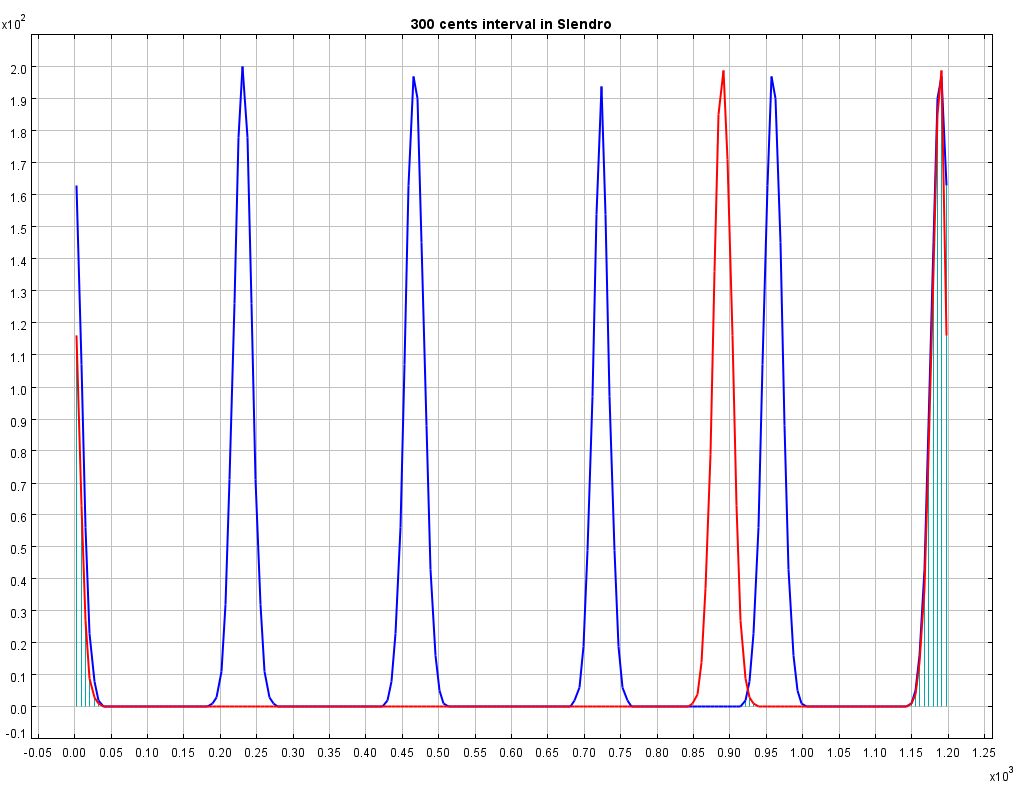
An example should make things clear. Lets search for an interval of 300 cents or exactly three semitones. A scala file with this interval is easy to define:
\`\`\`ruby\
! example.scl\
! An example of a tone interval of 300 cents\
Tone interval of 300 cents\
2\
!\
900\
1200.0\
\`\`\`
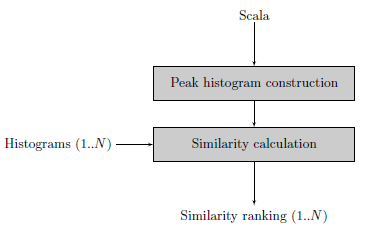
The next step is to create a histogram with an interval of 300 cents. In the block diagram this step is called "Peak histogram creation". The Similarity calculation step expects a list of histograms to compare with the newly defined histogram. Feeding the similarity calculation with the western12ET tone scale and a pentatonic Indonesian Slendro tone scale shows that a 300 cents interval is used in the western tone scale but is not available in the Slendro tone scale.
This example only uses scala files, creating histograms is actually not needed: calculating intervals can be done using the scala file itself. This changes when audio files are compared with each other or with scala files.
### Search Using Audio Files
When audio files are fed to the algorithm additional steps need to be taken.
1. First of all pitch detection is executed on the audio file. Currently two pitch extractors are implemented in pure Java, it is also possible to use an external pitch extractor such as [aubio](http://aubio.org)
2. Using pitch annotations a Pitch Histogram is created.
3. Peak detection on the Pitch Histogram results in a number of peaks, these should represent the distinct pitch classes used in the musical piece.
4. With the pitch classes a clean peak histogram is created during the Peak Histogram construction phase.
5. Finally the Peak histogram is matched with other histograms.
The last two steps are the same for audio files or scala files.
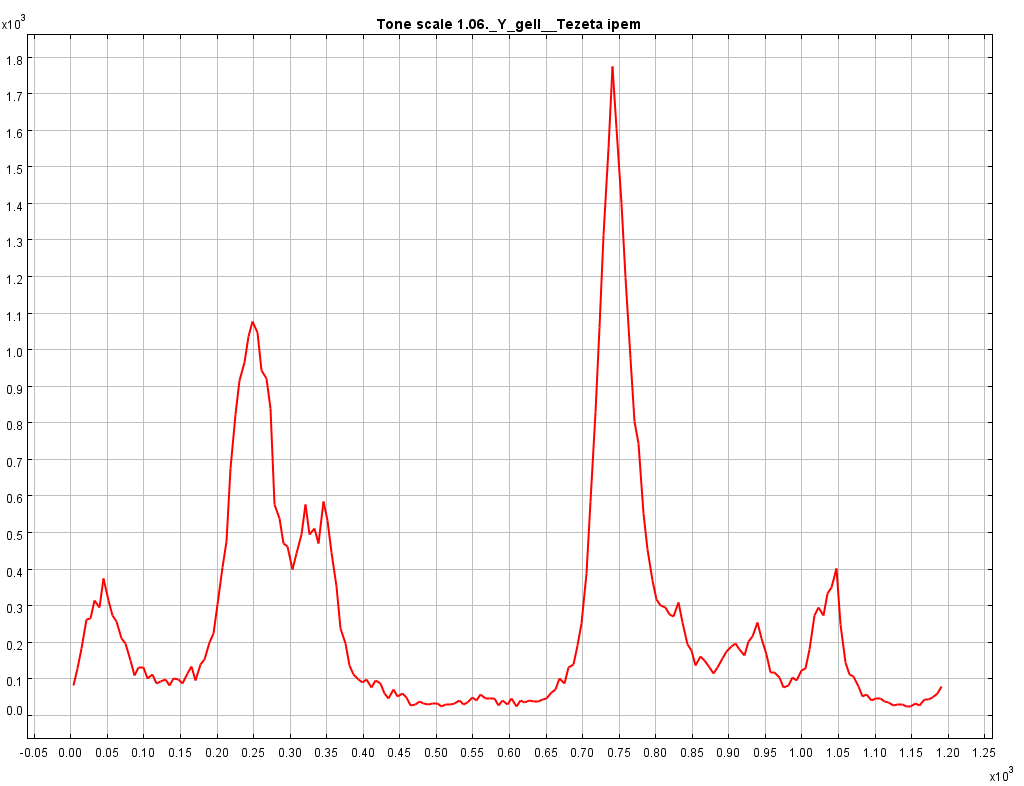
Using real audio files can cause *dirty* histograms. Determining how many distinct pitch classes are used is no trivial task, even for an expert (human) listener. Tarsos should provide a semi-automatic way of peak extraction: a best guess by an algorithm that can easily be corrected by a user. For the moment Tarsos does not allow manual intervention.
### Tarsos
To use tarsos you need a recent java runtime (1.6) and the following command line arguments:
\`\`\`ruby\
java -jar tarsos.jar rank ---detector TARSOS_MPM\
---needle audio.wav ---haystack scala.scl other_audio.wav other_scala_file.scl\
\`\`\`



- [data\_flow\_scala.png](https://0110.be/files/attachments/357/data_flow_scala.png)
- [data\_flow\_audio.png](https://0110.be/files/attachments/357/data_flow_audio.png)
- [tarsos.jar](https://0110.be/files/attachments/357/tarsos.jar)
---
## [Static Code Analysis For Java Using Eclipse](https://0110.be/posts/Static_Code_Analysis_For_Java_Using_Eclipse.md)
- Published: 2010-06-03T00:00:00Z
- Updated: 2020-11-17T09:04:00Z
- Author: Joren
- ID: 358
- Canonical: https://0110.be/posts/Static_Code_Analysis_For_Java_Using_Eclipse
- Tags: [Code](https://0110.be/tags/Code.md), [HoGent](https://0110.be/tags/HoGent.md), [Java](https://0110.be/tags/Java.md), [featured](https://0110.be/tags/featured.md)
This post is about the tools I use to keep the source code of [Tarsos](http://0110.be) reasonably clean, consistent and readable. Static code analysis can be of great help if you want to maintain strict coding standards and follow language idioms. Some of the [patterns they can detect for you](http://pmd.sourceforge.net/):
- Dead code - unused variables, parameters, methods
- Suboptimal code - wasteful resource usage
- Overcomplicated expressions - unnecessary if statements, for loops that could be while loops
- Duplicate code - copied/pasted code is a code smell.
- Formatting inconsistencies, e.g. variable modifier order
And even more subtle, but equally important:
- Resource management: is a resource handled (closed) correctly on all possible code paths?
- Abstraction level: is it needed to expose the concrete type of an object or could an (abstract) supertype or even an interface be used instead?
- ...
In a previous life I used .NET and the static code analysis tools FxCop & StyleCop. FxCop operates on bytecode (or intermediate language in .NET parlance) level, StyleCop analyses the source code itself. Tarsos uses JAVA so I looked for JAVA alternatives and found a few.
- PMD & Checkstyle both operate on source code level.
- FindBugs operates on bytecode level.
On freesoftwaremagazine.com there is an [article series on JAVA static code analysis software](http://www.freesoftwaremagazine.com/columns/destroy_annoying_bugs_part_1). It covers PMD and FixBugs and integration in Eclipse. It does not cover Checkstyle. Checkstyle is essentialy the same as PMD but it is better integrated in eclipse: it checks code on save and uses the standard 'Problems' interface, PMD does not.
To fix problems *Eclipse save actions* can save you some time. IBM has an article on [how to keep your code clean using Eclipse](http://www.ibm.com/developerworks/library/os-eclipse-clean/).
Continuous testing is also a really nice thing to have: detecting unexpected behavior while refactoring/programming can prevent unnecessary bug hunts. A [video about immediate feedback using continuous testing](http://improvingworks.com/products/infinitest/) makes this clear.
Another tip is a more philosophical one: making your code and code revisions publicly available makes you think twice before implementing (and subsequently publishing) a quick and dirty hack. Tarsos is available on github.
## References
- [FxCop](http://msdn.microsoft.com/en-us/library/bb429476(VS.80).aspx) & [StyleCop](http://code.msdn.microsoft.com/sourceanalysis)
- [Checkstyle](http://checkstyle.sourceforge.net/)
- [Find bugs](http://findbugs.sourceforge.net/)
- [PDM](http://pmd.sourceforge.net/)
- [Infinitest](http://improvingworks.com/products/infinitest/)
- [Github](http://github.com)


---
## [Tarsos demos](https://0110.be/posts/Tarsos_demos.md)
- Published: 2010-05-27T08:15:38Z
- Updated: 2013-12-05T18:19:15Z
- Author: Joren
- ID: 329
- Canonical: https://0110.be/posts/Tarsos_demos
- Tags: [HoGent](https://0110.be/tags/HoGent.md), [Java](https://0110.be/tags/Java.md), [Music Information Retrieval](https://0110.be/tags/Music%20Information%20Retrieval.md), [Tarsos](https://0110.be/tags/Tarsos.md)
I just finished creating a first release of Tarsos. The release contains several demo applications, some more usefull than other. Tarsos is a work in progress: not all functionality is exposed with the CLI (Command Line Interface) demo applications. The demos should however give a taste of the possibilities. All demo applications follow this pattern:
\`\`\`ruby\
java -jar tarsos.jar subcommand \[---option \[argument\] ...\]\
\`\`\`
To get help the `--help` switch can be used. It generates contextual help for either the subcommand or for Tarsos itself.
\`\`\`ruby\
java -jar tarsos.jar ---help\
java -jar tarsos.jar subcommand ---help\
\`\`\`
### Detect Pitch
\`\`\`ruby\
java -jar tarsos.jar detect_pitch ---in flute.novib.mf.C5B5.wav\
\`\`\`
### Midi to Audio Using a Scala Tone Scale
\`\`\`ruby\
java -jar tarsos.jar midi_to_wav ---midi satie_gymno1.mid ---scala 120.scl\
\`\`\`
### Audio to Scala Tone Scale
\`\`\`ruby\
java -jar tarsos.jar audio_to_scala ---in out.wav\
\`\`\`
### Annotate a File
\`\`\`ruby\
java -jar tarsos.jar annotate ---in out.wav\
\`\`\`
### Pitch table
\`\`\`ruby\
java -jar tarsos.jar pitch_table\
\`\`\`
- [tarsos.jar](https://0110.be/files/attachments/329/tarsos.jar)
- [flute.novib.mf.C5B5.wav](https://0110.be/files/attachments/329/flute.novib.mf.C5B5.wav)
- [satie\_gymno1.mid](https://0110.be/files/attachments/329/satie_gymno1.mid)
- [120.scl.txt](https://0110.be/files/attachments/329/120.scl.txt)
---
## [Doorhacking: Opening a Door With Your Cellphone](https://0110.be/posts/Doorhacking%3A_Opening_a_Door_With_Your_Cellphone.md)
- Published: 2010-04-22T00:00:00Z
- Updated: 2013-12-05T18:19:15Z
- Author: Joren
- ID: 71
- Canonical: https://0110.be/posts/Doorhacking%3A_Opening_a_Door_With_Your_Cellphone
- Tags: [0110.be](https://0110.be/tags/0110.be.md), [Code](https://0110.be/tags/Code.md), [Hackerspace Ghent](https://0110.be/tags/Hackerspace%20Ghent.md), [Projecten](https://0110.be/tags/Projecten.md)
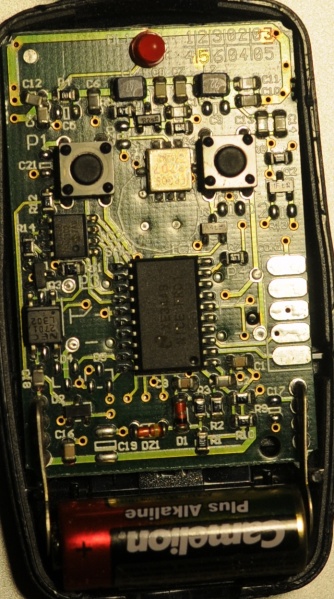
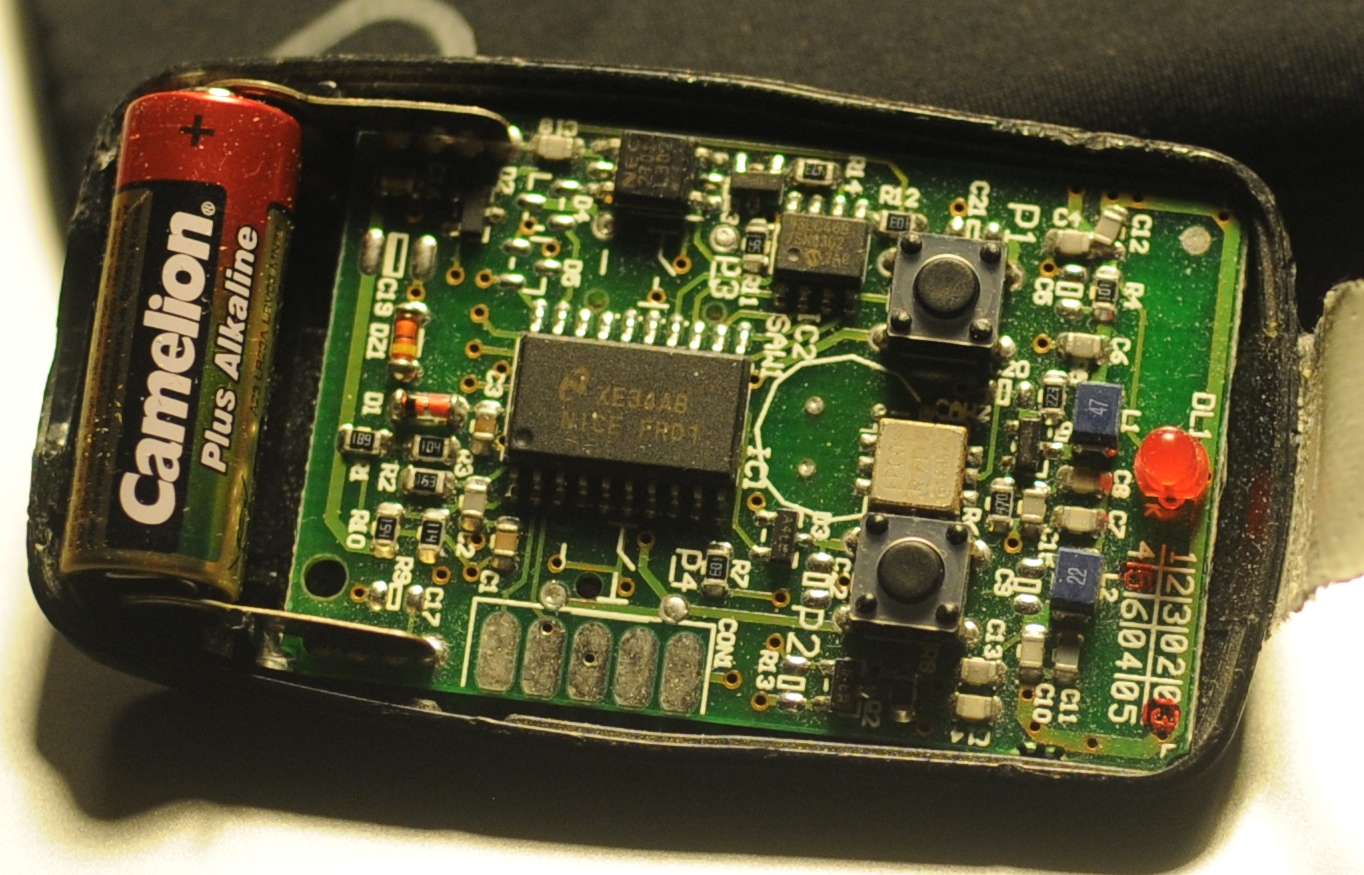
**The problem:** There is a group of people that want access to [Hackerspace Ghent](http://0x20.be) but there is only one remote to open the gate.
**The solution:** Build a system that reacts to a phone call by opening the gate if the number of the caller is whitelisted.
**What you need:**
- A [BeagleBoard](http://beagleboard.org/) or some [BeagleBoard alternative](http://beagleboard.org/breeds) with a Linux distribution running on it. Any server running a unix like operating system should be usable.
- A Huaweii e220 or an alternative GSM that supports (a subset of) AT commands and has a USB port.
- A team of hackers that know how to solder something togeher. E.g. The hardware guys of hackerspace Ghent.
- A "python script":\[gatekeeper.py\] that reacts to calls.
**The Hack**: First of all try to get caller id working by following the [Caller ID with Linux and Huawei e220 tutorial](http://0110.be/artikels/lees/Caller_ID_with_Linux_and_Huawei_e220). If this works you can listen to the serial communication using [pySerial](http://pyserial.sourceforge.net/) and react to a call. The following python code shows the wait for call method:
\`\`\`ruby\
def wait_for_call(self):\
self.data_channel.open()\
call_id_pattern = re.compile('.**CLIP.**"\\+(\[0-9\]+)",.\*')\
while True:\
bytes = self.data_channel.inWaiting()\
buffer = self.data_channel.readline(bytes)\
call_id_match = call_id_pattern.match(buffer)\
if call_id_match:\
number = call_id_match.group(1)\
self.handle_call(number)\
\`\`\`
The `handle_call` method ... handles the call.
The second thing that is needed is [a way to send a signal from the beagle board](http://blog.makezine.com/archive/2009/02/blinking_leds_with_the_beagle_board.html) to the remote. Sending a signal from the beagle board using Linux is really simple. The following bash commands initialize, activate and deactivate a pin.
\`\`\`ruby\
echo 168 \> /sys/class/gpio/export\
echo "high" \> /sys/class/gpio/gpio168/direction\
echo "low" \> /sys/class/gpio/gpio168/direction\
\`\`\`
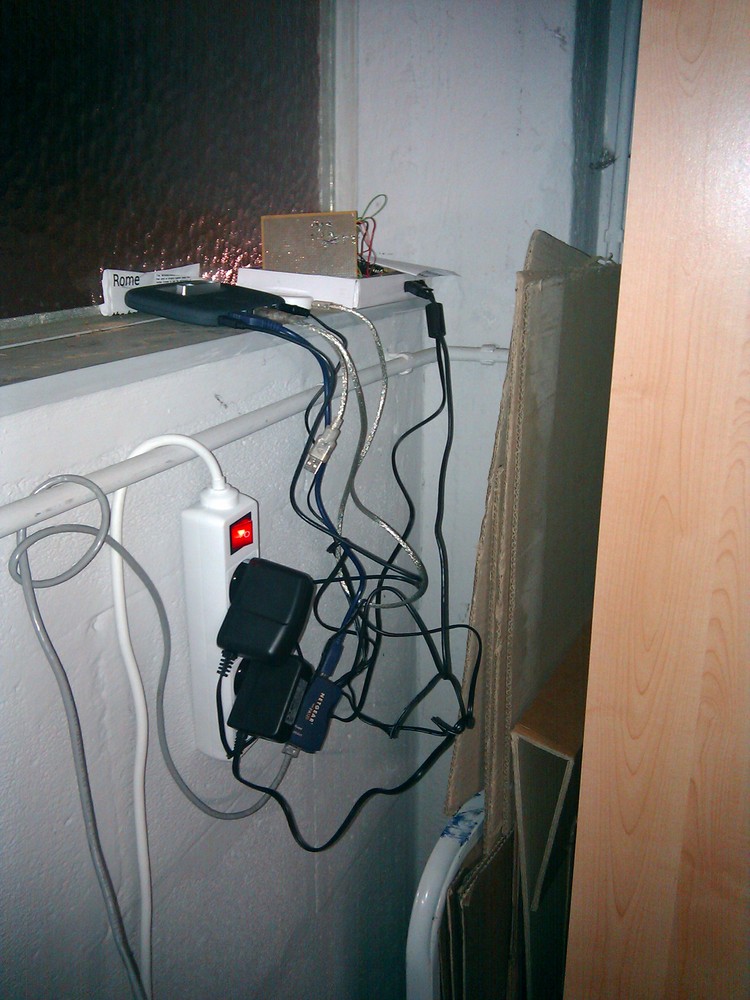
- [gatekeeper.py](https://0110.be/files/attachments/71/gatekeeper.py)
---
## [Tarsos Spectrogram](https://0110.be/posts/Tarsos_Spectrogram.md)
- Published: 2010-04-13T14:02:33Z
- Updated: 2013-12-05T18:19:15Z
- Author: Joren
- ID: 348
- Canonical: https://0110.be/posts/Tarsos_Spectrogram
- Tags: [Code](https://0110.be/tags/Code.md), [Computational ethnomusicology](https://0110.be/tags/Computational%20ethnomusicology.md), [HoGent](https://0110.be/tags/HoGent.md), [Java](https://0110.be/tags/Java.md), [Music Information Retrieval](https://0110.be/tags/Music%20Information%20Retrieval.md), [Tarsos](https://0110.be/tags/Tarsos.md)
Today I created a spectrogram application using Tarsos. The application listens to an audio input, computes an FFT and at the same time calculates pitch. The expected pitch is overlaid on the spectrogram. All this happens real-time and is implemented using JAVA.
This is the most recent version of the [spectrogram implementation in java](http://github.com/JorenSix/Tarsos/blob/master/src/be/hogent/tarsos/ui/Spectrogram.java).
\`\`\`java\
float pitch = Yin.processBuffer(buffer, (float) sampleRate);\
fft.transform(buffer);\
double maxAmplitude = 0;\
for (int j = 0; j \< buffer.length / 2; j) {\
double amplitude = buffer\[j\] \* buffer\[j\] + buffer\[j +\
buffer.length/2\] \* buffer\[j+ buffer.length/2\];\
amplitude = Math.pow(amplitude, 0.5);\
colorIndexes\[j\] = amplitude;\
maxAmplitude = Math.max(amplitude, maxAmplitude);\
}\
\`\`\`
If you want to test it yourself download the "spectrogram jar package":\[spectrogram.jar\] and execute:
\`\`\`ruby\
java -jar spectrogram.jar\
\`\`\`
- [spectrum.png](https://0110.be/files/attachments/348/spectrum.png)
- [spectrogram.jar](https://0110.be/files/attachments/348/spectrogram.jar)
---
## [Caller ID with Linux and Huawei e220](https://0110.be/posts/Caller_ID_with_Linux_and_Huawei_e220.md)
- Published: 2010-04-11T00:00:00Z
- Updated: 2013-12-05T18:19:15Z
- Author: Joren
- ID: 49
- Canonical: https://0110.be/posts/Caller_ID_with_Linux_and_Huawei_e220
- Tags: [0110.be](https://0110.be/tags/0110.be.md), [Code](https://0110.be/tags/Code.md), [Hackerspace Ghent](https://0110.be/tags/Hackerspace%20Ghent.md), [Projecten](https://0110.be/tags/Projecten.md)
This is the scenario: you have a Huawei e220, a linux computer and you want to react to a call from a set of predefined numbers. E.g. [ordering a pizza](https://0110.be/artikels/lees/Order_Pizza_with_USB_Pizza_Button) when you receive a call from a certain number.
The Huawei e220 supports a subset of the [AT commands](http://en.wikipedia.org/wiki/AT_commands), which subset is [an enterprise secret](http://forum.huawei.com/jive4/thread.jspa?threadID=324487) of te Huawei company. So there is no documentation available for the device I bought, thanks Huawei. Anyhow when you attach the e220 to a Linux machine you should get two serial ports:
\`\`\`ruby\
/dev/ttyUSB0\
/dev/ttyUSB1\
\`\`\`
To connect to the devices you can use a serial client. [GNU Screen](http://www.gnu.org/software/screen/) can be used as a serial client like this: `screen /dev/ttyUSB0 115200`. The first device, `ttyUSB0` is used to control `ttyUSB1`, so to enable caller ID on te Huawei e220 you need to send this message to `ttyUSB0`:
\`\`\`ruby\
AT+CLIP=1\
\`\`\`
To check for calls you should listen to `ttyUSB1`. A serial session for `ttyUSB1` looks like:
\`\`\`ruby\
\^BOOT:44594282,0,0,0,6\
\^RSSI:18\
RING\
+CLIP: "+33499311152",145,,,,0\
\^BOOT:44594282,0,0,0,6\
\`\`\`
The `RING` and `CLIP` messages are the most interesting. The `RING` signifies an incoming call, the `CLIP` is the caller ID. The `BOOT` and `RSSI` are some kind of ping messages. The following Python script demonstrates a complete session that enables caller ID, waits for a phone call and prints the number of the caller.
\`\`\`python\
#!/usr/bin/env python\
import serial, re
command_channel = serial.Serial(\
port='/dev/ttyUSB0',\
baudrate=115200,\
parity=serial.PARITY_NONE,\
stopbits=serial.STOPBITS_ONE,\
bytesize=serial.EIGHTBITS\
)\
command_channel.open()\
#enable caller id\
command_channel.write("AT+CLIP=1" + "\\r\\n")\
command_channel.close()
ser = serial.Serial(\
port='/dev/ttyUSB1',\
baudrate=9600,\
parity=serial.PARITY_NONE,\
stopbits=serial.STOPBITS_ONE,\
bytesize=serial.EIGHTBITS\
)
ser.open()
pattern = re.compile('.**CLIP.**"\\+(\[0-9\]+)",.\*')
while 1:\
buffer = ser.read(ser.inWaiting()).strip()\
buffer = buffer.replace("\\n","")\
match = pattern.match(buffer)\
if match:\
number = match.group(1)\
print number\
\`\`\`
---
## [YIN Pitch Tracker in JAVA](https://0110.be/posts/YIN_Pitch_Tracker_in_JAVA.md)
- Published: 2010-04-09T00:00:00Z
- Updated: 2020-11-17T09:04:25Z
- Author: Joren
- ID: 66
- Canonical: https://0110.be/posts/YIN_Pitch_Tracker_in_JAVA
- Tags: [0110.be](https://0110.be/tags/0110.be.md), [Code](https://0110.be/tags/Code.md), [Cultuur](https://0110.be/tags/Cultuur.md), [Muziek](https://0110.be/tags/Muziek.md), [Projecten](https://0110.be/tags/Projecten.md)
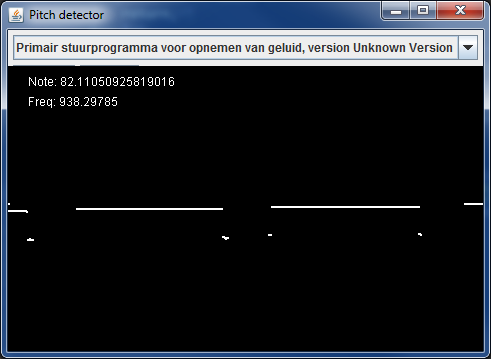
To make [Tarsos](http://0110.be/) more portable I wrote a pitch tracker in pure JAVA using the [YIN algorithm](http://recherche.ircam.fr/equipes/pcm/cheveign/ps/2002_JASA_YIN_proof.pdf) based on the implementation in C of [aubio](http://aubio.org). The implementation also uses some code written by Karl Helgasson and Teun de Lange of the [Jazzperiments project](http://www.jazzperiments.com/jazzperiments.html).
It can be used to perform real time pitch detection or to analyse files. To use it as a real time pitch detector just start the "JAR-file":\[pitch_detector_yin.jar\] by double clicking. To analyse a file execute one of the following. The first results in a list of annotations (text), the second shows the annotations graphically.
\`\`\`ruby\
java -jar pitch_detector_yin.jar flute.novib.mf.C5B5.wav\
java -jar pitch_detector_yin.jar ---file flute.novib.mf.C5B5.wav\
\`\`\`
The provided "flute sample":\[flute.novib.mf.C5B5.wav\] is from [*The Musical Samples* library of the University of Iowa](http://theremin.music.uiowa.edu/MIS.html) and converted to mono wav. The source code of the pitch tracker can be found below.
**Update:** the Yin implementation in Java has been incorporated into the [TarsosDSP project](https://github.com/JorenSix/TarsosDSP). An open source, Real-Time Audio Processing Framework in Java.
- [pitch\_detector\_yin.jar](https://0110.be/files/attachments/66/pitch_detector_yin.jar)
- [pitch\_detector\_yin\_src.zip](https://0110.be/files/attachments/66/pitch_detector_yin_src.zip)
- [flute.novib.mf.C5B5.wav](https://0110.be/files/attachments/66/flute.novib.mf.C5B5.wav)
---
## [Tarsos on GitHub](https://0110.be/posts/Tarsos_on_GitHub.md)
- Published: 2010-03-16T15:14:34Z
- Updated: 2013-12-05T18:19:15Z
- Author: Joren
- ID: 347
- Canonical: https://0110.be/posts/Tarsos_on_GitHub
- Tags: [Code](https://0110.be/tags/Code.md), [Computational ethnomusicology](https://0110.be/tags/Computational%20ethnomusicology.md), [HoGent](https://0110.be/tags/HoGent.md), [Java](https://0110.be/tags/Java.md), [Tarsos](https://0110.be/tags/Tarsos.md), [featured](https://0110.be/tags/featured.md)
The JAVA software program we are developing is called Tarsos and can now be found on [GitHub](http://github.com/JorenSix/Tarsos). GitHub is a web-based hosting service for projects that use the Git version control system.
Currently Tarsos is a collection of Java classes to create, compare and process pitch-frequency data using histograms. In it's current state it is not usable for end-users.
### Credits
Tarsos is developed at [University College Ghent, Faculty of Music](http://cons.hogent.be) and uses a number of open source libraries:
- [Gervill](https://gervill.dev.java.net/): a software sound synthesizer, supports the MIDI Tuning Standard. [API](https://gervill.dev.java.net/nonav/javadoc/index.html).
- [Jave](http://www.sauronsoftware.it/projects/jave/): a wrapper for [ffmpeg](http://ffmpeg.org/).
- [Apache Commons Math](http://commons.apache.org/math/): a library of lightweight, self-contained mathematics and statistics components [API](http://people.cs.ubc.ca/~kvdoel/jass/doc/index.html).
- [JASS](http://people.cs.ubc.ca/~kvdoel/jass/): a unit generator based audio synthesis programming environment. [API](http://people.cs.ubc.ca/~kvdoel/jass/doc/index.html).
- [Java-getopt](http://www.urbanophile.com/~arenn/hacking/download.html): a port of the GNU getopt family of functions. [API](http://www.urbanophile.com/~arenn/hacking/getopt/Package-gnu.getopt.html).
- [Ptplot](http://ptolemy.berkeley.edu/java/ptplot5.7/ptolemy/plot/doc/index.htm) a 2D plotting library. [API](http://ptolemy.berkeley.edu/java/ptplot5.7/doc/codeDoc/index.html).
---
## [Dataset](https://0110.be/posts/Dataset.md)
- Published: 2010-01-22T16:25:23Z
- Updated: 2013-12-05T18:19:15Z
- Author: Joren
- ID: 328
- Canonical: https://0110.be/posts/Dataset
- Tags: [Computational ethnomusicology](https://0110.be/tags/Computational%20ethnomusicology.md), [HoGent](https://0110.be/tags/HoGent.md)
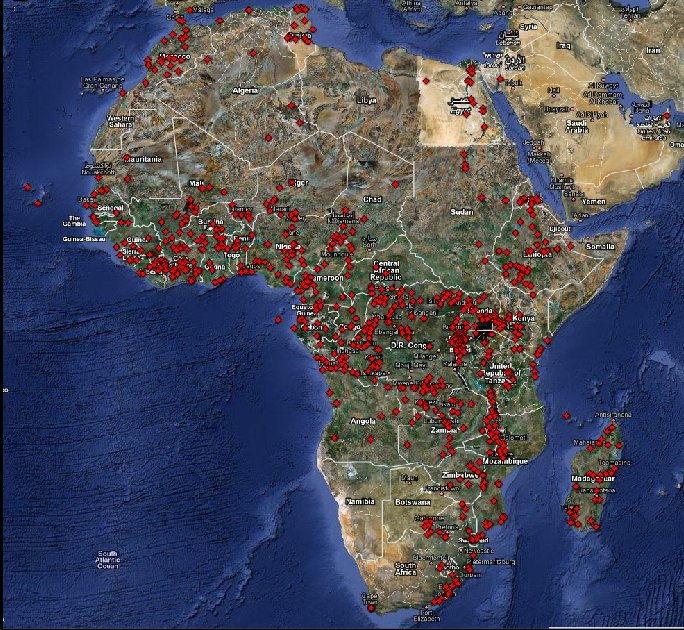
The dataset we use is the sound archive of the department of Ethnomusicology of the Royal Museum for Central Africa at Tervuren, Belgium. The archive was digitized during the DEKKMMA (Digitization of the Ethnomusicological Sound Archive of the Royal Museum for Central Africa - it works better in Dutch) project. More information about the dataset can be foun on [the website of the DEKKMMA project](http://music.africamuseum.be/english/index.html):
The archive is a collection of sound recordings of traditional music from Central Africa, with a particular focus on Congo and Rwanda. The sound archive contains about 3,000 hours of music recordings, the oldest of which date from 1910: Edison cylinders recorded by Hutereau in the Uele-province in Congo.
The archive contains several sound carriers (Edison cylinders, Sonofil wire, magnetic tapes, audiocassettes, disks, CD's ...) with associated metadata (paper files) and contextual data (photographs, films, video's, books, documents of all kind).
The collection was created during and after the colonial era of the Belgian Kingdom in Central Africa. The RMCA collection forms for an important part the musical memory of Central Africa and in terms of size, documentation and musical quality, it is -- without any doubt -- the world's most important sound archive for this region.
Using the meta data we did a rough geocoding of each recording to create an "interactive map of the dataset":\[dataset_geocodes.html\].
- [dataset\_geocodes.html](https://0110.be/files/attachments/328/dataset_geocodes.html)
---
## [Development and Application of MIR Techniques on Ethnic Music](https://0110.be/posts/Development_and_Application_of_MIR_Techniques_on_Ethnic_Music.md)
- Published: 2010-01-22T00:00:00Z
- Updated: 2014-02-13T10:49:44Z
- Author: Joren
- ID: 327
- Canonical: https://0110.be/posts/Development_and_Application_of_MIR_Techniques_on_Ethnic_Music
- Tags: [Computational ethnomusicology](https://0110.be/tags/Computational%20ethnomusicology.md), [HoGent](https://0110.be/tags/HoGent.md), [Music Information Retrieval](https://0110.be/tags/Music%20Information%20Retrieval.md), [UGent](https://0110.be/tags/UGent.md)
# About
The aim of this research project is to gain novel musicological insights into a large dataset of music from Central Africa. While practising ethnomusicological research on this dataset, we to develop and publish useful software and methodologies for the (ethno)musicological research community.
From November 2009 until November 2013 this research project was organised at [the School of Arts, University College Ghent](http://schoolofarts.be), under supervision by Olmo Cornelis. Later, from November 2013 onwards, the project turned into a 2 year doctoral research project hosted at [IPEM, University Ghent](http://www.ipem.ugent.be) under the supervision of Marc Leman.
### Partners
- [University Ghent, IPEM](http://www.ipem.ugent.be/): The Institute for Psychoacoustics and Electronic Music is part of the Music department at the Faculty of Arts and Philosophy, at Ghent University.
- [University College Ghent, School of Arts](http://schoolofarts.be): The School of Arts, Ghent consists of the Royal Conservatory and KASK.
- [Royal Museum for Central Africa, Tervuren](http://www.africamuseum.be/): A federal research institute which provides us with the dataset generated during the [DEKKMMA (Digitization of the Ethnomusicological Sound Archive of the Royal Museum for Central Africa - the abbreviation works better in Dutch.)](http://music.africamuseum.be/english/index.html) project.
---
## [Boids 3D with Processing](https://0110.be/posts/Boids_3D_with_Processing.md)
- Published: 2010-01-22T00:00:00Z
- Updated: 2013-12-05T18:19:14Z
- Author: Joren
- ID: 1
- Canonical: https://0110.be/posts/Boids_3D_with_Processing
- Tags: [0110.be](https://0110.be/tags/0110.be.md), [Code](https://0110.be/tags/Code.md), [Portfolio](https://0110.be/tags/Portfolio.md), [Projecten](https://0110.be/tags/Projecten.md)
- [boids\_windows.zip](https://0110.be/files/attachments/1/boids_windows.zip)
- [boids.png](https://0110.be/files/attachments/1/boids.png)
- [boids\_macosx.zip](https://0110.be/files/attachments/1/boids_macosx.zip)
- [boids\_linux.zip](https://0110.be/files/attachments/1/boids_linux.zip)
- [boids\_src.zip](https://0110.be/files/attachments/1/boids_src.zip)
- [peasycam.jar](https://0110.be/files/attachments/1/peasycam.jar)
- [Boids.jar](https://0110.be/files/attachments/1/Boids.jar)
- [core.jar](https://0110.be/files/attachments/1/core.jar)
- [loading.gif](https://0110.be/files/attachments/1/loading.gif)
---
## [Jobsopschool.be](https://0110.be/posts/Jobsopschool.be.md)
- Published: 2010-01-20T00:00:00Z
- Updated: 2013-12-05T18:19:15Z
- Author: Joren
- ID: 10
- Canonical: https://0110.be/posts/Jobsopschool.be
- Tags: [0110.be](https://0110.be/tags/0110.be.md)
[Jobsopschool.be](http://jobsopschool.be) werd door 0110.be ontwikkeld in opdracht van scholengemeenschap Sperregem. Het doel van die webapplicatie is om de administratieve rompslomp bij het zoeken naar en aanwerven van kandidaten voor vervangingen in het onderwijs te vereenvoudigen. Zoek je [vacatures in het basisonderwijs](http://jobsopschool.be?) Neem dan zeker een kijkje op Jobopschool.be.
---
## [Order Pizza with USB Pizza Button](https://0110.be/posts/Order_Pizza_with_USB_Pizza_Button.md)
- Published: 2009-11-11T00:00:00Z
- Updated: 2013-12-05T18:19:15Z
- Author: Joren
- ID: 188
- Canonical: https://0110.be/posts/Order_Pizza_with_USB_Pizza_Button
- Tags: [0110.be](https://0110.be/tags/0110.be.md), [Code](https://0110.be/tags/Code.md), [Hackerspace Ghent](https://0110.be/tags/Hackerspace%20Ghent.md), [Poging tot humor](https://0110.be/tags/Poging%20tot%20humor.md), [Projecten](https://0110.be/tags/Projecten.md)
Recently I bought a big shiny red USB-button. It is big, red and shiny. Initially I planned to use it to deploy new versions of websites to a server but I found a much better use: *ordering pizza*. Graphically the use case translates to something akin to:
If you would like to enhance your life quality leveraging the power of a USB pizza-button: you can! This is what you need:
1. A PC running Linux. This tutorial is specifically geared towards Debian-based distos. YMMV.
2. A big, shiny red USB button. Just google "USB panic button" if you want one.
3. A location where you can order pizzas via a website. I live in Ghent, Belgium and use just-eat.be. Other websites can be supported by modifying a Ruby script.
Technically we need **a driver** to check when the button was pushed, a way to **communicate** the fact that the button was pushed and lastly we need to be able to **react** to the request.
**The driver**: on the internets I found [a driver for the button](http://www.aeracode.org/2009/1/22/panic-button/). Another modification was done to make the driver process a daemon.
**The communication**: The original Python script executed another script on the local pc. A more flexible approach is possible using sockets. With sockets it is possible to notify any computer on a network.
\`\`\`ruby\
if PanicButton().pressed():\
\# create a TCP socket\
s = socket.socket(socket.AF_INET, socket.SOCK_STREAM)\
\# connect to server on the port\
s.connect((SERVER, SERVER_TCP_PORT))\
\# send the order (margherita at restaurant mario)\
s.send("mario: \[margherita_big\]\\n")\
\`\`\`
**The reaction**: a ruby TCP server waits for message from the driver. When it does it automates a HTTP session on a website. It executes a series of HTTP-GET's and POST's. It uses the [mechanize library](http://mechanize.rubyforge.org/mechanize/).
\`\`\`ruby\
login_url = "http://www.just-eat.be/pages/member/login.aspx"\
a = WWW::Mechanize.new\
a.get(login_url) do \|login_page\|\
#post login_form\
login_form = login_page.forms.first\
login_form.txtUser = "username"\
login_form.txtPass = "password"\
a.submit(login_form, login_form.buttons\[1\])\
end\
\`\`\`
Some libraries are needed. For python you need the usb library, the [python deamons lib](http://pypi.python.org/pypi/python-daemon/) needs to be installed seperatly. Setuptools are needed to install the deamons package.
\`\`\`ruby\
sudo apt-get install python-usb python-setuptools\
\`\`\`
Ruby needs rubygems to install the needed mechanize and daemons library. Mechanize needs the libxslt-dev package. You also need the build-essential package to build mechanize.
\`\`\`ruby\
sudo apt-get install rubygems libxslt-dev\
sudo gem install mechanize daemons\
\`\`\`
To automatically start the daemons on boot you can use the [crontab \@reboot directive](http://mkaz.com/ref/unix_cron.html) of the root user. E.g.:
\`\`\`ruby\
`reboot /opt/pizza_service/pizza_daemon.rb
`reboot /opt/pizza_service/pizza_button_driver.py\
\`\`\`
- [order\_pizza\_with\_panic\_button.jpg](https://0110.be/files/attachments/188/order_pizza_with_panic_button.jpg)
- [pizza\_daemon.rb.txt](https://0110.be/files/attachments/188/pizza_daemon.rb.txt)
- [pizza\_server.rb](https://0110.be/files/attachments/188/pizza_server.rb)
- [usb-panic-button.png](https://0110.be/files/attachments/188/usb-panic-button.png)
- [pizza\_button\_driver.py](https://0110.be/files/attachments/188/pizza_button_driver.py)
---
## [Touchatag RFID reader and Ubuntu Linux](https://0110.be/posts/Touchatag_RFID_reader_and_Ubuntu_Linux.md)
- Published: 2009-10-05T00:00:00Z
- Updated: 2013-12-05T18:19:15Z
- Author: Joren
- ID: 56
- Canonical: https://0110.be/posts/Touchatag_RFID_reader_and_Ubuntu_Linux
- Tags: [0110.be](https://0110.be/tags/0110.be.md), [Code](https://0110.be/tags/Code.md), [Harde waren](https://0110.be/tags/Harde%20waren.md), [Projecten](https://0110.be/tags/Projecten.md)

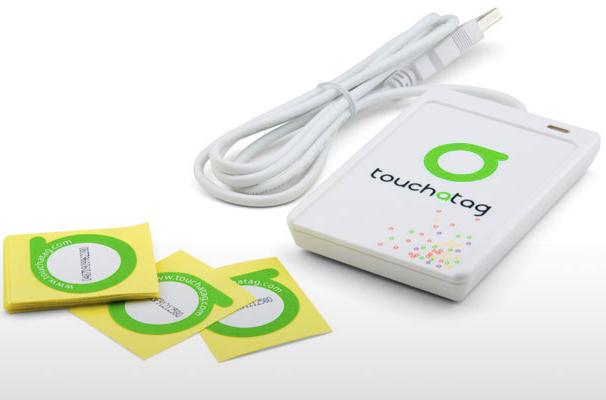
This blog post is about how to use the [Touchatag](http://www.touchatag.com) RFID reader hardware on Ubuntu Linux without using the Touchatag web service.
An RFID reader with tags can used to fire events. With a bit of scripting the events can be handled to do practically any task.
Normally a Touchatag reader is used together with the [Touchatag web service](http://www.touchatag.com/developer/tools/advanced-http-application) but for some RFID applications the web service is just not practical. E.g. for embedded Linux devices without an Internet connection. In this tutorial I wil document how I got the Touchatag hardware working under Ubuntu Linux.
To follow this tutorial you will need:
- Touchatag hardware: the USB reader and some tags
- A Ubuntu Linux computer (I tested 9.10 Karmic Koala and 8.04 )
- SVN to download source code from a repository
The touchatag USB reader works at 13.56MHz (High Frequency RFID) and has a readout distance of about 4 cm (1.5 inch) when used with the touchatag RFID tags. Internally it uses an ACS ACR122U reader with a SAM card. A Linux driver is readily available so when you plug it in `lsusb` you should get something like this:
\`\`\`ruby\
lsusb
Bus 007 Device 001: ID 1d6b:0001 Linux Foundation 1.1 root hub\
Bus 005 Device 004: ID 072e:90dd Advanced Card Systems, Ltd\
\`\`\`
lsusb recognizes the device incorrectly but that's [not a problem](http://code.google.com/p/tageventor/wiki/SupportedReadersAndTags). To read RFID-tags and respond to events additional software is needed: [tagEventor](http://code.google.com/p/tageventor/) is a software library that does just that. It can be downloaded using an svn command:
\`\`\`ruby\
svn export http://tageventor.googlecode.com svn/trunk/ tageventor\
\`\`\`
To compile tagEventor a couple of other software packages or header files should be available on your system. Te [tagEventor software dependencies](http://code.google.com/p/tageventor/wiki/SoftwareDependencies) are described on the [tagEventor wiki](http://code.google.com/p/tageventor/w/list). On Ubuntu (and possibly other Debian based distro's the installation is simple:
\`\`\`ruby\
sudo aptitude install build-essential libpcsclite-dev build-essential pcscd libccid\
#if you need gnome support\
#sudo aptitude install libgtk2.0-dev\
\`\`\`
Now the tricky part. Two header files of the pcsclite package need to be modified (update: this bug is fixed [see here](http://code.google.com/p/tageventor/issues/detail?id=2)). tagEventor builds and can be installed:
\`\`\`ruby\
cd tageventor\
make\
...\
tagEventor BUILT (./bin/Release/tagEventor)
sudo ./install.sh\
...\
\`\`\`
When tagEventor is correctly installed the only thing left is ... to build your application. When an event is fired tagEventor executes the `/etc/tageventor/generic` script with three parameters (see below). Using some kind of [IPC (Inter Process Communication)](http://en.wikipedia.org/wiki/Inter-process_communication) an application can react to events. A simple and flexible way to propagate events (inter-processes, over a network, platform and programming language independent) uses sockets. The code below is the `/etc/tageventor/generic` script (make sure it is executable), it communicates with the server: the second script. To run the server execute `ruby /name/of/server.rb`
\`\`\`ruby\
#!/usr/bin/ruby
1. \$1 = SAM (unique ID of the SAM chip in the smart card reader if exists, "NoSAM" otherwise
2. \$2 = UID (unique ID of the tag, as later we may use wildcard naming)
3. \$3 = Event Type (IN for new tag placed on reader, OUT for tag removed from reader)
require 'socket'
data = ARGV.join('\|')\
puts data
streamSock = TCPSocket.new( "127.0.0.1", 20000 )\
streamSock.send(data, 0)\
streamSock.close\
\`\`\`
\`\`\`ruby\
require "socket"\
dts = TCPServer.new('localhost', 20000)\
loop do\
Thread.start(dts.accept) do \|s\|\
puts s.gets\
s.close\
end\
end\
\`\`\`
The tagEventor software is made by [the Autelic Association](http://www.autelic.org/) a Non-Profit association dedicated to making technology easier to use for all. I would like to thank Andrew Mackenzie, the founder and president of the association for creating the software and the support.
---
## [Jobsopschool](https://0110.be/posts/Jobsopschool.md)
- Published: 2009-03-01T00:00:00Z
- Updated: 2013-12-05T18:19:15Z
- Author: Joren
- ID: 11
- Canonical: https://0110.be/posts/Jobsopschool
- Tags: [0110.be](https://0110.be/tags/0110.be.md), [Code](https://0110.be/tags/Code.md), [Portfolio](https://0110.be/tags/Portfolio.md), [Projecten](https://0110.be/tags/Projecten.md)
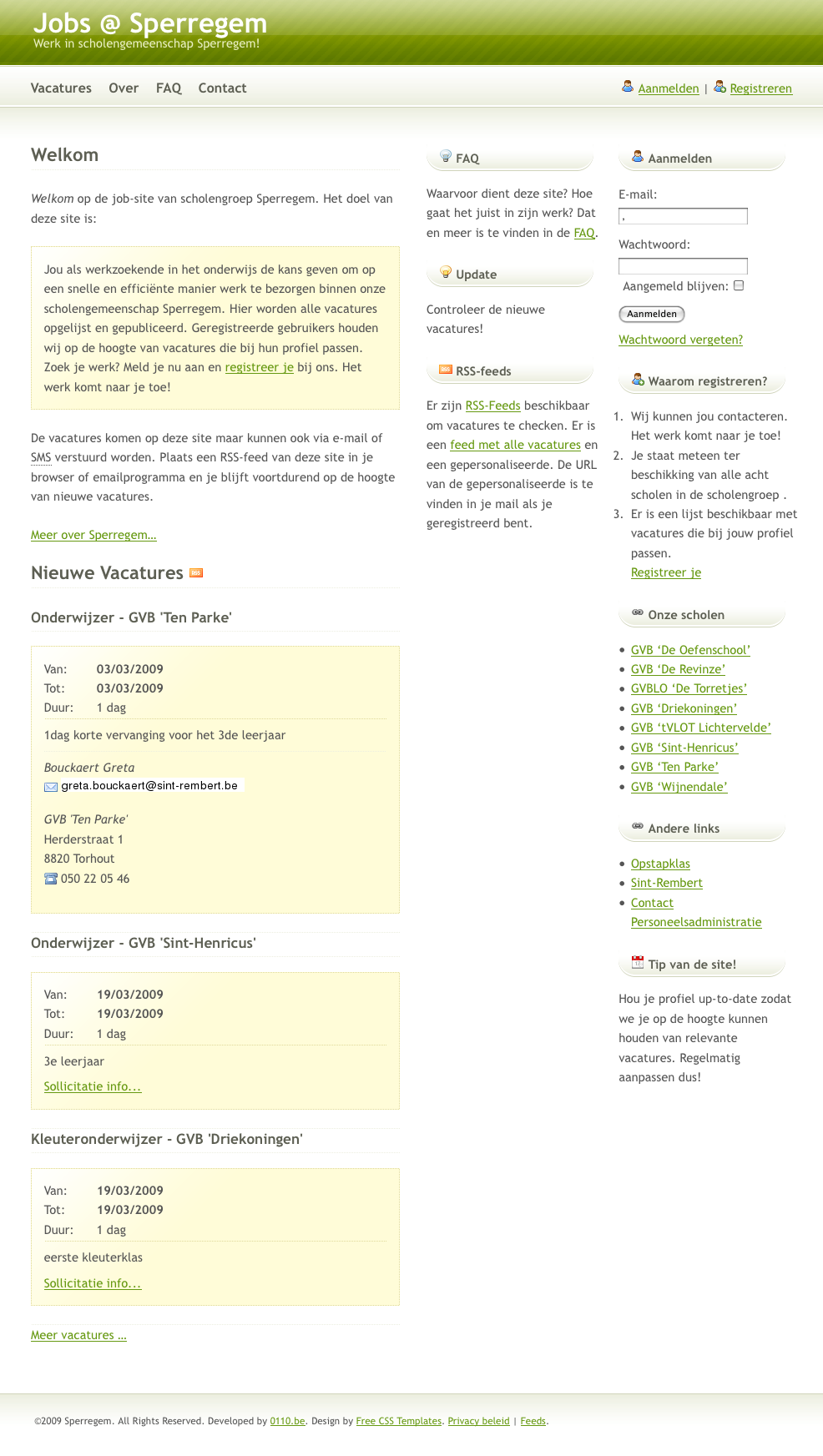
Ik heb in opdracht van scholengroep Sperregem een website gemaakt die het vinden van kandidaten voor korte vervangingen vlotter doet verlopen. Mensen met interesse voor [vacatures in het onderwijs](http://jobsopschool.be) in West-Vlaanderen kunnen zich er op inschrijven.
De website heeft enkele voordelen voor verschillende scholen in de scholengroep:
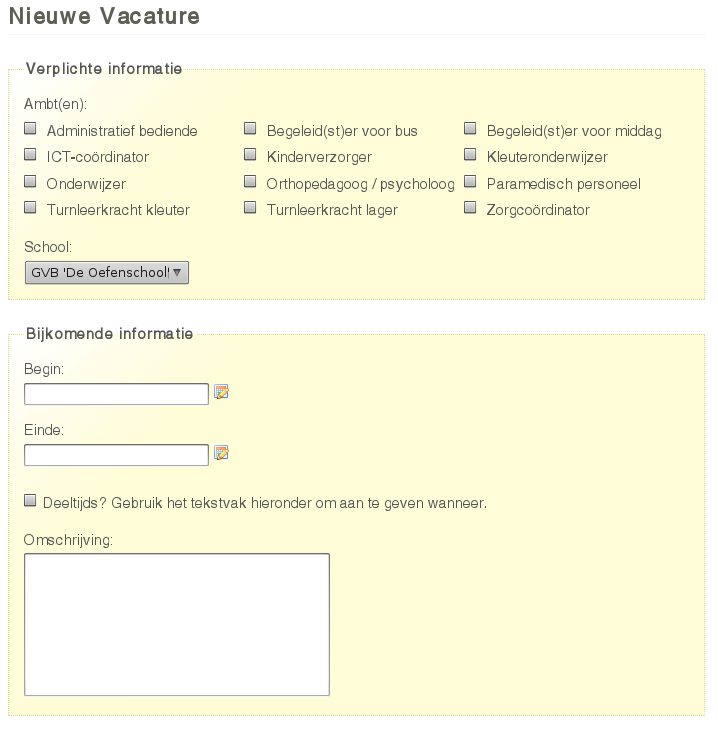
- Het zoeken van kandidaten is erg eenvoudig: na het invoeren van een vacature komt er een lijst met kandidaten met een geschikt profiel die tijdens de vacature beschikbaar zijn.
- Er kunnen e-mail of SMS-berichten verstuurd worden om kandidaten op de hoogte te brengen van een vacature.
- Profielen van kandidaten zijn altijd up-to-date: de kandidaten zijn er zelf verantwoordelijk voor en kandidaten lange tijd niets van zich laten horen worden automatisch op non-actief gezet.
- De historiek van kandidaten wordt automatisch bijgehouden en kan opgezocht worden.
Ook voor de aspirant onderwijzers is de website handig:
- De vacatures zijn publiek zichtbaar, kandidaten kunnen dus actief solliciteren.
- Ze kunnen zelf hun profiel beheren en bijvoorbeeld een vernieuwde versie van hun C.V. uploaden.
- Voor elke kandidaat is een gepersonaliseerde lijst met vacatures beschikbaar (ook via RSS), afgestemd op hun profiel.
Daarnaast is het ook voor de personeelsdienst een handige tool: die kan nu een beter overzicht bewaren over de vacatures en de invulling ervan in de verschillende scholen.
Hieronder staan enkele screenshots.
---
## [Vooruit.be vernieuwd](https://0110.be/posts/Vooruit.be_vernieuwd.md)
- Published: 2009-02-27T00:00:00Z
- Updated: 2013-12-05T18:19:15Z
- Author: Joren
- ID: 271
- Canonical: https://0110.be/posts/Vooruit.be_vernieuwd
- Tags: [0110.be](https://0110.be/tags/0110.be.md), [Code](https://0110.be/tags/Code.md), [Cultuur](https://0110.be/tags/Cultuur.md), [Vooruit](https://0110.be/tags/Vooruit.md)

Vandaag is de vernieuwde vooruitwebsite gelanceerd:
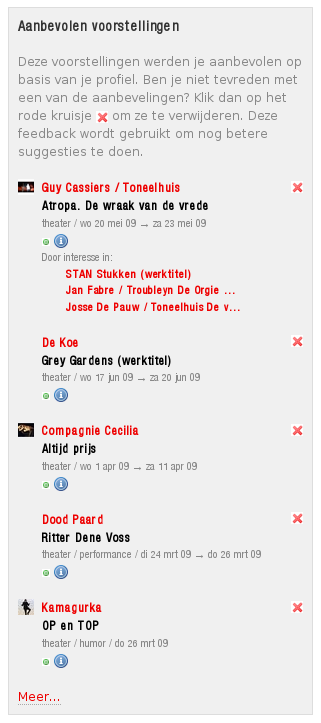
> We bieden je nog meer video's, foto's, audiotracks en tekstmateriaal en hebben ook jouw persoonlijke voordelen uitgebreid. Wanneer [je lid wordt van www.vooruit.be](http://vooruit.be/nl/signup), kan je nog steeds je kalender aanvullen, vrienden maken en reacties posten, maar daarnaast krijg je ook *aanbevelingen op maat*, kan je voorstellingen tippen en kan je berichten sturen naar vrienden [\*](http://vooruit.be/nl/headlines/244).
Het gepersonaliseerde aanbevelingssysteem is door Greet Dolvelde en mezelf in het kader van onze thesis: [Collaborative Filtering: Onderzoek & implementatie](https://0110.be/artikels/lees/Collaborative_Filtering%253A_Onderzoek_%2526_implementatie) \[pdf\] ontwikkeld. Dus waar wacht je nog op? [Word lid](http://vooruit.be/nl/signup), check de [aanbevelingen bij concerten](http://vooruit.be/nl/event/1759?genre=concerts) en vooral je gepersonaliseerde aanbevelingen.
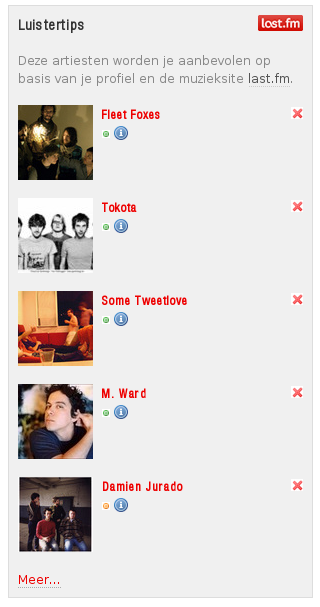
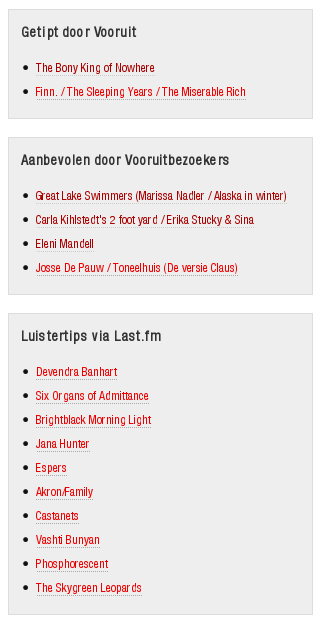
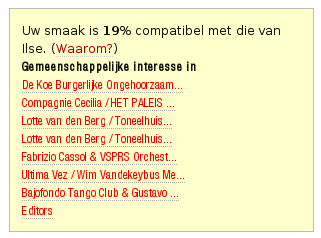
Voor de iets minder enthousiaste doorklikkikkers staan hieronder wat screenshots van de verschillende soorten aanbevelingen op [www.vooruit.be](http://vooruit.be):



---
## [Verhuis naar VPS](https://0110.be/posts/Verhuis_naar_VPS.md)
- Published: 2009-02-16T00:00:00Z
- Updated: 2013-12-05T18:19:15Z
- Author: Joren
- ID: 234
- Canonical: https://0110.be/posts/Verhuis_naar_VPS
- Tags: [0110.be](https://0110.be/tags/0110.be.md), [Code](https://0110.be/tags/Code.md), [Harde waren](https://0110.be/tags/Harde%20waren.md)

Waarschijnlijk heb je het al gemerkt: deze site gaat nu heel wat sneller. Dit is te danken aan een verhuis. [0110.be](http://0110.be) wordt nu gehost op een VPS (Virtual Private Server).
De virtuele server heeft Ubuntu 8.04 LTS Server als besturingssysteem en draait op [een Xen hypervisor](http://en.wikipedia.org/wiki/Xen). De fysieke server zelf bevat een achttal Intel® Xeon® E5440 @ 2.83GHz CPU's.
De server staat in [Amsterdam](http://globalswitch.nl/locations/amsterdam.en.html) en is rechtstreeks verbonden met het grootste internetknooppunt ter wereld: [AMS-IX](http://en.wikipedia.org/wiki/Amsterdam_Internet_Exchange).
---
## [SQL-bestand met een lijst van alle Belgische postcodes en steden](https://0110.be/posts/SQL-bestand_met_een_lijst_van_alle_Belgische_postcodes_en_steden.md)
- Published: 2008-11-29T00:00:00Z
- Updated: 2013-12-05T18:19:15Z
- Author: Joren
- ID: 210
- Canonical: https://0110.be/posts/SQL-bestand_met_een_lijst_van_alle_Belgische_postcodes_en_steden
- Tags: [0110.be](https://0110.be/tags/0110.be.md), [Code](https://0110.be/tags/Code.md)

Uit de [lijst van postcodes van alle Belgische steden](http://www.post.be/site/nl/postal_codes.html) heb ik een SQL-bestand samengesteld. De gegevens bevatten de postcode zelf, de naam van de stad, de naam van de stad in hoofdletters en een veld "structure" waaruit de gemeente-deelgemeente relatie gehaald kan worden als er op gesorteerd wordt. Dit zijn bijvoorbeeld de deelgemeentes van Chimay.
6460 CHIMAY
6460 Bailièvre
6460 Robechies
6460 Saint-Remy (Ht.)
6460 Salles
6460 Villers-la-Tour
6461 Virelles
6462 Vaulx-lez-Chimay
6463 Lompret
6464 Baileux
6464 Bourlers
6464 Forges
6464 l'Escaillère
6464 Rièzes
\
\
Het sorteren kan in [PostgreSQL](http://www.postgresql.org) met deze SQL instructie: `order by translate(structure, ' ', 'z')`. Het SQL-script zelf is een lijst van `INSERT INTO` SQL-Statements.
insert into cities(zipcode,name,up,structure) VALUES ('1790','Affligem','AFFLIGEM','1790 AFFLIGEM');
insert into cities(zipcode,name,up,structure) VALUES ('9051','Afsnee','AFSNEE','9051 Afsnee');
insert into cities(zipcode,name,up,structure) VALUES ('5544','Agimont','AGIMONT','5544 Agimont');
...
Dit is het "SQL-bestand met een lijst van alle Belgische postcodes en steden":\[steden.sql.txt\]. Hopelijk is hier iemand ooit iets mee.
---
## [Query Tool](https://0110.be/posts/Query_Tool.md)
- Published: 2008-11-10T00:00:00Z
- Updated: 2013-12-05T18:19:15Z
- Author: Joren
- ID: 103
- Canonical: https://0110.be/posts/Query_Tool
- Tags: [0110.be](https://0110.be/tags/0110.be.md), [Code](https://0110.be/tags/Code.md), [Portfolio](https://0110.be/tags/Portfolio.md), [Vooruit](https://0110.be/tags/Vooruit.md)

While working at the [Vooruit Arts Centre](http://vooruit.be/en) I got the assignment to create a tool to query an Oracle database with ticketing data. There were a few requirements for the Query Tool, in the current version all of these are met:
- First of all it had to be easy to execute complex queries, no knowledge of SQL (Structured Query Language) should be required for the end user.
- The results of the queries should be exportable to an easy to analyse format. \* Editing queries or adding new ones should be doable, by someone knowledgeable with SQL.
- The Query Tool should be easy to configure and database independent.
- Should work on Windows, Mac OS X and Linux.
By publishing the Query Tool on my website I hope that the fruits of my labour can be enjoyed by a wider audience. To see it in action you can *"give it a spin":\[QueryTool.jar\]*. A recent version, version 6, of the [JRE (Java Runtime Environment)](http://www.java.com/en/download/manual.jsp) is needed.
## How Do I Use The Query Tool?
The program supports two ways to query a database:
- A number of predefined queries can be selected and executed. Depending on the selected query, zero or more parameters are required. E.g. the screen shot below depicts a query with one parameter: a product category. When the query is executed all the products in the selected category are fetched.
- The tab "SQL" can be used to execute arbitrary SQL-instructions.
The two buttons below are self explanatory. When the button "CVS Export" is hit a CVS file is created in a configured directory.
Depending on the complexity of a query it can take a long time before results are returned. Because the application is multithreaded the user interface remains responsive and the query can be stopped at any time.
The contents of the tab "log" gives you an idea what the application does. When something goes awry while executing a query a message appears in this tab.
The tab "Config" can be used to set configuration parameters. The tab "Help" contains... helpful information.
### How Do I Add My Own Queries?
The list of predefined queries is constructed by iterating over SQL-files in a configured directory. Adding additional queries to the program is easy, just add an extra SQL-file to the directory. An SQL-file should have the following format, otherwise it is ignored:
TITEL
----
DESCRIPTION
----
SQL-INSTRUCTION with zero or more !{PARAMETERS}!
In the screen shot above this query is visible:
Select products in category
----
Select all the products in a category.
----
SELECT * FROM
products WHERE categoryid = !{category}!
To make the queries dynamic the Query Tool supports different kinds of parameters. A parameter has this form: !{type name}!, the name is optional. If there is a name specified it is used as a label in the interface, otherwise type is used. There are three types of parameters:
1. Parameters that define a type. For each type a corresponding user interface is rendered. E.g. for the type string a text field is rendered. The supported types are:\
#\* !{string}!\
#\* !{boolean}!\
#\* !{double}!\
#\* !{date}!\
#\* !{integer}!
2. Parameters for raw SQL. A textfield is rendered, the contents is directly injected in the SQL-query. It has this format: !{sql}!
3. Parameters for lists. In the example above a list parameter is used. These lists are fetched from the database. E.g. a list of categories. The SQL-instruction and name of the list parameters can be configured.
If you want to use your own database you need to configure the database connection string. The program uses JDBC to connect to the database. It uses metadata provided by the JDBC layer. If your database has a JDBC driver with support for metadata the Query Tool will work correctly. The JDBC driver must be included in the classpath.
## Credits
The Query Tool uses the [famfamfam mini icons](http://www.famfamfam.com/lab/icons/mini/).
For demoing purposes the executable contains a lightweight [hsql](http://hsqldb.org/) database. The data in the database is a modified version of the [Microsoft Northwind](http://www.codeplex.com/NorthwindCommunity/) database. The "northwind hsql database":\[northwind.hsql.zip\] is created with this "SQL-script":\[northwind.script.txt\].
## Downloads
- "Java Source code en documentation":\[QueryTool.source.zip\]: contains an [eclipse](http://eclipse.org) project.
- "Executable":\[QueryTool.jar\]: Contains only the executable.
- [ui.png](https://0110.be/files/attachments/103/ui.png)
- [vooruit\_logo.png](https://0110.be/files/attachments/103/vooruit_logo.png)
- [northwind.script.txt](https://0110.be/files/attachments/103/northwind.script.txt)
- [northwind.hsql.zip](https://0110.be/files/attachments/103/northwind.hsql.zip)
- [QueryTool.source.zip](https://0110.be/files/attachments/103/QueryTool.source.zip)
- [QueryTool.jar](https://0110.be/files/attachments/103/QueryTool.jar)
---
[Newer posts](https://0110.be/Blog.md?page=6)
[Older posts](https://0110.be/Blog.md?page=8)





 Monday the 20th and Tuesday the 21th of December I attended two workshops at The Queen Mary University of London: [The Machine Listening Workshop](http://www.eecs.qmul.ac.uk/events/mlw/mlw2010/) and [Digital Music Research Network One-day Workshop 2010](http://www.elec.qmul.ac.uk/dmrn/events/dmrnp5/)
At the workshop I had an interesting meeting with Dan Tidhar. He researches harpsichord temperament estimation at QMUL (Queen Mary University of London). Together they created the [Tempest web service](http://www.isophonics.net/sawa/tempest/) where you can upload harpsichord audio and let the system guess the temperament. The process is described in the paper "High precision frequency estimation for harpsichord tuning classification". Although Tarsos was not officially part of the programme I hijacked the poster sessions to show a live demo of Tarsos with Dan's dataset.
Another interesting talk was about [2032](http://www.dynamictonality.com/2032), a tunable synthesizer with definable Harmonics. It elaborates on the ideas of Sethares about tone scales .
---
## [Latex & Version Control Introduction](https://0110.be/posts/Latex__%26_Version_Control_Introduction.md)
- Published: 2010-11-30T08:56:17Z
- Updated: 2013-12-05T18:19:15Z
- Author: Joren
- ID: 365
- Canonical: https://0110.be/posts/Latex__%26_Version_Control_Introduction
- Tags: [HoGent](https://0110.be/tags/HoGent.md), [Presentation](https://0110.be/tags/Presentation.md)
Monday the 20th and Tuesday the 21th of December I attended two workshops at The Queen Mary University of London: [The Machine Listening Workshop](http://www.eecs.qmul.ac.uk/events/mlw/mlw2010/) and [Digital Music Research Network One-day Workshop 2010](http://www.elec.qmul.ac.uk/dmrn/events/dmrnp5/)
At the workshop I had an interesting meeting with Dan Tidhar. He researches harpsichord temperament estimation at QMUL (Queen Mary University of London). Together they created the [Tempest web service](http://www.isophonics.net/sawa/tempest/) where you can upload harpsichord audio and let the system guess the temperament. The process is described in the paper "High precision frequency estimation for harpsichord tuning classification". Although Tarsos was not officially part of the programme I hijacked the poster sessions to show a live demo of Tarsos with Dan's dataset.
Another interesting talk was about [2032](http://www.dynamictonality.com/2032), a tunable synthesizer with definable Harmonics. It elaborates on the ideas of Sethares about tone scales .
---
## [Latex & Version Control Introduction](https://0110.be/posts/Latex__%26_Version_Control_Introduction.md)
- Published: 2010-11-30T08:56:17Z
- Updated: 2013-12-05T18:19:15Z
- Author: Joren
- ID: 365
- Canonical: https://0110.be/posts/Latex__%26_Version_Control_Introduction
- Tags: [HoGent](https://0110.be/tags/HoGent.md), [Presentation](https://0110.be/tags/Presentation.md)
 Monday, I'll give a small presentation about Latex and Version Control for the research team at the [University College Gent, Faculty of Music](http://cons.hogent.be). The idea is to give a pragmatic overview of working with Latex and version control. The "presentation about Latex & Version control (in Dutch)":\[latex_svn_presentatie.pdf\] can be downloaded. The presentation itself is created using Latex and "the source of the presentation":\[latex_svn_presentatie.zip\] is also available. A good description of Latex can be found [here](http://swik.net/LaTeX):
> LaTeX (pronounced "latech") is a document preparation system for high-quality typesetting based on, and succeeding TeX formatting. It is a very popular format in academia, as it allows advanced document formatting capabilities not found in other common document formatting systems. Some of these capabilities include table figure notations, bibliography formatting (see BibTeX), and an advanced macro language.
Some useful references:
- [Practical Latex introduction course (in Dutch)](http://zeus.ugent.be/~gaspard/latex/)
- [UGent Latex website](http://latex.ugent.be)
- [WikiBook about Latex](http://en.wikibooks.org/wiki/Latex)
- [Eclipse](http://eclipse.org): an IDE (Integrated Development Environment) which can be used as Latex editor with version control by installing the [TeXclipse](http://texlipse.sourceforge.net/) and [Subclipse](http://subclipse.tigris.org/) plugins.
- [latex\_svn\_presentatie.zip](https://0110.be/files/attachments/365/latex_svn_presentatie.zip)
- [latex\_icon.png](https://0110.be/files/attachments/365/latex_icon.png)
- [latex\_svn\_presentatie.pdf](https://0110.be/files/attachments/365/latex_svn_presentatie.pdf)
---
## [Seminar - Research on Music History and Analysis](https://0110.be/posts/Seminar_-_Research_on_Music_History_and_Analysis.md)
- Published: 2010-11-26T14:39:40Z
- Updated: 2013-12-05T18:19:15Z
- Author: Joren
- ID: 364
- Canonical: https://0110.be/posts/Seminar_-_Research_on_Music_History_and_Analysis
- Tags: [Computational musicology](https://0110.be/tags/Computational%20musicology.md), [HoGent](https://0110.be/tags/HoGent.md), [Music Information Retrieval](https://0110.be/tags/Music%20Information%20Retrieval.md), [Presentation](https://0110.be/tags/Presentation.md)
This post contains links to genuinely useful software to do signal based audio analysis.
- [Sonic Visualizer](http://www.sonicvisualiser.org): As its name suggests Sonic Visualizer contains a lot different visualisations for audio. It can be used for analysis (pitch,beat,chroma,...) with [VAMP-plugins](http://vamp-plugins.org). To quote *"The aim of Sonic Visualiser is to be the first program you reach for when want to study a musical recording rather than simply listen to it"*. It is the swiss army knife of audio analysis.
- [BeatRoot](http://www.eecs.qmul.ac.uk/~simond/beatroot/) is designed specifically for one goal: beat tracking. It can be used for e.g. comparing tempi of different performances of the same piece or to track tempo deviation within one piece.
- [Tartini](http://tartini.net) is capable to do real-time pitch analysis of sound. You can e.g. play into a microphone with a violin and see the harmonics you produce and adapt you playing style based on visual feedback. It also contains a pitch deviation measuring apparatus to analyse vibrato.
- [Tarsos](http://tarsos.0110.be) is software for tone scale analysis. It is useful to extract tone scales from audio. Different tuning systems can be seen, extracted and compared. It also contains the ability to play along with the original song with a tuned midi keyboard .
[Melodic Match](http://www.melodicmatch.com) is a different beast. It does not work on signal level but processes symbolic audio. More to the point it searches through MusicXML files - which can be created from MIDI-files. See its website for use cases. Melodic Match is only available for Windows.
During a lecture at the [University College Gent, Faculty of Music](http://cons.hogent.be) these tools were presented with some examples. "The slides (Slides in Dutch)":\[presentatie.pdf\] and "a zip-file with audio samples, slides and software":\[Tarsos-presentatie.zip\] are available for reference. Most of the time was given to Tarsos, the software we developed.
[Olmo Cornelis](http://webs.hogent.be/olmocornelis/) also gave a lecture about his own research and how Tarsos fits in the bigger picture. "His presentation (Slides in English)":\[lezing_Olmo_Cornelis_zonder_audio.ppt\] and "the presentation with audio":\[lezing_Olmo_Cornelis_met_audio.zip\] are also available here.





- [presentatie.pdf](https://0110.be/files/attachments/364/presentatie.pdf)
- [Tarsos-presentatie.zip](https://0110.be/files/attachments/364/Tarsos-presentatie.zip)
- [lezing\_Olmo\_Cornelis\_zonder\_audio.ppt](https://0110.be/files/attachments/364/lezing_Olmo_Cornelis_zonder_audio.ppt)
- [lezing\_Olmo\_Cornelis\_met\_audio.zip](https://0110.be/files/attachments/364/lezing_Olmo_Cornelis_met_audio.zip)
---
## [Groovy Tarsos Scripting](https://0110.be/posts/Groovy_Tarsos_Scripting.md)
- Published: 2010-11-09T00:00:00Z
- Updated: 2020-11-17T09:12:42Z
- Author: Joren
- ID: 346
- Canonical: https://0110.be/posts/Groovy_Tarsos_Scripting
- Tags: [Code](https://0110.be/tags/Code.md), [HoGent](https://0110.be/tags/HoGent.md), [Java](https://0110.be/tags/Java.md), [Tarsos](https://0110.be/tags/Tarsos.md), [featured](https://0110.be/tags/featured.md)
Monday, I'll give a small presentation about Latex and Version Control for the research team at the [University College Gent, Faculty of Music](http://cons.hogent.be). The idea is to give a pragmatic overview of working with Latex and version control. The "presentation about Latex & Version control (in Dutch)":\[latex_svn_presentatie.pdf\] can be downloaded. The presentation itself is created using Latex and "the source of the presentation":\[latex_svn_presentatie.zip\] is also available. A good description of Latex can be found [here](http://swik.net/LaTeX):
> LaTeX (pronounced "latech") is a document preparation system for high-quality typesetting based on, and succeeding TeX formatting. It is a very popular format in academia, as it allows advanced document formatting capabilities not found in other common document formatting systems. Some of these capabilities include table figure notations, bibliography formatting (see BibTeX), and an advanced macro language.
Some useful references:
- [Practical Latex introduction course (in Dutch)](http://zeus.ugent.be/~gaspard/latex/)
- [UGent Latex website](http://latex.ugent.be)
- [WikiBook about Latex](http://en.wikibooks.org/wiki/Latex)
- [Eclipse](http://eclipse.org): an IDE (Integrated Development Environment) which can be used as Latex editor with version control by installing the [TeXclipse](http://texlipse.sourceforge.net/) and [Subclipse](http://subclipse.tigris.org/) plugins.
- [latex\_svn\_presentatie.zip](https://0110.be/files/attachments/365/latex_svn_presentatie.zip)
- [latex\_icon.png](https://0110.be/files/attachments/365/latex_icon.png)
- [latex\_svn\_presentatie.pdf](https://0110.be/files/attachments/365/latex_svn_presentatie.pdf)
---
## [Seminar - Research on Music History and Analysis](https://0110.be/posts/Seminar_-_Research_on_Music_History_and_Analysis.md)
- Published: 2010-11-26T14:39:40Z
- Updated: 2013-12-05T18:19:15Z
- Author: Joren
- ID: 364
- Canonical: https://0110.be/posts/Seminar_-_Research_on_Music_History_and_Analysis
- Tags: [Computational musicology](https://0110.be/tags/Computational%20musicology.md), [HoGent](https://0110.be/tags/HoGent.md), [Music Information Retrieval](https://0110.be/tags/Music%20Information%20Retrieval.md), [Presentation](https://0110.be/tags/Presentation.md)
This post contains links to genuinely useful software to do signal based audio analysis.
- [Sonic Visualizer](http://www.sonicvisualiser.org): As its name suggests Sonic Visualizer contains a lot different visualisations for audio. It can be used for analysis (pitch,beat,chroma,...) with [VAMP-plugins](http://vamp-plugins.org). To quote *"The aim of Sonic Visualiser is to be the first program you reach for when want to study a musical recording rather than simply listen to it"*. It is the swiss army knife of audio analysis.
- [BeatRoot](http://www.eecs.qmul.ac.uk/~simond/beatroot/) is designed specifically for one goal: beat tracking. It can be used for e.g. comparing tempi of different performances of the same piece or to track tempo deviation within one piece.
- [Tartini](http://tartini.net) is capable to do real-time pitch analysis of sound. You can e.g. play into a microphone with a violin and see the harmonics you produce and adapt you playing style based on visual feedback. It also contains a pitch deviation measuring apparatus to analyse vibrato.
- [Tarsos](http://tarsos.0110.be) is software for tone scale analysis. It is useful to extract tone scales from audio. Different tuning systems can be seen, extracted and compared. It also contains the ability to play along with the original song with a tuned midi keyboard .
[Melodic Match](http://www.melodicmatch.com) is a different beast. It does not work on signal level but processes symbolic audio. More to the point it searches through MusicXML files - which can be created from MIDI-files. See its website for use cases. Melodic Match is only available for Windows.
During a lecture at the [University College Gent, Faculty of Music](http://cons.hogent.be) these tools were presented with some examples. "The slides (Slides in Dutch)":\[presentatie.pdf\] and "a zip-file with audio samples, slides and software":\[Tarsos-presentatie.zip\] are available for reference. Most of the time was given to Tarsos, the software we developed.
[Olmo Cornelis](http://webs.hogent.be/olmocornelis/) also gave a lecture about his own research and how Tarsos fits in the bigger picture. "His presentation (Slides in English)":\[lezing_Olmo_Cornelis_zonder_audio.ppt\] and "the presentation with audio":\[lezing_Olmo_Cornelis_met_audio.zip\] are also available here.





- [presentatie.pdf](https://0110.be/files/attachments/364/presentatie.pdf)
- [Tarsos-presentatie.zip](https://0110.be/files/attachments/364/Tarsos-presentatie.zip)
- [lezing\_Olmo\_Cornelis\_zonder\_audio.ppt](https://0110.be/files/attachments/364/lezing_Olmo_Cornelis_zonder_audio.ppt)
- [lezing\_Olmo\_Cornelis\_met\_audio.zip](https://0110.be/files/attachments/364/lezing_Olmo_Cornelis_met_audio.zip)
---
## [Groovy Tarsos Scripting](https://0110.be/posts/Groovy_Tarsos_Scripting.md)
- Published: 2010-11-09T00:00:00Z
- Updated: 2020-11-17T09:12:42Z
- Author: Joren
- ID: 346
- Canonical: https://0110.be/posts/Groovy_Tarsos_Scripting
- Tags: [Code](https://0110.be/tags/Code.md), [HoGent](https://0110.be/tags/HoGent.md), [Java](https://0110.be/tags/Java.md), [Tarsos](https://0110.be/tags/Tarsos.md), [featured](https://0110.be/tags/featured.md)
 There is more to Tarsos then meets te eye. The graphical user interface only exposes some functionality; the API (Application Programmer Interface) exposes all of Tarsos' capabilities.
Tarsos is programmed in Java so the API is accessible trough Java and other programming languages targeting the JVM (Java Virtual Machine) like JRuby, Scala and Groovy. The following examples use [the Groovy programming language](http://groovy.codehaus.org/) because I find it the most aesthetically pleasing with regards to interoperability and it gets the job done without getting in your way.
To run the examples a copy of the [Tarsos JAR-file](http://0110.be/releases/Tarsos) needs to be added to the Classpath and the Groovy runtime must be installed correctly. I'll leave this as an exercise for the reader: godspeed to you, brave soul. Quick protip: placing a copy of the jar in the extensions directory seems to work best, e.g. see [important java directories on mac OS X.](http://developer.apple.com/library/mac/#qa/qa2001/qa1170.html)
The first example extracts pitch class histograms from a bunch of files and saves them as EPS (Encapsulated PostScript)-files. It iterates a directory recursively and handles each file that matches a given regular expression. In this example the regular expression matches all WAV-files. Batch processing is one of those things scripting is ideal for, doing the same thing with the user interface would be tedious or even mind-numbingly boring, not groovy at all indeed.
\`\`\`ruby\
import be.hogent.tarsos.\*\
import be.hogent.tarsos.util.\*\
import be.hogent.tarsos.util.histogram.ToneScaleHistogram\
import be.hogent.tarsos.sampled.pitch.Annotation\
import be.hogent.tarsos.sampled.pitch.PitchDetectionMode
dir = "/home/joren/audio"
FileUtils.glob(dir,".\*.wav",true).each { file -\>\
audioFile = new AudioFile(file)\
pitchDetector = PitchDetectionMode.TARSOS_YIN.getPitchDetector(audioFile)\
pitchDetector.executePitchDetection()\
//get some annotations\
annotations = pitchDetector.getAnnotations()\
//create an ambitus and tone scale histogram\
ambitusHistogram = Annotation.ambitusHistogram(annotations)\
toneScaleHisto = ambitusHistogram.toneScaleHistogram()\
//plot a smoothed version of the histogram\
p = new SimplePlot()\
p.addData 0, toneScaleHisto.gaussianSmooth(0.2)\
p.save FileUtils.basename( file) + ".eps"\
}\
\`\`\`
The second example uses functionality that is currently only available trough the API. It takes a MIDI-file and synthesizes it to a wave file using an arbitrary scale. In this case 10-TET. The heavy-work is done by the [Gervill synthesizer](https://gervill.dev.java.net/). The resulting file is available for download, micro---macro?---tonal Bach is great: "BWV 1013 in 10-TET":\[BWV_1013_10-TET.mp3\]. The result of "an analysis with Tarsos on the synthesized audio":\[120.png\] clearly shows an interval of 120 cents with some deviations.
\`\`\`ruby\
import java.io.File\
import be.hogent.tarsos.midi.MidiToWavRenderer\
import be.hogent.tarsos.util.ScalaFile
midiFile = new File("BWV_1013.mid")\
outFile = new File("out.wav")
tuning = \[0,120,240,360,480,600,720,840,960,1080\] as double \[\]
MidiToWavRenderer renderer\
renderer = new MidiToWavRenderer()\
renderer.setTuning(tuning)\
renderer.createWavFile(midiFile, outFile)\
\`\`\`
An extended version of this second example script could be used to generate a dataset with audio and corresponding tone scale information on the fly. The dataset could then be used as a baseline.
The API is not yet well documented and is still in flux or more correctly: superflux. Note to self: I will provide documentation and a number of useful examples when the dust settles down. I'm not even sure if I will stick with Groovy. Scala has a nice Lispy feel to it and seems more developed. Groovy has a less steep learning curve, especially if you have some experience with Ruby. JRuby is also nice but the interoperability with legacy Java looks like an ugly hack.


- [medium.png](https://0110.be/files/attachments/346/medium.png)
- [120.png](https://0110.be/files/attachments/346/120.png)
- [BWV\_1013\_10-TET.mp3](https://0110.be/files/attachments/346/BWV_1013_10-TET.mp3)
---
## [Tarsos Screencast](https://0110.be/posts/Tarsos_Screencast.md)
- Published: 2010-10-08T15:16:47Z
- Updated: 2013-12-05T18:19:15Z
- Author: Joren
- ID: 344
- Canonical: https://0110.be/posts/Tarsos_Screencast
- Tags: [Computational ethnomusicology](https://0110.be/tags/Computational%20ethnomusicology.md), [HoGent](https://0110.be/tags/HoGent.md), [Tarsos](https://0110.be/tags/Tarsos.md)
There is more to Tarsos then meets te eye. The graphical user interface only exposes some functionality; the API (Application Programmer Interface) exposes all of Tarsos' capabilities.
Tarsos is programmed in Java so the API is accessible trough Java and other programming languages targeting the JVM (Java Virtual Machine) like JRuby, Scala and Groovy. The following examples use [the Groovy programming language](http://groovy.codehaus.org/) because I find it the most aesthetically pleasing with regards to interoperability and it gets the job done without getting in your way.
To run the examples a copy of the [Tarsos JAR-file](http://0110.be/releases/Tarsos) needs to be added to the Classpath and the Groovy runtime must be installed correctly. I'll leave this as an exercise for the reader: godspeed to you, brave soul. Quick protip: placing a copy of the jar in the extensions directory seems to work best, e.g. see [important java directories on mac OS X.](http://developer.apple.com/library/mac/#qa/qa2001/qa1170.html)
The first example extracts pitch class histograms from a bunch of files and saves them as EPS (Encapsulated PostScript)-files. It iterates a directory recursively and handles each file that matches a given regular expression. In this example the regular expression matches all WAV-files. Batch processing is one of those things scripting is ideal for, doing the same thing with the user interface would be tedious or even mind-numbingly boring, not groovy at all indeed.
\`\`\`ruby\
import be.hogent.tarsos.\*\
import be.hogent.tarsos.util.\*\
import be.hogent.tarsos.util.histogram.ToneScaleHistogram\
import be.hogent.tarsos.sampled.pitch.Annotation\
import be.hogent.tarsos.sampled.pitch.PitchDetectionMode
dir = "/home/joren/audio"
FileUtils.glob(dir,".\*.wav",true).each { file -\>\
audioFile = new AudioFile(file)\
pitchDetector = PitchDetectionMode.TARSOS_YIN.getPitchDetector(audioFile)\
pitchDetector.executePitchDetection()\
//get some annotations\
annotations = pitchDetector.getAnnotations()\
//create an ambitus and tone scale histogram\
ambitusHistogram = Annotation.ambitusHistogram(annotations)\
toneScaleHisto = ambitusHistogram.toneScaleHistogram()\
//plot a smoothed version of the histogram\
p = new SimplePlot()\
p.addData 0, toneScaleHisto.gaussianSmooth(0.2)\
p.save FileUtils.basename( file) + ".eps"\
}\
\`\`\`
The second example uses functionality that is currently only available trough the API. It takes a MIDI-file and synthesizes it to a wave file using an arbitrary scale. In this case 10-TET. The heavy-work is done by the [Gervill synthesizer](https://gervill.dev.java.net/). The resulting file is available for download, micro---macro?---tonal Bach is great: "BWV 1013 in 10-TET":\[BWV_1013_10-TET.mp3\]. The result of "an analysis with Tarsos on the synthesized audio":\[120.png\] clearly shows an interval of 120 cents with some deviations.
\`\`\`ruby\
import java.io.File\
import be.hogent.tarsos.midi.MidiToWavRenderer\
import be.hogent.tarsos.util.ScalaFile
midiFile = new File("BWV_1013.mid")\
outFile = new File("out.wav")
tuning = \[0,120,240,360,480,600,720,840,960,1080\] as double \[\]
MidiToWavRenderer renderer\
renderer = new MidiToWavRenderer()\
renderer.setTuning(tuning)\
renderer.createWavFile(midiFile, outFile)\
\`\`\`
An extended version of this second example script could be used to generate a dataset with audio and corresponding tone scale information on the fly. The dataset could then be used as a baseline.
The API is not yet well documented and is still in flux or more correctly: superflux. Note to self: I will provide documentation and a number of useful examples when the dust settles down. I'm not even sure if I will stick with Groovy. Scala has a nice Lispy feel to it and seems more developed. Groovy has a less steep learning curve, especially if you have some experience with Ruby. JRuby is also nice but the interoperability with legacy Java looks like an ugly hack.


- [medium.png](https://0110.be/files/attachments/346/medium.png)
- [120.png](https://0110.be/files/attachments/346/120.png)
- [BWV\_1013\_10-TET.mp3](https://0110.be/files/attachments/346/BWV_1013_10-TET.mp3)
---
## [Tarsos Screencast](https://0110.be/posts/Tarsos_Screencast.md)
- Published: 2010-10-08T15:16:47Z
- Updated: 2013-12-05T18:19:15Z
- Author: Joren
- ID: 344
- Canonical: https://0110.be/posts/Tarsos_Screencast
- Tags: [Computational ethnomusicology](https://0110.be/tags/Computational%20ethnomusicology.md), [HoGent](https://0110.be/tags/HoGent.md), [Tarsos](https://0110.be/tags/Tarsos.md)
 This afternoon I created [a screencast showing the main features of Tarsos](http://www.youtube.com/watch?v=nzDdYvqgcOo). If everything goes well it should be visible below.
To give Tarsos a try you can start Tarsos using JAVA WebStart or download the [executable Tarsos JAR-file](https://0110.be/attachment/tarsos.jar). A JAVA 1.5 runtime is required.
---
## [Tarsos Presented at the "Perspectives for Computational Musicology" Symposium](https://0110.be/posts/Tarsos_Presented_at_the_%22Perspectives_for_Computational_Musicology%22_Symposium.md)
- Published: 2010-10-06T14:42:01Z
- Updated: 2013-12-05T18:19:15Z
- Author: Joren
- ID: 341
- Canonical: https://0110.be/posts/Tarsos_Presented_at_the_%22Perspectives_for_Computational_Musicology%22_Symposium
- Tags: [Computational ethnomusicology](https://0110.be/tags/Computational%20ethnomusicology.md), [HoGent](https://0110.be/tags/HoGent.md), [Music Information Retrieval](https://0110.be/tags/Music%20Information%20Retrieval.md), [Presentation](https://0110.be/tags/Presentation.md), [featured](https://0110.be/tags/featured.md)
This afternoon I created [a screencast showing the main features of Tarsos](http://www.youtube.com/watch?v=nzDdYvqgcOo). If everything goes well it should be visible below.
To give Tarsos a try you can start Tarsos using JAVA WebStart or download the [executable Tarsos JAR-file](https://0110.be/attachment/tarsos.jar). A JAVA 1.5 runtime is required.
---
## [Tarsos Presented at the "Perspectives for Computational Musicology" Symposium](https://0110.be/posts/Tarsos_Presented_at_the_%22Perspectives_for_Computational_Musicology%22_Symposium.md)
- Published: 2010-10-06T14:42:01Z
- Updated: 2013-12-05T18:19:15Z
- Author: Joren
- ID: 341
- Canonical: https://0110.be/posts/Tarsos_Presented_at_the_%22Perspectives_for_Computational_Musicology%22_Symposium
- Tags: [Computational ethnomusicology](https://0110.be/tags/Computational%20ethnomusicology.md), [HoGent](https://0110.be/tags/HoGent.md), [Music Information Retrieval](https://0110.be/tags/Music%20Information%20Retrieval.md), [Presentation](https://0110.be/tags/Presentation.md), [featured](https://0110.be/tags/featured.md)
 Yesterday Tarsos was publicly presented at the symposium [Perspectives for Computational Musicology](https://www.meertens.knaw.nl/cms/nl/agenda-othermenu-70/143334-5-oktober-2010) in Amsterdam. The first public presentation of Tarsos, excluding this website. The symposium was organized by [the Meertens Institute](https://www.meertens.knaw.nl/cms/en) on the occasion of Peter van Kranenburg's PhD defense.
The presentation included a live demo of a daily build of Tarsos (a Friday evening build) which worked, surprisingly, without hiccups. The presentation was done by [Olmo Cornelis](http://cons.hogent.be/nl/onderzoek/onderzoeksprojecten/olmo-cornelis/bio). This was the small introduction:
> **Tarsos - a Platform for Pitch Analysis of Ethnic Music**
Yesterday Tarsos was publicly presented at the symposium [Perspectives for Computational Musicology](https://www.meertens.knaw.nl/cms/nl/agenda-othermenu-70/143334-5-oktober-2010) in Amsterdam. The first public presentation of Tarsos, excluding this website. The symposium was organized by [the Meertens Institute](https://www.meertens.knaw.nl/cms/en) on the occasion of Peter van Kranenburg's PhD defense.
The presentation included a live demo of a daily build of Tarsos (a Friday evening build) which worked, surprisingly, without hiccups. The presentation was done by [Olmo Cornelis](http://cons.hogent.be/nl/onderzoek/onderzoeksprojecten/olmo-cornelis/bio). This was the small introduction:
> **Tarsos - a Platform for Pitch Analysis of Ethnic Music** \
This blog post comments on using the Marvell OpenRD SoC(System on a Chip) as a low power multipurpose home server.
### The Hardware
The specifications of the [OpenRD SoC](http://open-rd.org) are very similar to the better known [SheevaPlug](http://en.wikipedia.org/wiki/SheevaPlug) devices, so it has 512MB DDR2 RAM, an 1.2GHz ARM processor and 512MB internal flash. To be more precise the OpenRD SoC is essentially a SheevaPlug in a different form factor. The main advantage of this form factor is the number of available connections: 7xUSB, SATA, eSATA, 2xGb Ethernet, VGA, Audio, ... which make the device a lot more extendable and practical as a mulitpurpose home server.
### The Software
Thanks to the work of [Dr. Martin Michlmayr](http://www.cyrius.com) there is a Debian port for the Kirkwood platform readily available. He even wrote a tutorial on [how to install Debian on a SheevaPlug](http://www.cyrius.com/debian/kirkwood/sheevaplug/install.html). Installing Debian on an OpenRD is exactly the same except for one important detail: the `arcNumber` variable.
Once Debian is installed you can `apt-get` or `aptitude` almost all the software you are used to: webserver, samba, ruby, ...
### The Alternatives
- [Sheevaplug](http://en.wikipedia.org/wiki/SheevaPlug)
- [Beagle Board](http://beagleboard.org) or other [OMAP3 SoC's](http://processors.wiki.ti.com/index.php?title=OMAP3_Boards). The IGEPv2 e.g. has wireless and wired network connections.
- [Alix system Boards](http://www.pcengines.ch/alix.htm) are mostly x86 based.
- [NSLU2](http://en.wikipedia.org/wiki/NSLU2) An ARM platform.


---
## [Rendering MIDI Using Arbitrary Tone Scales](https://0110.be/posts/Rendering_MIDI_Using_Arbitrary_Tone_Scales.md)
- Published: 2010-06-29T12:58:41Z
- Updated: 2013-12-05T18:19:15Z
- Author: Joren
- ID: 334
- Canonical: https://0110.be/posts/Rendering_MIDI_Using_Arbitrary_Tone_Scales
- Tags: [Computational ethnomusicology](https://0110.be/tags/Computational%20ethnomusicology.md), [HoGent](https://0110.be/tags/HoGent.md), [Music Information Retrieval](https://0110.be/tags/Music%20Information%20Retrieval.md), [Tarsos](https://0110.be/tags/Tarsos.md), [featured](https://0110.be/tags/featured.md)
\
This blog post comments on using the Marvell OpenRD SoC(System on a Chip) as a low power multipurpose home server.
### The Hardware
The specifications of the [OpenRD SoC](http://open-rd.org) are very similar to the better known [SheevaPlug](http://en.wikipedia.org/wiki/SheevaPlug) devices, so it has 512MB DDR2 RAM, an 1.2GHz ARM processor and 512MB internal flash. To be more precise the OpenRD SoC is essentially a SheevaPlug in a different form factor. The main advantage of this form factor is the number of available connections: 7xUSB, SATA, eSATA, 2xGb Ethernet, VGA, Audio, ... which make the device a lot more extendable and practical as a mulitpurpose home server.
### The Software
Thanks to the work of [Dr. Martin Michlmayr](http://www.cyrius.com) there is a Debian port for the Kirkwood platform readily available. He even wrote a tutorial on [how to install Debian on a SheevaPlug](http://www.cyrius.com/debian/kirkwood/sheevaplug/install.html). Installing Debian on an OpenRD is exactly the same except for one important detail: the `arcNumber` variable.
Once Debian is installed you can `apt-get` or `aptitude` almost all the software you are used to: webserver, samba, ruby, ...
### The Alternatives
- [Sheevaplug](http://en.wikipedia.org/wiki/SheevaPlug)
- [Beagle Board](http://beagleboard.org) or other [OMAP3 SoC's](http://processors.wiki.ti.com/index.php?title=OMAP3_Boards). The IGEPv2 e.g. has wireless and wired network connections.
- [Alix system Boards](http://www.pcengines.ch/alix.htm) are mostly x86 based.
- [NSLU2](http://en.wikipedia.org/wiki/NSLU2) An ARM platform.


---
## [Rendering MIDI Using Arbitrary Tone Scales](https://0110.be/posts/Rendering_MIDI_Using_Arbitrary_Tone_Scales.md)
- Published: 2010-06-29T12:58:41Z
- Updated: 2013-12-05T18:19:15Z
- Author: Joren
- ID: 334
- Canonical: https://0110.be/posts/Rendering_MIDI_Using_Arbitrary_Tone_Scales
- Tags: [Computational ethnomusicology](https://0110.be/tags/Computational%20ethnomusicology.md), [HoGent](https://0110.be/tags/HoGent.md), [Music Information Retrieval](https://0110.be/tags/Music%20Information%20Retrieval.md), [Tarsos](https://0110.be/tags/Tarsos.md), [featured](https://0110.be/tags/featured.md)
 Tarsos can be used to render MIDI files to audio (WAV) files using arbitrary tone scales. This functionallity can be used to (automatically) verify tone scale extraction from audio files. Since I could not find a dataset with audio and corresponding tone scales creating one using MIDI seemed a good idea.
MIDI files can be found in spades, tone scales on the other hand are harder to find. Luckily there is one massive source, the [Scala Tone Scale Archive](http://www.huygens-fokker.org/scala/downloads.html#scales): *A large collection of over 3700 tone scales*.
Using Scala tone scale files and a midi files a *Tone Scale - Audio* dataset can be generated. The quality of the audio depends on the (software) synthesizer and the [SoundFont](http://en.wikipedia.org/wiki/SoundFont) used. Tarsos currently uses the [Gervill synthesizer](https://gervill.dev.java.net/). Gervill is a pure Java software synthesizer with support for 24bit SoundFonts and the MIDI tuning standard.\
Tarsos can be used to render MIDI files to audio (WAV) files using arbitrary tone scales. This functionallity can be used to (automatically) verify tone scale extraction from audio files. Since I could not find a dataset with audio and corresponding tone scales creating one using MIDI seemed a good idea.
MIDI files can be found in spades, tone scales on the other hand are harder to find. Luckily there is one massive source, the [Scala Tone Scale Archive](http://www.huygens-fokker.org/scala/downloads.html#scales): *A large collection of over 3700 tone scales*.
Using Scala tone scale files and a midi files a *Tone Scale - Audio* dataset can be generated. The quality of the audio depends on the (software) synthesizer and the [SoundFont](http://en.wikipedia.org/wiki/SoundFont) used. Tarsos currently uses the [Gervill synthesizer](https://gervill.dev.java.net/). Gervill is a pure Java software synthesizer with support for 24bit SoundFonts and the MIDI tuning standard.\
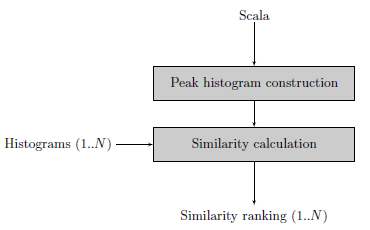 Scala files are text files with information about a tone scale. It is used to share and exchange tone scales. The file format originates from the [Scala program](http://www.huygens-fokker.org/scala/) :
> Scala is a powerful software tool for experimentation with musical tunings, such as just intonation scales, equal and historical temperaments, microtonal and macrotonal scales, and non-Western scales. It supports scale creation, editing, comparison, analysis, ...
The Scala file format is popular because there is a [library with more than 3000 tone scales](http://www.huygens-fokker.org/scala/downloads.html#scales) available on the Scala website.
Tarsos also understands Scala files. It is able to create a pitch class histogram using a gaussian mixture model. A technique described in *A. C. Gedik, B.Bozkurt, 2010, "Pitch Frequency Histogram Based Music Information Retrieval for Turkish Music ", Signal Processing, vol.10, pp.1049-1063. (doi:10.106/j.sigpro.2009.06.017)*.
An example should make things clear. Lets search for an interval of 300 cents or exactly three semitones. A scala file with this interval is easy to define:
\`\`\`ruby\
! example.scl\
! An example of a tone interval of 300 cents\
Tone interval of 300 cents\
2\
!\
900\
1200.0\
\`\`\`
The next step is to create a histogram with an interval of 300 cents. In the block diagram this step is called "Peak histogram creation". The Similarity calculation step expects a list of histograms to compare with the newly defined histogram. Feeding the similarity calculation with the western12ET tone scale and a pentatonic Indonesian Slendro tone scale shows that a 300 cents interval is used in the western tone scale but is not available in the Slendro tone scale.
This example only uses scala files, creating histograms is actually not needed: calculating intervals can be done using the scala file itself. This changes when audio files are compared with each other or with scala files.
### Search Using Audio Files
Scala files are text files with information about a tone scale. It is used to share and exchange tone scales. The file format originates from the [Scala program](http://www.huygens-fokker.org/scala/) :
> Scala is a powerful software tool for experimentation with musical tunings, such as just intonation scales, equal and historical temperaments, microtonal and macrotonal scales, and non-Western scales. It supports scale creation, editing, comparison, analysis, ...
The Scala file format is popular because there is a [library with more than 3000 tone scales](http://www.huygens-fokker.org/scala/downloads.html#scales) available on the Scala website.
Tarsos also understands Scala files. It is able to create a pitch class histogram using a gaussian mixture model. A technique described in *A. C. Gedik, B.Bozkurt, 2010, "Pitch Frequency Histogram Based Music Information Retrieval for Turkish Music ", Signal Processing, vol.10, pp.1049-1063. (doi:10.106/j.sigpro.2009.06.017)*.
An example should make things clear. Lets search for an interval of 300 cents or exactly three semitones. A scala file with this interval is easy to define:
\`\`\`ruby\
! example.scl\
! An example of a tone interval of 300 cents\
Tone interval of 300 cents\
2\
!\
900\
1200.0\
\`\`\`
The next step is to create a histogram with an interval of 300 cents. In the block diagram this step is called "Peak histogram creation". The Similarity calculation step expects a list of histograms to compare with the newly defined histogram. Feeding the similarity calculation with the western12ET tone scale and a pentatonic Indonesian Slendro tone scale shows that a 300 cents interval is used in the western tone scale but is not available in the Slendro tone scale.
This example only uses scala files, creating histograms is actually not needed: calculating intervals can be done using the scala file itself. This changes when audio files are compared with each other or with scala files.
### Search Using Audio Files
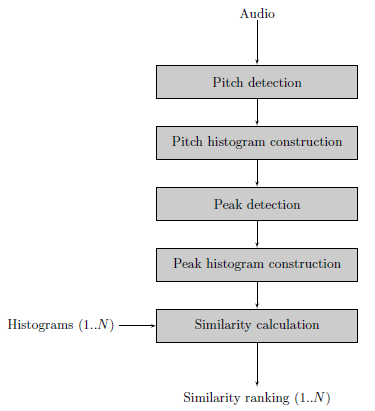 When audio files are fed to the algorithm additional steps need to be taken.
1. First of all pitch detection is executed on the audio file. Currently two pitch extractors are implemented in pure Java, it is also possible to use an external pitch extractor such as [aubio](http://aubio.org)
2. Using pitch annotations a Pitch Histogram is created.
3. Peak detection on the Pitch Histogram results in a number of peaks, these should represent the distinct pitch classes used in the musical piece.
4. With the pitch classes a clean peak histogram is created during the Peak Histogram construction phase.
5. Finally the Peak histogram is matched with other histograms.
The last two steps are the same for audio files or scala files.
Using real audio files can cause *dirty* histograms. Determining how many distinct pitch classes are used is no trivial task, even for an expert (human) listener. Tarsos should provide a semi-automatic way of peak extraction: a best guess by an algorithm that can easily be corrected by a user. For the moment Tarsos does not allow manual intervention.
### Tarsos
To use tarsos you need a recent java runtime (1.6) and the following command line arguments:
\`\`\`ruby\
java -jar tarsos.jar rank ---detector TARSOS_MPM\
---needle audio.wav ---haystack scala.scl other_audio.wav other_scala_file.scl\
\`\`\`
When audio files are fed to the algorithm additional steps need to be taken.
1. First of all pitch detection is executed on the audio file. Currently two pitch extractors are implemented in pure Java, it is also possible to use an external pitch extractor such as [aubio](http://aubio.org)
2. Using pitch annotations a Pitch Histogram is created.
3. Peak detection on the Pitch Histogram results in a number of peaks, these should represent the distinct pitch classes used in the musical piece.
4. With the pitch classes a clean peak histogram is created during the Peak Histogram construction phase.
5. Finally the Peak histogram is matched with other histograms.
The last two steps are the same for audio files or scala files.
Using real audio files can cause *dirty* histograms. Determining how many distinct pitch classes are used is no trivial task, even for an expert (human) listener. Tarsos should provide a semi-automatic way of peak extraction: a best guess by an algorithm that can easily be corrected by a user. For the moment Tarsos does not allow manual intervention.
### Tarsos
To use tarsos you need a recent java runtime (1.6) and the following command line arguments:
\`\`\`ruby\
java -jar tarsos.jar rank ---detector TARSOS_MPM\
---needle audio.wav ---haystack scala.scl other_audio.wav other_scala_file.scl\
\`\`\`
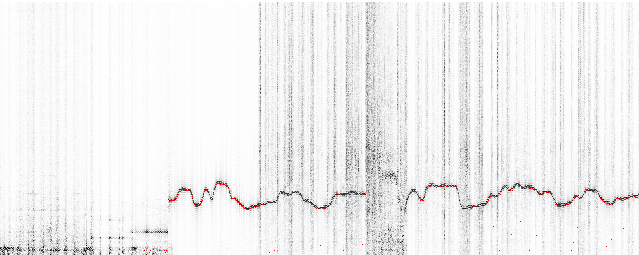 This is the most recent version of the [spectrogram implementation in java](http://github.com/JorenSix/Tarsos/blob/master/src/be/hogent/tarsos/ui/Spectrogram.java).
\`\`\`java\
float pitch = Yin.processBuffer(buffer, (float) sampleRate);\
fft.transform(buffer);\
double maxAmplitude = 0;\
for (int j = 0; j \< buffer.length / 2; j) {\
double amplitude = buffer\[j\] \* buffer\[j\] + buffer\[j +\
buffer.length/2\] \* buffer\[j+ buffer.length/2\];\
amplitude = Math.pow(amplitude, 0.5);\
colorIndexes\[j\] = amplitude;\
maxAmplitude = Math.max(amplitude, maxAmplitude);\
}\
\`\`\`
If you want to test it yourself download the "spectrogram jar package":\[spectrogram.jar\] and execute:
\`\`\`ruby\
java -jar spectrogram.jar\
\`\`\`
- [spectrum.png](https://0110.be/files/attachments/348/spectrum.png)
- [spectrogram.jar](https://0110.be/files/attachments/348/spectrogram.jar)
---
## [Caller ID with Linux and Huawei e220](https://0110.be/posts/Caller_ID_with_Linux_and_Huawei_e220.md)
- Published: 2010-04-11T00:00:00Z
- Updated: 2013-12-05T18:19:15Z
- Author: Joren
- ID: 49
- Canonical: https://0110.be/posts/Caller_ID_with_Linux_and_Huawei_e220
- Tags: [0110.be](https://0110.be/tags/0110.be.md), [Code](https://0110.be/tags/Code.md), [Hackerspace Ghent](https://0110.be/tags/Hackerspace%20Ghent.md), [Projecten](https://0110.be/tags/Projecten.md)
This is the most recent version of the [spectrogram implementation in java](http://github.com/JorenSix/Tarsos/blob/master/src/be/hogent/tarsos/ui/Spectrogram.java).
\`\`\`java\
float pitch = Yin.processBuffer(buffer, (float) sampleRate);\
fft.transform(buffer);\
double maxAmplitude = 0;\
for (int j = 0; j \< buffer.length / 2; j) {\
double amplitude = buffer\[j\] \* buffer\[j\] + buffer\[j +\
buffer.length/2\] \* buffer\[j+ buffer.length/2\];\
amplitude = Math.pow(amplitude, 0.5);\
colorIndexes\[j\] = amplitude;\
maxAmplitude = Math.max(amplitude, maxAmplitude);\
}\
\`\`\`
If you want to test it yourself download the "spectrogram jar package":\[spectrogram.jar\] and execute:
\`\`\`ruby\
java -jar spectrogram.jar\
\`\`\`
- [spectrum.png](https://0110.be/files/attachments/348/spectrum.png)
- [spectrogram.jar](https://0110.be/files/attachments/348/spectrogram.jar)
---
## [Caller ID with Linux and Huawei e220](https://0110.be/posts/Caller_ID_with_Linux_and_Huawei_e220.md)
- Published: 2010-04-11T00:00:00Z
- Updated: 2013-12-05T18:19:15Z
- Author: Joren
- ID: 49
- Canonical: https://0110.be/posts/Caller_ID_with_Linux_and_Huawei_e220
- Tags: [0110.be](https://0110.be/tags/0110.be.md), [Code](https://0110.be/tags/Code.md), [Hackerspace Ghent](https://0110.be/tags/Hackerspace%20Ghent.md), [Projecten](https://0110.be/tags/Projecten.md)
 This is the scenario: you have a Huawei e220, a linux computer and you want to react to a call from a set of predefined numbers. E.g. [ordering a pizza](https://0110.be/artikels/lees/Order_Pizza_with_USB_Pizza_Button) when you receive a call from a certain number.
The Huawei e220 supports a subset of the [AT commands](http://en.wikipedia.org/wiki/AT_commands), which subset is [an enterprise secret](http://forum.huawei.com/jive4/thread.jspa?threadID=324487) of te Huawei company. So there is no documentation available for the device I bought, thanks Huawei. Anyhow when you attach the e220 to a Linux machine you should get two serial ports:
\`\`\`ruby\
/dev/ttyUSB0\
/dev/ttyUSB1\
\`\`\`
To connect to the devices you can use a serial client. [GNU Screen](http://www.gnu.org/software/screen/) can be used as a serial client like this: `screen /dev/ttyUSB0 115200`. The first device, `ttyUSB0` is used to control `ttyUSB1`, so to enable caller ID on te Huawei e220 you need to send this message to `ttyUSB0`:
\`\`\`ruby\
AT+CLIP=1\
\`\`\`
To check for calls you should listen to `ttyUSB1`. A serial session for `ttyUSB1` looks like:
\`\`\`ruby\
\^BOOT:44594282,0,0,0,6\
\^RSSI:18\
RING\
+CLIP: "+33499311152",145,,,,0\
\^BOOT:44594282,0,0,0,6\
\`\`\`
The `RING` and `CLIP` messages are the most interesting. The `RING` signifies an incoming call, the `CLIP` is the caller ID. The `BOOT` and `RSSI` are some kind of ping messages. The following Python script demonstrates a complete session that enables caller ID, waits for a phone call and prints the number of the caller.
\`\`\`python\
#!/usr/bin/env python\
import serial, re
command_channel = serial.Serial(\
port='/dev/ttyUSB0',\
baudrate=115200,\
parity=serial.PARITY_NONE,\
stopbits=serial.STOPBITS_ONE,\
bytesize=serial.EIGHTBITS\
)\
command_channel.open()\
#enable caller id\
command_channel.write("AT+CLIP=1" + "\\r\\n")\
command_channel.close()
ser = serial.Serial(\
port='/dev/ttyUSB1',\
baudrate=9600,\
parity=serial.PARITY_NONE,\
stopbits=serial.STOPBITS_ONE,\
bytesize=serial.EIGHTBITS\
)
ser.open()
pattern = re.compile('.**CLIP.**"\\+(\[0-9\]+)",.\*')
while 1:\
buffer = ser.read(ser.inWaiting()).strip()\
buffer = buffer.replace("\\n","")\
match = pattern.match(buffer)\
if match:\
number = match.group(1)\
print number\
\`\`\`
---
## [YIN Pitch Tracker in JAVA](https://0110.be/posts/YIN_Pitch_Tracker_in_JAVA.md)
- Published: 2010-04-09T00:00:00Z
- Updated: 2020-11-17T09:04:25Z
- Author: Joren
- ID: 66
- Canonical: https://0110.be/posts/YIN_Pitch_Tracker_in_JAVA
- Tags: [0110.be](https://0110.be/tags/0110.be.md), [Code](https://0110.be/tags/Code.md), [Cultuur](https://0110.be/tags/Cultuur.md), [Muziek](https://0110.be/tags/Muziek.md), [Projecten](https://0110.be/tags/Projecten.md)
To make [Tarsos](http://0110.be/) more portable I wrote a pitch tracker in pure JAVA using the [YIN algorithm](http://recherche.ircam.fr/equipes/pcm/cheveign/ps/2002_JASA_YIN_proof.pdf) based on the implementation in C of [aubio](http://aubio.org). The implementation also uses some code written by Karl Helgasson and Teun de Lange of the [Jazzperiments project](http://www.jazzperiments.com/jazzperiments.html).
It can be used to perform real time pitch detection or to analyse files. To use it as a real time pitch detector just start the "JAR-file":\[pitch_detector_yin.jar\] by double clicking. To analyse a file execute one of the following. The first results in a list of annotations (text), the second shows the annotations graphically.
\`\`\`ruby\
java -jar pitch_detector_yin.jar flute.novib.mf.C5B5.wav\
java -jar pitch_detector_yin.jar ---file flute.novib.mf.C5B5.wav\
\`\`\`
The provided "flute sample":\[flute.novib.mf.C5B5.wav\] is from [*The Musical Samples* library of the University of Iowa](http://theremin.music.uiowa.edu/MIS.html) and converted to mono wav. The source code of the pitch tracker can be found below.
**Update:** the Yin implementation in Java has been incorporated into the [TarsosDSP project](https://github.com/JorenSix/TarsosDSP). An open source, Real-Time Audio Processing Framework in Java.

- [pitch\_detector\_yin.jar](https://0110.be/files/attachments/66/pitch_detector_yin.jar)
- [pitch\_detector\_yin\_src.zip](https://0110.be/files/attachments/66/pitch_detector_yin_src.zip)
- [flute.novib.mf.C5B5.wav](https://0110.be/files/attachments/66/flute.novib.mf.C5B5.wav)
---
## [Tarsos on GitHub](https://0110.be/posts/Tarsos_on_GitHub.md)
- Published: 2010-03-16T15:14:34Z
- Updated: 2013-12-05T18:19:15Z
- Author: Joren
- ID: 347
- Canonical: https://0110.be/posts/Tarsos_on_GitHub
- Tags: [Code](https://0110.be/tags/Code.md), [Computational ethnomusicology](https://0110.be/tags/Computational%20ethnomusicology.md), [HoGent](https://0110.be/tags/HoGent.md), [Java](https://0110.be/tags/Java.md), [Tarsos](https://0110.be/tags/Tarsos.md), [featured](https://0110.be/tags/featured.md)
The JAVA software program we are developing is called Tarsos and can now be found on [GitHub](http://github.com/JorenSix/Tarsos). GitHub is a web-based hosting service for projects that use the Git version control system.
Currently Tarsos is a collection of Java classes to create, compare and process pitch-frequency data using histograms. In it's current state it is not usable for end-users.
### Credits
Tarsos is developed at [University College Ghent, Faculty of Music](http://cons.hogent.be) and uses a number of open source libraries:
- [Gervill](https://gervill.dev.java.net/): a software sound synthesizer, supports the MIDI Tuning Standard. [API](https://gervill.dev.java.net/nonav/javadoc/index.html).
- [Jave](http://www.sauronsoftware.it/projects/jave/): a wrapper for [ffmpeg](http://ffmpeg.org/).
- [Apache Commons Math](http://commons.apache.org/math/): a library of lightweight, self-contained mathematics and statistics components [API](http://people.cs.ubc.ca/~kvdoel/jass/doc/index.html).
- [JASS](http://people.cs.ubc.ca/~kvdoel/jass/): a unit generator based audio synthesis programming environment. [API](http://people.cs.ubc.ca/~kvdoel/jass/doc/index.html).
- [Java-getopt](http://www.urbanophile.com/~arenn/hacking/download.html): a port of the GNU getopt family of functions. [API](http://www.urbanophile.com/~arenn/hacking/getopt/Package-gnu.getopt.html).
- [Ptplot](http://ptolemy.berkeley.edu/java/ptplot5.7/ptolemy/plot/doc/index.htm) a 2D plotting library. [API](http://ptolemy.berkeley.edu/java/ptplot5.7/doc/codeDoc/index.html).
---
## [Dataset](https://0110.be/posts/Dataset.md)
- Published: 2010-01-22T16:25:23Z
- Updated: 2013-12-05T18:19:15Z
- Author: Joren
- ID: 328
- Canonical: https://0110.be/posts/Dataset
- Tags: [Computational ethnomusicology](https://0110.be/tags/Computational%20ethnomusicology.md), [HoGent](https://0110.be/tags/HoGent.md)
The dataset we use is the sound archive of the department of Ethnomusicology of the Royal Museum for Central Africa at Tervuren, Belgium. The archive was digitized during the DEKKMMA (Digitization of the Ethnomusicological Sound Archive of the Royal Museum for Central Africa - it works better in Dutch) project. More information about the dataset can be foun on [the website of the DEKKMMA project](http://music.africamuseum.be/english/index.html):
This is the scenario: you have a Huawei e220, a linux computer and you want to react to a call from a set of predefined numbers. E.g. [ordering a pizza](https://0110.be/artikels/lees/Order_Pizza_with_USB_Pizza_Button) when you receive a call from a certain number.
The Huawei e220 supports a subset of the [AT commands](http://en.wikipedia.org/wiki/AT_commands), which subset is [an enterprise secret](http://forum.huawei.com/jive4/thread.jspa?threadID=324487) of te Huawei company. So there is no documentation available for the device I bought, thanks Huawei. Anyhow when you attach the e220 to a Linux machine you should get two serial ports:
\`\`\`ruby\
/dev/ttyUSB0\
/dev/ttyUSB1\
\`\`\`
To connect to the devices you can use a serial client. [GNU Screen](http://www.gnu.org/software/screen/) can be used as a serial client like this: `screen /dev/ttyUSB0 115200`. The first device, `ttyUSB0` is used to control `ttyUSB1`, so to enable caller ID on te Huawei e220 you need to send this message to `ttyUSB0`:
\`\`\`ruby\
AT+CLIP=1\
\`\`\`
To check for calls you should listen to `ttyUSB1`. A serial session for `ttyUSB1` looks like:
\`\`\`ruby\
\^BOOT:44594282,0,0,0,6\
\^RSSI:18\
RING\
+CLIP: "+33499311152",145,,,,0\
\^BOOT:44594282,0,0,0,6\
\`\`\`
The `RING` and `CLIP` messages are the most interesting. The `RING` signifies an incoming call, the `CLIP` is the caller ID. The `BOOT` and `RSSI` are some kind of ping messages. The following Python script demonstrates a complete session that enables caller ID, waits for a phone call and prints the number of the caller.
\`\`\`python\
#!/usr/bin/env python\
import serial, re
command_channel = serial.Serial(\
port='/dev/ttyUSB0',\
baudrate=115200,\
parity=serial.PARITY_NONE,\
stopbits=serial.STOPBITS_ONE,\
bytesize=serial.EIGHTBITS\
)\
command_channel.open()\
#enable caller id\
command_channel.write("AT+CLIP=1" + "\\r\\n")\
command_channel.close()
ser = serial.Serial(\
port='/dev/ttyUSB1',\
baudrate=9600,\
parity=serial.PARITY_NONE,\
stopbits=serial.STOPBITS_ONE,\
bytesize=serial.EIGHTBITS\
)
ser.open()
pattern = re.compile('.**CLIP.**"\\+(\[0-9\]+)",.\*')
while 1:\
buffer = ser.read(ser.inWaiting()).strip()\
buffer = buffer.replace("\\n","")\
match = pattern.match(buffer)\
if match:\
number = match.group(1)\
print number\
\`\`\`
---
## [YIN Pitch Tracker in JAVA](https://0110.be/posts/YIN_Pitch_Tracker_in_JAVA.md)
- Published: 2010-04-09T00:00:00Z
- Updated: 2020-11-17T09:04:25Z
- Author: Joren
- ID: 66
- Canonical: https://0110.be/posts/YIN_Pitch_Tracker_in_JAVA
- Tags: [0110.be](https://0110.be/tags/0110.be.md), [Code](https://0110.be/tags/Code.md), [Cultuur](https://0110.be/tags/Cultuur.md), [Muziek](https://0110.be/tags/Muziek.md), [Projecten](https://0110.be/tags/Projecten.md)
To make [Tarsos](http://0110.be/) more portable I wrote a pitch tracker in pure JAVA using the [YIN algorithm](http://recherche.ircam.fr/equipes/pcm/cheveign/ps/2002_JASA_YIN_proof.pdf) based on the implementation in C of [aubio](http://aubio.org). The implementation also uses some code written by Karl Helgasson and Teun de Lange of the [Jazzperiments project](http://www.jazzperiments.com/jazzperiments.html).
It can be used to perform real time pitch detection or to analyse files. To use it as a real time pitch detector just start the "JAR-file":\[pitch_detector_yin.jar\] by double clicking. To analyse a file execute one of the following. The first results in a list of annotations (text), the second shows the annotations graphically.
\`\`\`ruby\
java -jar pitch_detector_yin.jar flute.novib.mf.C5B5.wav\
java -jar pitch_detector_yin.jar ---file flute.novib.mf.C5B5.wav\
\`\`\`
The provided "flute sample":\[flute.novib.mf.C5B5.wav\] is from [*The Musical Samples* library of the University of Iowa](http://theremin.music.uiowa.edu/MIS.html) and converted to mono wav. The source code of the pitch tracker can be found below.
**Update:** the Yin implementation in Java has been incorporated into the [TarsosDSP project](https://github.com/JorenSix/TarsosDSP). An open source, Real-Time Audio Processing Framework in Java.

- [pitch\_detector\_yin.jar](https://0110.be/files/attachments/66/pitch_detector_yin.jar)
- [pitch\_detector\_yin\_src.zip](https://0110.be/files/attachments/66/pitch_detector_yin_src.zip)
- [flute.novib.mf.C5B5.wav](https://0110.be/files/attachments/66/flute.novib.mf.C5B5.wav)
---
## [Tarsos on GitHub](https://0110.be/posts/Tarsos_on_GitHub.md)
- Published: 2010-03-16T15:14:34Z
- Updated: 2013-12-05T18:19:15Z
- Author: Joren
- ID: 347
- Canonical: https://0110.be/posts/Tarsos_on_GitHub
- Tags: [Code](https://0110.be/tags/Code.md), [Computational ethnomusicology](https://0110.be/tags/Computational%20ethnomusicology.md), [HoGent](https://0110.be/tags/HoGent.md), [Java](https://0110.be/tags/Java.md), [Tarsos](https://0110.be/tags/Tarsos.md), [featured](https://0110.be/tags/featured.md)
The JAVA software program we are developing is called Tarsos and can now be found on [GitHub](http://github.com/JorenSix/Tarsos). GitHub is a web-based hosting service for projects that use the Git version control system.
Currently Tarsos is a collection of Java classes to create, compare and process pitch-frequency data using histograms. In it's current state it is not usable for end-users.
### Credits
Tarsos is developed at [University College Ghent, Faculty of Music](http://cons.hogent.be) and uses a number of open source libraries:
- [Gervill](https://gervill.dev.java.net/): a software sound synthesizer, supports the MIDI Tuning Standard. [API](https://gervill.dev.java.net/nonav/javadoc/index.html).
- [Jave](http://www.sauronsoftware.it/projects/jave/): a wrapper for [ffmpeg](http://ffmpeg.org/).
- [Apache Commons Math](http://commons.apache.org/math/): a library of lightweight, self-contained mathematics and statistics components [API](http://people.cs.ubc.ca/~kvdoel/jass/doc/index.html).
- [JASS](http://people.cs.ubc.ca/~kvdoel/jass/): a unit generator based audio synthesis programming environment. [API](http://people.cs.ubc.ca/~kvdoel/jass/doc/index.html).
- [Java-getopt](http://www.urbanophile.com/~arenn/hacking/download.html): a port of the GNU getopt family of functions. [API](http://www.urbanophile.com/~arenn/hacking/getopt/Package-gnu.getopt.html).
- [Ptplot](http://ptolemy.berkeley.edu/java/ptplot5.7/ptolemy/plot/doc/index.htm) a 2D plotting library. [API](http://ptolemy.berkeley.edu/java/ptplot5.7/doc/codeDoc/index.html).
---
## [Dataset](https://0110.be/posts/Dataset.md)
- Published: 2010-01-22T16:25:23Z
- Updated: 2013-12-05T18:19:15Z
- Author: Joren
- ID: 328
- Canonical: https://0110.be/posts/Dataset
- Tags: [Computational ethnomusicology](https://0110.be/tags/Computational%20ethnomusicology.md), [HoGent](https://0110.be/tags/HoGent.md)
The dataset we use is the sound archive of the department of Ethnomusicology of the Royal Museum for Central Africa at Tervuren, Belgium. The archive was digitized during the DEKKMMA (Digitization of the Ethnomusicological Sound Archive of the Royal Museum for Central Africa - it works better in Dutch) project. More information about the dataset can be foun on [the website of the DEKKMMA project](http://music.africamuseum.be/english/index.html):

 **The communication**: The original Python script executed another script on the local pc. A more flexible approach is possible using sockets. With sockets it is possible to notify any computer on a network.
\`\`\`ruby\
if PanicButton().pressed():\
\# create a TCP socket\
s = socket.socket(socket.AF_INET, socket.SOCK_STREAM)\
\# connect to server on the port\
s.connect((SERVER, SERVER_TCP_PORT))\
\# send the order (margherita at restaurant mario)\
s.send("mario: \[margherita_big\]\\n")\
\`\`\`
**The reaction**: a ruby TCP server waits for message from the driver. When it does it automates a HTTP session on a website. It executes a series of HTTP-GET's and POST's. It uses the [mechanize library](http://mechanize.rubyforge.org/mechanize/).
\`\`\`ruby\
login_url = "http://www.just-eat.be/pages/member/login.aspx"\
a = WWW::Mechanize.new\
a.get(login_url) do \|login_page\|\
#post login_form\
login_form = login_page.forms.first\
login_form.txtUser = "username"\
login_form.txtPass = "password"\
a.submit(login_form, login_form.buttons\[1\])\
end\
\`\`\`
Some libraries are needed. For python you need the usb library, the [python deamons lib](http://pypi.python.org/pypi/python-daemon/) needs to be installed seperatly. Setuptools are needed to install the deamons package.
\`\`\`ruby\
sudo apt-get install python-usb python-setuptools\
\`\`\`
Ruby needs rubygems to install the needed mechanize and daemons library. Mechanize needs the
**The communication**: The original Python script executed another script on the local pc. A more flexible approach is possible using sockets. With sockets it is possible to notify any computer on a network.
\`\`\`ruby\
if PanicButton().pressed():\
\# create a TCP socket\
s = socket.socket(socket.AF_INET, socket.SOCK_STREAM)\
\# connect to server on the port\
s.connect((SERVER, SERVER_TCP_PORT))\
\# send the order (margherita at restaurant mario)\
s.send("mario: \[margherita_big\]\\n")\
\`\`\`
**The reaction**: a ruby TCP server waits for message from the driver. When it does it automates a HTTP session on a website. It executes a series of HTTP-GET's and POST's. It uses the [mechanize library](http://mechanize.rubyforge.org/mechanize/).
\`\`\`ruby\
login_url = "http://www.just-eat.be/pages/member/login.aspx"\
a = WWW::Mechanize.new\
a.get(login_url) do \|login_page\|\
#post login_form\
login_form = login_page.forms.first\
login_form.txtUser = "username"\
login_form.txtPass = "password"\
a.submit(login_form, login_form.buttons\[1\])\
end\
\`\`\`
Some libraries are needed. For python you need the usb library, the [python deamons lib](http://pypi.python.org/pypi/python-daemon/) needs to be installed seperatly. Setuptools are needed to install the deamons package.
\`\`\`ruby\
sudo apt-get install python-usb python-setuptools\
\`\`\`
Ruby needs rubygems to install the needed mechanize and daemons library. Mechanize needs the