---
title: 'Between: 2008/11/01 en 2008/11/30 - 0110.be'
canonical: https://0110.be/date/2008/11
markdown_url: https://0110.be/date/2008/11.md
page: 0
posts_per_page: 30
total_posts: 2
filters:
year: 2008
month: 11
previous:
next:
---
# Between: 2008/11/01 en 2008/11/30 - 0110.be
## [SQL-bestand met een lijst van alle Belgische postcodes en steden](https://0110.be/posts/SQL-bestand_met_een_lijst_van_alle_Belgische_postcodes_en_steden.md)
- Published: 2008-11-29T00:00:00Z
- Updated: 2013-12-05T18:19:15Z
- Author: Joren
- ID: 210
- Canonical: https://0110.be/posts/SQL-bestand_met_een_lijst_van_alle_Belgische_postcodes_en_steden
- Tags: [0110.be](https://0110.be/tags/0110.be.md), [Code](https://0110.be/tags/Code.md)

Uit de [lijst van postcodes van alle Belgische steden](http://www.post.be/site/nl/postal_codes.html) heb ik een SQL-bestand samengesteld. De gegevens bevatten de postcode zelf, de naam van de stad, de naam van de stad in hoofdletters en een veld "structure" waaruit de gemeente-deelgemeente relatie gehaald kan worden als er op gesorteerd wordt. Dit zijn bijvoorbeeld de deelgemeentes van Chimay.
6460 CHIMAY
6460 Bailièvre
6460 Robechies
6460 Saint-Remy (Ht.)
6460 Salles
6460 Villers-la-Tour
6461 Virelles
6462 Vaulx-lez-Chimay
6463 Lompret
6464 Baileux
6464 Bourlers
6464 Forges
6464 l'Escaillère
6464 Rièzes
\
\
Het sorteren kan in [PostgreSQL](http://www.postgresql.org) met deze SQL instructie: `order by translate(structure, ' ', 'z')`. Het SQL-script zelf is een lijst van `INSERT INTO` SQL-Statements.
insert into cities(zipcode,name,up,structure) VALUES ('1790','Affligem','AFFLIGEM','1790 AFFLIGEM');
insert into cities(zipcode,name,up,structure) VALUES ('9051','Afsnee','AFSNEE','9051 Afsnee');
insert into cities(zipcode,name,up,structure) VALUES ('5544','Agimont','AGIMONT','5544 Agimont');
...
Dit is het "SQL-bestand met een lijst van alle Belgische postcodes en steden":\[steden.sql.txt\]. Hopelijk is hier iemand ooit iets mee.
---
## [Query Tool](https://0110.be/posts/Query_Tool.md)
- Published: 2008-11-10T00:00:00Z
- Updated: 2013-12-05T18:19:15Z
- Author: Joren
- ID: 103
- Canonical: https://0110.be/posts/Query_Tool
- Tags: [0110.be](https://0110.be/tags/0110.be.md), [Code](https://0110.be/tags/Code.md), [Portfolio](https://0110.be/tags/Portfolio.md), [Vooruit](https://0110.be/tags/Vooruit.md)

While working at the [Vooruit Arts Centre](http://vooruit.be/en) I got the assignment to create a tool to query an Oracle database with ticketing data. There were a few requirements for the Query Tool, in the current version all of these are met:
- First of all it had to be easy to execute complex queries, no knowledge of SQL (Structured Query Language) should be required for the end user.
- The results of the queries should be exportable to an easy to analyse format. \* Editing queries or adding new ones should be doable, by someone knowledgeable with SQL.
- The Query Tool should be easy to configure and database independent.
- Should work on Windows, Mac OS X and Linux.
By publishing the Query Tool on my website I hope that the fruits of my labour can be enjoyed by a wider audience. To see it in action you can *"give it a spin":\[QueryTool.jar\]*. A recent version, version 6, of the [JRE (Java Runtime Environment)](http://www.java.com/en/download/manual.jsp) is needed.
## How Do I Use The Query Tool?
The program supports two ways to query a database:
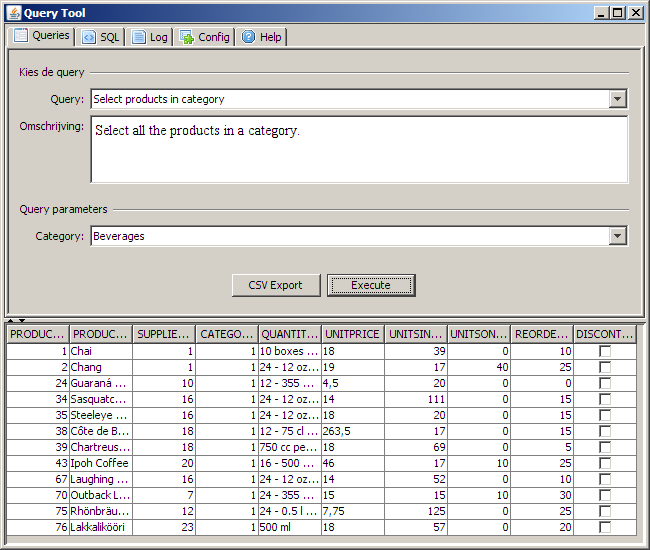
- A number of predefined queries can be selected and executed. Depending on the selected query, zero or more parameters are required. E.g. the screen shot below depicts a query with one parameter: a product category. When the query is executed all the products in the selected category are fetched.
- The tab "SQL" can be used to execute arbitrary SQL-instructions.
The two buttons below are self explanatory. When the button "CVS Export" is hit a CVS file is created in a configured directory.
Depending on the complexity of a query it can take a long time before results are returned. Because the application is multithreaded the user interface remains responsive and the query can be stopped at any time.
The contents of the tab "log" gives you an idea what the application does. When something goes awry while executing a query a message appears in this tab.
The tab "Config" can be used to set configuration parameters. The tab "Help" contains... helpful information.
### How Do I Add My Own Queries?
The list of predefined queries is constructed by iterating over SQL-files in a configured directory. Adding additional queries to the program is easy, just add an extra SQL-file to the directory. An SQL-file should have the following format, otherwise it is ignored:
TITEL
----
DESCRIPTION
----
SQL-INSTRUCTION with zero or more !{PARAMETERS}!
In the screen shot above this query is visible:
Select products in category
----
Select all the products in a category.
----
SELECT * FROM
products WHERE categoryid = !{category}!
To make the queries dynamic the Query Tool supports different kinds of parameters. A parameter has this form: !{type name}!, the name is optional. If there is a name specified it is used as a label in the interface, otherwise type is used. There are three types of parameters:
1. Parameters that define a type. For each type a corresponding user interface is rendered. E.g. for the type string a text field is rendered. The supported types are:\
#\* !{string}!\
#\* !{boolean}!\
#\* !{double}!\
#\* !{date}!\
#\* !{integer}!
2. Parameters for raw SQL. A textfield is rendered, the contents is directly injected in the SQL-query. It has this format: !{sql}!
3. Parameters for lists. In the example above a list parameter is used. These lists are fetched from the database. E.g. a list of categories. The SQL-instruction and name of the list parameters can be configured.
If you want to use your own database you need to configure the database connection string. The program uses JDBC to connect to the database. It uses metadata provided by the JDBC layer. If your database has a JDBC driver with support for metadata the Query Tool will work correctly. The JDBC driver must be included in the classpath.
## Credits
The Query Tool uses the [famfamfam mini icons](http://www.famfamfam.com/lab/icons/mini/).
For demoing purposes the executable contains a lightweight [hsql](http://hsqldb.org/) database. The data in the database is a modified version of the [Microsoft Northwind](http://www.codeplex.com/NorthwindCommunity/) database. The "northwind hsql database":\[northwind.hsql.zip\] is created with this "SQL-script":\[northwind.script.txt\].
## Downloads
- "Java Source code en documentation":\[QueryTool.source.zip\]: contains an [eclipse](http://eclipse.org) project.
- "Executable":\[QueryTool.jar\]: Contains only the executable.
- [ui.png](https://0110.be/files/attachments/103/ui.png)
- [vooruit\_logo.png](https://0110.be/files/attachments/103/vooruit_logo.png)
- [northwind.script.txt](https://0110.be/files/attachments/103/northwind.script.txt)
- [northwind.hsql.zip](https://0110.be/files/attachments/103/northwind.hsql.zip)
- [QueryTool.source.zip](https://0110.be/files/attachments/103/QueryTool.source.zip)
- [QueryTool.jar](https://0110.be/files/attachments/103/QueryTool.jar)
---