---
title: 'Between: 2017/04/01 en 2017/04/30 - 0110.be'
canonical: https://0110.be/date/2017/4
markdown_url: https://0110.be/date/2017/4.md
page: 0
posts_per_page: 30
total_posts: 2
filters:
year: 2017
month: 4
previous:
next:
---
# Between: 2017/04/01 en 2017/04/30 - 0110.be
## [Workshop on ESP32 microcontroller](https://0110.be/posts/Workshop_on_ESP32_microcontroller.md)
- Published: 2017-04-08T00:00:00Z
- Updated: 2017-04-11T19:26:37Z
- Author: Joren
- ID: 453
- Canonical: https://0110.be/posts/Workshop_on_ESP32_microcontroller
- Tags: [0110.be](https://0110.be/tags/0110.be.md), [Hackerspace Ghent](https://0110.be/tags/Hackerspace%20Ghent.md)
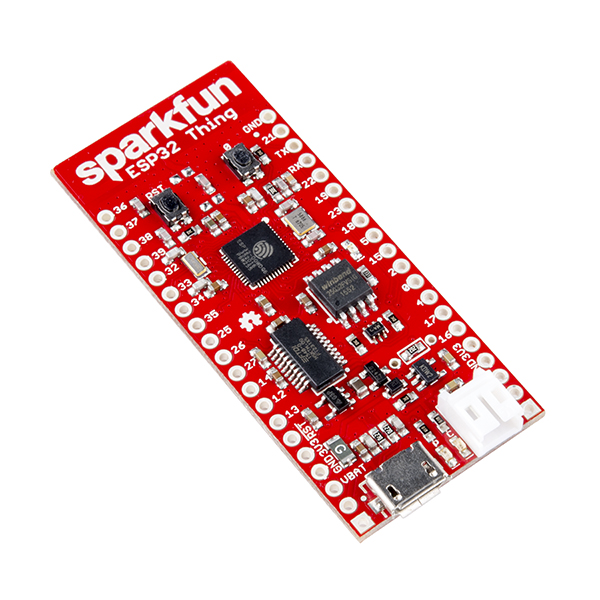 On Saturday the eight of April I gave a workshop on the ESP 32 micro controller at [Newline](http://hackerspace.gent/newline), the yearly hackerspace conference of Hackerspace Ghent. The aim was to provide a hands-on introduction. The participants had to program to make the ESP execute the following:
- Blink
- Connecting to wifi
- Sending data from the ESP32
- Sending data using TCP
- Broadcast data over UDP
- Broadcast data using OSC over UDP
- Broadcasting sensor data over UDP and OSC
- Mesh Networking
At the start of the workshop I gave a "presention":\[2017.04.ESP32_intro.pdf\] as an introduction.
---
## [ESP32 workshop](https://0110.be/posts/ESP32_workshop.md)
- Published: 2017-04-05T00:00:00Z
- Updated: 2025-11-29T15:52:11Z
- Author: Joren
- ID: 452
- Canonical: https://0110.be/posts/ESP32_workshop
- Tags:
## ESP32 Workshop {#top}
- [Getting Started](#start)
- [Blink](#blink)
- [Hello WiFi](#hello) - Connecting to WiFi
- Sending data from the ESP32
- [Sending data using TCP](#send_tcp)
- [Broadcast data over UDP](#data_over_udp)
- [Broadcast data using OSC over UDP](#send_osc_over_udp)
- [Broadcasting sensor data over UDP and OSC](#send_sensor_data)
- [Mesh Networking](#mesh)
## Getting Started [ ^ ](#top) {#start}
During the workshop we will use the [ESP32 Thing](https://www.sparkfun.com/products/13907) by Sparkfun. It has [local distributors](https://www.antratek.be/sparkfun-esp32-thing). The Sparkfun guide to [get started with the ESP32](https://learn.sparkfun.com/tutorials/esp32-thing-hookup-guide) is useful as well.
1. [Arduino IDE version 1.8.2](https://www.arduino.cc/en/main/software)
2. [Installation Instructions](https://github.com/espressif/arduino-esp32#installation-instructions)
3. The server components are in Ruby. The server components are not needed but optionally a Ruby environment with gem osc-ruby installed is practical.
Some common pitfalls: make sure that you have git and a compatible version of python on your system. Python 2.7.10 seems to work on Mac.
On Saturday the eight of April I gave a workshop on the ESP 32 micro controller at [Newline](http://hackerspace.gent/newline), the yearly hackerspace conference of Hackerspace Ghent. The aim was to provide a hands-on introduction. The participants had to program to make the ESP execute the following:
- Blink
- Connecting to wifi
- Sending data from the ESP32
- Sending data using TCP
- Broadcast data over UDP
- Broadcast data using OSC over UDP
- Broadcasting sensor data over UDP and OSC
- Mesh Networking
At the start of the workshop I gave a "presention":\[2017.04.ESP32_intro.pdf\] as an introduction.
---
## [ESP32 workshop](https://0110.be/posts/ESP32_workshop.md)
- Published: 2017-04-05T00:00:00Z
- Updated: 2025-11-29T15:52:11Z
- Author: Joren
- ID: 452
- Canonical: https://0110.be/posts/ESP32_workshop
- Tags:
## ESP32 Workshop {#top}
- [Getting Started](#start)
- [Blink](#blink)
- [Hello WiFi](#hello) - Connecting to WiFi
- Sending data from the ESP32
- [Sending data using TCP](#send_tcp)
- [Broadcast data over UDP](#data_over_udp)
- [Broadcast data using OSC over UDP](#send_osc_over_udp)
- [Broadcasting sensor data over UDP and OSC](#send_sensor_data)
- [Mesh Networking](#mesh)
## Getting Started [ ^ ](#top) {#start}
During the workshop we will use the [ESP32 Thing](https://www.sparkfun.com/products/13907) by Sparkfun. It has [local distributors](https://www.antratek.be/sparkfun-esp32-thing). The Sparkfun guide to [get started with the ESP32](https://learn.sparkfun.com/tutorials/esp32-thing-hookup-guide) is useful as well.
1. [Arduino IDE version 1.8.2](https://www.arduino.cc/en/main/software)
2. [Installation Instructions](https://github.com/espressif/arduino-esp32#installation-instructions)
3. The server components are in Ruby. The server components are not needed but optionally a Ruby environment with gem osc-ruby installed is practical.
Some common pitfalls: make sure that you have git and a compatible version of python on your system. Python 2.7.10 seems to work on Mac.
## Blink [ ^ ](#top)
As a way to test the setup, connect the ESP32 and upload following code:
*Goal*: Upload code to the ESP32, make it blink! Check serial communication.
*Method*: Configure your environment correctly
*Needed information*: The code below, tip: always use 115200 as baud rate
```cpp
int ledPin = 5;
void setup()
{
pinMode(ledPin, OUTPUT);
Serial.begin(115200);
}
void loop()
{
Serial.println("Hello world");
digitalWrite(ledPin, HIGH);
delay(200);
digitalWrite(ledPin, LOW);
delay(200);
}
```
When uploading make sure you select the correct serial port.
Perhaps you need to press the `0` button after compilation and before upload.
You should see something like below when uploading:
```text
Writing at 0x00001000... (100 %)
Wrote 10128 bytes (6242 compressed) at 0x00001000 in 0.1 seconds (effective 1014.8 kbit/s)...
Hash of data verified.
Compressed 3072 bytes to 105...
Writing at 0x00008000... (100 %)
Wrote 3072 bytes (105 compressed) at 0x00008000 in 0.0 seconds (effective 1581.6 kbit/s)...
Hash of data verified.
Compressed 8192 bytes to 47...
Writing at 0x0000e000... (100 %)
Wrote 8192 bytes (47 compressed) at 0x0000e000 in 0.0 seconds (effective 3926.9 kbit/s)...
Hash of data verified.
Compressed 508720 bytes to 265166...
Writing at 0x00010000... (5 %)
Writing at 0x00014000... (11 %)
Writing at 0x00018000... (17 %)
Writing at 0x0001c000... (23 %)
Writing at 0x00020000... (29 %)
Writing at 0x00024000... (35 %)
Writing at 0x00028000... (41 %)
Writing at 0x0002c000... (47 %)
Writing at 0x00030000... (52 %)
Writing at 0x00034000... (58 %)
Writing at 0x00038000... (64 %)
Writing at 0x0003c000... (70 %)
Writing at 0x00040000... (76 %)
Writing at 0x00044000... (82 %)
Writing at 0x00048000... (88 %)
Writing at 0x0004c000... (94 %)
Writing at 0x00050000... (100 %)
Wrote 508720 bytes (265166 compressed) at 0x00010000 in 5.9 seconds (effective 690.8 kbit/s)...
Hash of data verified.
Leaving...
Hard resetting...
```
## Hello Wifi[ ^ ](#top) {#hello}
*Goal*: Connect to WiFi access point and get an IP address
*Method*: Use function hooks to react to events
*Needed information*: SSID: ESP32 WEP password: Ghent
```cpp
#include
const char* ssid = "ESP32";
const char* password = "ghent";
void WiFiEvent(WiFiEvent_t event) {
Serial.printf("[WiFi-event] event: %d\n", event);
switch(event) {
case SYSTEM_EVENT_STA_GOT_IP:
Serial.println("WiFi connected");
Serial.println("IP address: ");
Serial.println(WiFi.localIP());
break;
case SYSTEM_EVENT_STA_DISCONNECTED:
Serial.println("WiFi lost connection");
break;
}
}
void setup() {
Serial.begin(115200);
// delete old config
WiFi.disconnect(true);
delay(1000);
WiFi.onEvent(WiFiEvent);
WiFi.begin(ssid, password);
Serial.println();
Serial.println("Wait for WiFi... ");
}
void loop() {
delay(1000);
}
```
After a sucesful upload you should see something like this in the serial console:
```text
Wait for WiFi...
[WiFi-event] event: 2
[WiFi-event] event: 4
[WiFi-event] event: 7
WiFi connected
IP address:
192.168.1.22
```
## Sending data from the ESP32 [ ^ ](#top) {#send}
### Sending data using TCP [ ^ ](#top) {#send_tcp}
*Goal*: Connect to TCP server and send and receive data
*Method*: Use the WiFiClient class to send and receive data
*Needed information*: There is a TCP server running on port 2222 of 192.168.1.24
*Bonus*: Run your own TCP server with your own code or the ruby code provided.
```cpp
#include
const char* ssid = "esp32";
const char* password = "ghent";
boolean connected = false;
const uint16_t server_tcp_port = 2222;
const char * server_tcp_host = "192.168.1.24"; // ip or dns
void WiFiEvent(WiFiEvent_t event)
{
Serial.printf("[WiFi-event] event: %d\n", event);
switch(event) {
case SYSTEM_EVENT_STA_GOT_IP:
Serial.println("WiFi connected");
Serial.println("IP address: ");
Serial.println(WiFi.localIP());
connected = true;
break;
case SYSTEM_EVENT_STA_DISCONNECTED:
Serial.println("WiFi lost connection");
connected = false;
break;
}
}
void setup()
{
Serial.begin(115200);
// delete old config
WiFi.disconnect(true);
delay(1000);
WiFi.onEvent(WiFiEvent);
WiFi.begin(ssid, password);
Serial.println();
Serial.println();
Serial.println("Wait for WiFi... ");
}
void loop() {
//wait 5 seconds
delay(5000);
//if we are connected
if(connected) {
//create a tcp connection
WiFiClient client;
//check if the server can be connected to
if (!client.connect(server_tcp_host, server_tcp_port)) {
Serial.println("TCP connection failed, check server config!");
} else {
delay(50);
//read back one lines from server
while(client.available()) {
String line = client.readStringUntil('\n');
Serial.println(line);
}
// Send this data to the server
unsigned long time = millis();
client.print("ESP time: ");
client.println(time);
delay(50);
Serial.println("TCP connection close");
client.stop();
}
}
}
```
Ruby TCP server
```ruby
require 'socket'
server = TCPServer.new 2222
loop do
Thread.start(server.accept) do |client|
sock_domain, remote_port, remote_hostname, remote_ip = client.peeraddr
client.puts "Sever time is #{Time.now}\n"
data = client.gets
puts "Msg from #{remote_ip}: #{data}"
system("tput bel")
end
end
```
### Broadcast data over UDP [ ^ ](#top) {#data_over_udp}
*Goal*: Send some data over UDP!
*Method*: Send UDP packets over the network
*Needed information*: SSID: ESP32 WEP password: Ghent. UDP server running on 192.168.1.24
*Bonus question*: How do you broadcast, is broadcasting possible with TCP?
*Bonus bonus*: Run your own UDP server and listen to the packets
```cpp
/*
* This sketch sends random data over UDP on a ESP32 device
*
*/
#include
#include
// WiFi network name and password:
const char * networkName = "esp32";
const char * networkPswd = "ghent";
//IP address to send UDP data to:
// either use the ip address of the server or
// a network broadcast address
const char * udpAddress = "192.168.1.24";
const int udpPort = 3333;
//Are we currently connected?
boolean connected = false;
//The udp library class
WiFiUDP udp;
void setup() {
// Initilize hardware serial:
Serial.begin(115200);
//Connect to the WiFi network
connectToWiFi(networkName, networkPswd);
}
void loop() {
//only send data when connected
if(connected) {
//Send a packet
udp.beginPacket(udpAddress, udpPort);
udp.printf("Millis since boot: %u", millis());
udp.endPacket();
}
//Wait for 5 seconds
delay(5000);
}
void connectToWiFi(const char * ssid, const char * pwd) {
Serial.println("Connecting to WiFi network: " + String(ssid));
// delete old config
WiFi.disconnect(true);
//register event handler
WiFi.onEvent(WiFiEvent);
//Initiate connection
WiFi.begin(ssid, pwd);
Serial.println("Waiting for WIFI connection...");
}
//wifi event handler
void WiFiEvent(WiFiEvent_t event) {
switch(event) {
case SYSTEM_EVENT_STA_GOT_IP:
//When connected set
Serial.print("WiFi connected! IP address: ");
Serial.println(WiFi.localIP());
//initializes the UDP state
//This initializes the transfer buffer
udp.begin(WiFi.localIP(), udpPort);
connected = true;
break;
case SYSTEM_EVENT_STA_DISCONNECTED:
Serial.println("WiFi lost connection");
connected = false;
break;
}
}
```
Ruby UDP server
```ruby
# This ruby script listens on UDP port 3333
# for messages from the ESP32 board and prints them
require 'socket'
include Socket::Constants
udp_socket = UDPSocket.new(AF_INET)
#bind
udp_socket.bind("", 3333)
puts 'Server listening'
while true do
message, sender = udp_socket.recvfrom(1024)
puts message
end
```
### Broadcast data using OSC over UDP [ ^ ](#top) {#send_osc_over_udp}
*Goal*: Get a beer, be the first to say your name!
*Method*: Send your name over OSC to the broadcast address of the network
*Needed information*: SSID: ESP32 WEP password: Ghent. OSC 'method' is /ESP32, 192.168.1.0/16 is the network so the broadcast address is .... You also need the "OSC Arduino Library for ESP32":https://0110.be/files/attachments/452/OSC.zip it is a slightly modified version of the [official version](https://github.com/CNMAT/OSC). The official version does not work.
```cpp
#include
#include
#include
// WiFi network name and password:
const char * networkName = "esp32";
const char * networkPswd = "ghent";
//IP address to send UDP data to:
// either use the ip address of the server or
// a network broadcast address
const IPAddress udpAddress(192, 168, 1, 255);
const int udpPort = 4444;
//Are we currently connected?
boolean connected = false;
//The udp library class
WiFiUDP udp;
void setup() {
// Initilize hardware serial:
Serial.begin(115200);
//Connect to the WiFi network
connectToWiFi(networkName, networkPswd);
}
void loop() {
//only send data when connected
if(connected) {
//Send a packet
int value = random(100);
OSCMessage msg("/esp");
msg.add((unsigned int) millis());
msg.add((unsigned int) value);
udp.beginPacket(udpAddress, udpPort);
msg.send(udp);
udp.endPacket();
msg.empty();
}
//Wait for 5 seconds
delay(5000);
}
void connectToWiFi(const char * ssid, const char * pwd) {
Serial.println("Connecting to WiFi network: " + String(ssid));
// delete old config
WiFi.disconnect(true);
//register event handler
WiFi.onEvent(WiFiEvent);
//Initiate connection
WiFi.begin(ssid, pwd);
Serial.println("Waiting for WIFI connection...");
}
//wifi event handler
void WiFiEvent(WiFiEvent_t event) {
switch(event) {
case SYSTEM_EVENT_STA_GOT_IP:
//When connected set
Serial.print("WiFi connected! IP address: ");
Serial.println(WiFi.localIP());
//initializes the UDP state
//This initializes the transfer buffer
udp.begin(WiFi.localIP(), udpPort);
connected = true;
break;
case SYSTEM_EVENT_STA_DISCONNECTED:
Serial.println("WiFi lost connection");
connected = false;
break;
}
}
```
### Broadcasting sensor data over UDP and OSC [ ^ ](#top) {#send_sensor_data}
*Goal*: Send sensor data over UDP via OSC and react to it!
*Method*: Send UDP OSC packets over the network and sonify in "Pure Data"
*Needed information*: SSID: ESP32 WEP password: Ghent. OSC server running in pd at port 4444, expecting messages
*Bonus question*: Play with the sonification.
Battery is a single cell li-ion like available [here](https://www.antratek.be/polymer-lithium-ion-battery-2000mah)
```cpp
#include
#include
#include
#include
#include
#include
// WiFi network name and password:
const char * networkName = "esp32";
const char * networkPswd = "ghent";
//IP address to send UDP data to:
// either use the ip address of the server or
// a network broadcast address
const IPAddress udpAddress(192, 168, 1, 255);
const int udpPort = 4444;
Adafruit_BNO055 bno = Adafruit_BNO055();
//Are we currently connected?
boolean connected = false;
//The udp library class
WiFiUDP udp;
void setup() {
// Initilize hardware serial:
Serial.begin(115200);
/* Initialise the sensor */
if(!bno.begin())
{
/* There was a problem detecting the BNO055 ... check your connections */
Serial.print("Ooops, no BNO055 detected ... Check your wiring or I2C ADDR!");
while(1);
}
bno.setExtCrystalUse(true);
//Connect to the WiFi network
connectToWiFi(networkName, networkPswd);
}
void loop() {
//only send data when connected
if(connected) {
//Send a packet
int value = random(100);
imu::Vector<3> acc = bno.getVector(Adafruit_BNO055::VECTOR_LINEARACCEL);
double norm = sqrt(acc.x() * acc.x() + acc.y() * acc.y() + acc.z() * acc.z());
Serial.print("norm: ");
Serial.print(norm);
Serial.println("");
OSCMessage msg("/esp");
msg.add((unsigned int) millis());
msg.add((float) norm);
udp.beginPacket(udpAddress, udpPort);
msg.send(udp);
udp.endPacket();
msg.empty();
}
//Wait for 25ms
delay(25);
}
void connectToWiFi(const char * ssid, const char * pwd) {
Serial.println("Connecting to WiFi network: " + String(ssid));
// delete old config
WiFi.disconnect(true);
//register event handler
WiFi.onEvent(WiFiEvent);
//Initiate connection
WiFi.begin(ssid, pwd);
Serial.println("Waiting for WIFI connection...");
}
//wifi event handler
void WiFiEvent(WiFiEvent_t event) {
switch(event) {
case SYSTEM_EVENT_STA_GOT_IP:
//When connected set
Serial.print("WiFi connected! IP address: ");
Serial.println(WiFi.localIP());
//initializes the UDP state
//This initializes the transfer buffer
udp.begin(WiFi.localIP(), udpPort);
connected = true;
break;
case SYSTEM_EVENT_STA_DISCONNECTED:
Serial.println("WiFi lost connection");
connected = false;
break;
}
}
```
## Mesh Networking [ ^ ](#top) {#mesh}
*Goal*: Make a Mesh network of ESP32's
*Method*: Set the ESP in Station and Access Point mode at the same time, scan for open networks and connect
*Needed information*: See above and the examples to scan for Access Points
- [OSC.zip](https://0110.be/files/attachments/452/OSC.zip)
---