---
title: 'Between: 2022/02/01 en 2022/02/28 - 0110.be'
canonical: https://0110.be/date/2022/2
markdown_url: https://0110.be/date/2022/2.md
page: 0
posts_per_page: 30
total_posts: 2
filters:
year: 2022
month: 2
previous:
next:
---
# Between: 2022/02/01 en 2022/02/28 - 0110.be
## [An audio focused ffmpeg build for the web](https://0110.be/posts/An_audio_focused_ffmpeg_build_for_the_web.md)
- Published: 2022-02-24T00:00:00Z
- Updated: 2025-11-29T14:24:41Z
- Author: Joren
- ID: 488
- Canonical: https://0110.be/posts/An_audio_focused_ffmpeg_build_for_the_web
- Tags: [Code](https://0110.be/tags/Code.md), [Command Line Application](https://0110.be/tags/Command%20Line%20Application.md), [UGent](https://0110.be/tags/UGent.md)
I have prepared **an audio focused ffmpeg build for the web** which facilitates browser based audio applications. I have prepared three demos:
1. [Audio transcoding and playback demo](https://0110.be/attachment/cors/ffmpeg.audio.wasm/transcode.html): converts any media file into audio compatible with the Web Audio API for in-browser playback or analysis.
2. [High quality time-stretching or pitch-shifting](https://0110.be/attachment/cors/ffmpeg.audio.wasm/pitch_speed_tempo_mod.html): demonstrates how pitch and tempo can be modified independently thanks to the [Rubber Band Library](https://breakfastquay.com/rubberband/audio).
3. [Basic media info](https://0110.be/attachment/cors/ffmpeg.audio.wasm/basic_media_info.html): gives information about the streams and encodings used in a media file.

Fig: [audio transcodinging in the browser](https://0110.be/attachment/cors/ffmpeg.audio.wasm/transcode.html). A `wav` file is converted to an `mp3`.
A bit more about the rationale behind this effort: Browsers have become practical platforms for audio processing applications thanks to the combination of [Web Audio API](https://developer.mozilla.org/en-US/docs/Web/API/Web_Audio_API) , performant Javascript environment and [WebAssembly](https://webassembly.org/). Have a look, for example, at [essentia.JS](https://mtg.github.io/essentia.js).
However, browsers only support a small subset of audio formats and container formats. Dealing with many (legacy) audio formats is often a rather painful experience since there are so many media container formats which can contain a surprising variation of audio (and video) encodings. In short, decoding audio for in-browser analysis or playback is often problematic.
Luckily there is [FFmpeg](https://ffmpeg.org) which claims to be *'a complete, cross-platform solution to record, convert and stream audio and video'*. It is, indeed, capable to decode almost any audio encoding known to man from about any container. Additionally, it also contains tools to filter, manipulate, resample, stretch, ... audio. FFmpeg is a must-have when working with audio. It would be ideal to have FFmpeg running in a browser...
Thanks to [WebAssembly](https://webassembly.org/) ffmpeg can be compiled for use in the browser. There have been [efforts](https://github.com/ffmpegwasm/ffmpeg.wasm-core) [to](https://github.com/ffmpegwasm/ffmpeg.wasm) [get](https://github.com/wide-video/ffmpeg-wasm) ffmpeg working in the browser. These efforts have been focusing on the complete ffmpeg suite. Now I have prepared **an audio focused ffmpeg build for the web** based on these efforts. I have selected only audio parts which makes the resulting .wasm binary four to five times smaller (from \~20MB to \~5MB). I also provided a simplified Javascript wrapper. The project brings audio decoding to the browser but also audio filtering, transcoding, pitch-shifting, sample rate conversions, audio channel manipulation, and so forth. It is also capable to extract audio streams from video container formats.
Next to the pure functionality of ffmpeg there are general advantages to run audio analysis software in the browser at client-side:
- **Ease-of-use**: no software needs to be installed. The runtime comes with a compatible browser.
- **Privacy**: Since media files are not transferred it is impossible for the system running the service to make unauthorised copies of these files. There is no need to trust the service since all processing happens locally, in the browser.
- **Speed**: Downloading and especially uploading large media files takes a while. When files are kept locally, processing can start immediately and no time is wasted sending bytes over the internet. This results in a snappy user experience.
- **Computational load**: the computational load of transcoding is distributed over the clients and not centralised on a (single) server. The server does not do any computing and only serves static files, so it can handle as many concurrent clients as its bandwidth allows.
Check out the [audio focused ffmpeg build for the web](https://github.com/JorenSix/ffmpeg.audio.wasm) on GitHub.
---
## [pffft.wasm: an FFT library for the web](https://0110.be/posts/pffft.wasm%3A_an_FFT_library_for_the_web.md)
- Published: 2022-02-10T00:00:00Z
- Updated: 2022-06-30T18:55:49Z
- Author: Joren
- ID: 487
- Canonical: https://0110.be/posts/pffft.wasm%3A_an_FFT_library_for_the_web
- Tags: [Code](https://0110.be/tags/Code.md), [UGent](https://0110.be/tags/UGent.md)
[PFFFT](https://bitbucket.org/jpommier/pffft/src/master/README.md) is a small, pretty fast FFT library programmed in C with a BSD-like license. I have taken it upon myself to compile a WebAssembly version of PFFFT to make it available for browsers and node.js environments. It is called [pffft.wasm](https://github.com/JorenSix/pffft.wasm) and available on GitHub.
The pffft.wasm library comes in two flavours. One is compiled with [SIMD](https://en.wikipedia.org/wiki/Single_instruction,_multiple_data) instructions while the other comes without these instructions. SIMD stands for 'single instruction, multiple data' and does what it advertises: in a single step it processes multiple datapoints. The aim of SIMD is to make calculations several times faster. Especially for workloads where the same calculations are repeated over and over again on similar data, SIMD optimisation is relevant. FFT calculation is such a workload.
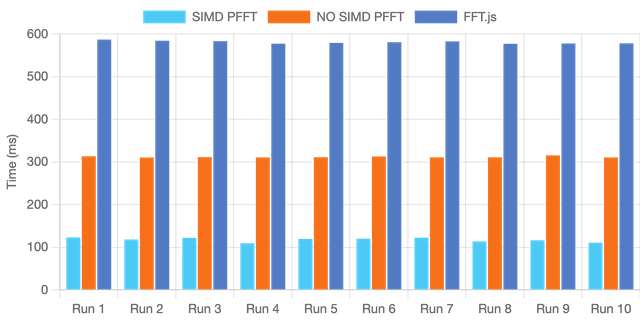
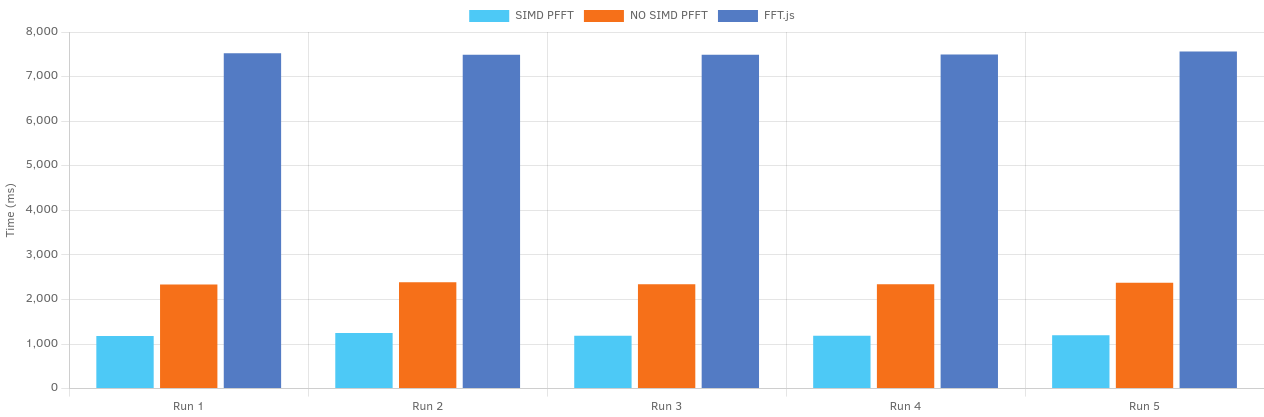
Evidently the SIMD version is much faster but there is no need to take my word for it. Below you can benchmark the SIMD version of pffft.wasm and compare it with the non-SIMD version on your machine. A pure Javascript FFT library called [FFT.js](https://github.com/indutny/fft.js/) serves as a baseline.
When running the same benchmark on Firefox and on Chrome it becomes clear that FFT.js on Chrome is *about twice as fast* thanks to its superior Javascript engine for this workload. The performance of the WebAssembly versions in Chrome and Firefox is nearly identical. Safari unfortunately does not (yet) support SIMD WebAssembly binaries and fails to complete the benchmark.
The source code, the limitations and other info can be found at the [pffft.wasm GitHub repository](https://github.com/JorenSix/pffft.wasm)
Edit: [PulseFFT](https://github.com/AWSM-WASM/PulseFFT) might be of interest as well: a (as far as I can tell non-SIMD) WASM version of KissFFT.

---