---
title: Text to Speech to Speech Recognition - Am I Sitting in a Room?
canonical: https://0110.be/posts/Text_to_Speech_to_Speech_Recognition_-_Am_I_Sitting_in_a_Room%3F
markdown_url: https://0110.be/posts/Text_to_Speech_to_Speech_Recognition_-_Am_I_Sitting_in_a_Room%3F.md
id: 324
published_at: '2012-03-24T00:00:00Z'
updated_at: '2013-12-05T18:19:15Z'
author: Joren
tags:
- name: 0110.be
markdown_url: https://0110.be/tags/0110.be.md
- name: Code
markdown_url: https://0110.be/tags/Code.md
- name: Hackerspace Ghent
markdown_url: https://0110.be/tags/Hackerspace%20Ghent.md
- name: Muziek
markdown_url: https://0110.be/tags/Muziek.md
- name: Poging tot humor
markdown_url: https://0110.be/tags/Poging%20tot%20humor.md
- name: Projecten
markdown_url: https://0110.be/tags/Projecten.md
---
# Text to Speech to Speech Recognition - Am I Sitting in a Room?
This post is about a hack I did for the 2012 [Amsterdam music hack days](http://amsterdam.musichackday.org/2012/index.php?page=Main+page). From the website:
> The Amsterdam Music Hack Day is a full weekend of hacking in which participants will conceptualize, create and present their projects. Music + software + mobile + hardware + art + the web. Anything goes as long as it's music related
The hackathon was organized at the NiMK(Nederlands instituut voor Media Kunst) the 25th and 24th of May. My hack tries to let a phone start a conversation on its own. It does this by speaking a text and listening to the spoken text with speech recognition. The speech recognition introduces all kinds of interesting permutations of the original text. The recognized text is spoken again and so a dreamlike, unique nonsensical discussion starts. It lets you hear what goes on in the mind of the phone.
The idea is based on Alvin Lucier's *I am Sitting in a Room* form 1969 which is embedded below. He used analogue tapes to generate a similar recursive loop. It is a better implementation of [something I did a couple of years ago](http://0110.be/artikels/lees/Text_To_Speech_Recognition).
The implementation is done with Android and its API's. Both speech recognition and text to speech are available on android. Those API's are used and a user interface shows the recognized text. An example of a session can be found below:
To install the application you can download "Tryalogue.apk":\[Tryalogue.apk\] of use the QR-code below. You need Android 2.3 with Voice Recognition and TTS installed. Also needed is an internet connection. "The source":\[Tryalogue.zip\] is also up for grabs.

 This post is about a hack I did for the 2012 [Amsterdam music hack days](http://amsterdam.musichackday.org/2012/index.php?page=Main+page). From the website:
> The Amsterdam Music Hack Day is a full weekend of hacking in which participants will conceptualize, create and present their projects. Music + software + mobile + hardware + art + the web. Anything goes as long as it's music related
The hackathon was organized at the NiMK(Nederlands instituut voor Media Kunst) the 25th and 24th of May. My hack tries to let a phone start a conversation on its own. It does this by speaking a text and listening to the spoken text with speech recognition. The speech recognition introduces all kinds of interesting permutations of the original text. The recognized text is spoken again and so a dreamlike, unique nonsensical discussion starts. It lets you hear what goes on in the mind of the phone.
The idea is based on Alvin Lucier's *I am Sitting in a Room* form 1969 which is embedded below. He used analogue tapes to generate a similar recursive loop. It is a better implementation of [something I did a couple of years ago](http://0110.be/artikels/lees/Text_To_Speech_Recognition).
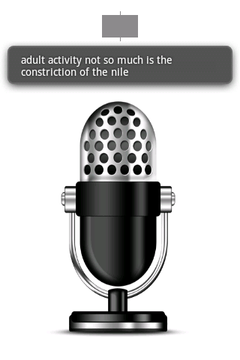
The implementation is done with Android and its API's. Both speech recognition and text to speech are available on android. Those API's are used and a user interface shows the recognized text. An example of a session can be found below:
To install the application you can download "Tryalogue.apk":\[Tryalogue.apk\] of use the QR-code below. You need Android 2.3 with Voice Recognition and TTS installed. Also needed is an internet connection. "The source":\[Tryalogue.zip\] is also up for grabs.
This post is about a hack I did for the 2012 [Amsterdam music hack days](http://amsterdam.musichackday.org/2012/index.php?page=Main+page). From the website:
> The Amsterdam Music Hack Day is a full weekend of hacking in which participants will conceptualize, create and present their projects. Music + software + mobile + hardware + art + the web. Anything goes as long as it's music related
The hackathon was organized at the NiMK(Nederlands instituut voor Media Kunst) the 25th and 24th of May. My hack tries to let a phone start a conversation on its own. It does this by speaking a text and listening to the spoken text with speech recognition. The speech recognition introduces all kinds of interesting permutations of the original text. The recognized text is spoken again and so a dreamlike, unique nonsensical discussion starts. It lets you hear what goes on in the mind of the phone.
The idea is based on Alvin Lucier's *I am Sitting in a Room* form 1969 which is embedded below. He used analogue tapes to generate a similar recursive loop. It is a better implementation of [something I did a couple of years ago](http://0110.be/artikels/lees/Text_To_Speech_Recognition).
The implementation is done with Android and its API's. Both speech recognition and text to speech are available on android. Those API's are used and a user interface shows the recognized text. An example of a session can be found below:
To install the application you can download "Tryalogue.apk":\[Tryalogue.apk\] of use the QR-code below. You need Android 2.3 with Voice Recognition and TTS installed. Also needed is an internet connection. "The source":\[Tryalogue.zip\] is also up for grabs.