---
title: 'The Pidato Experiment: Vibrato on a Digital Piano Using an Arduino'
canonical: https://0110.be/posts/The_Pidato_Experiment%3A_Vibrato_on_a_Digital_Piano_Using_an_Arduino
markdown_url: https://0110.be/posts/The_Pidato_Experiment%3A_Vibrato_on_a_Digital_Piano_Using_an_Arduino.md
id: 410
published_at: '2011-09-21T00:00:00Z'
updated_at: '2023-05-25T07:36:48Z'
author: Joren
tags:
- name: Code
markdown_url: https://0110.be/tags/Code.md
- name: HoGent
markdown_url: https://0110.be/tags/HoGent.md
---
# The Pidato Experiment: Vibrato on a Digital Piano Using an Arduino
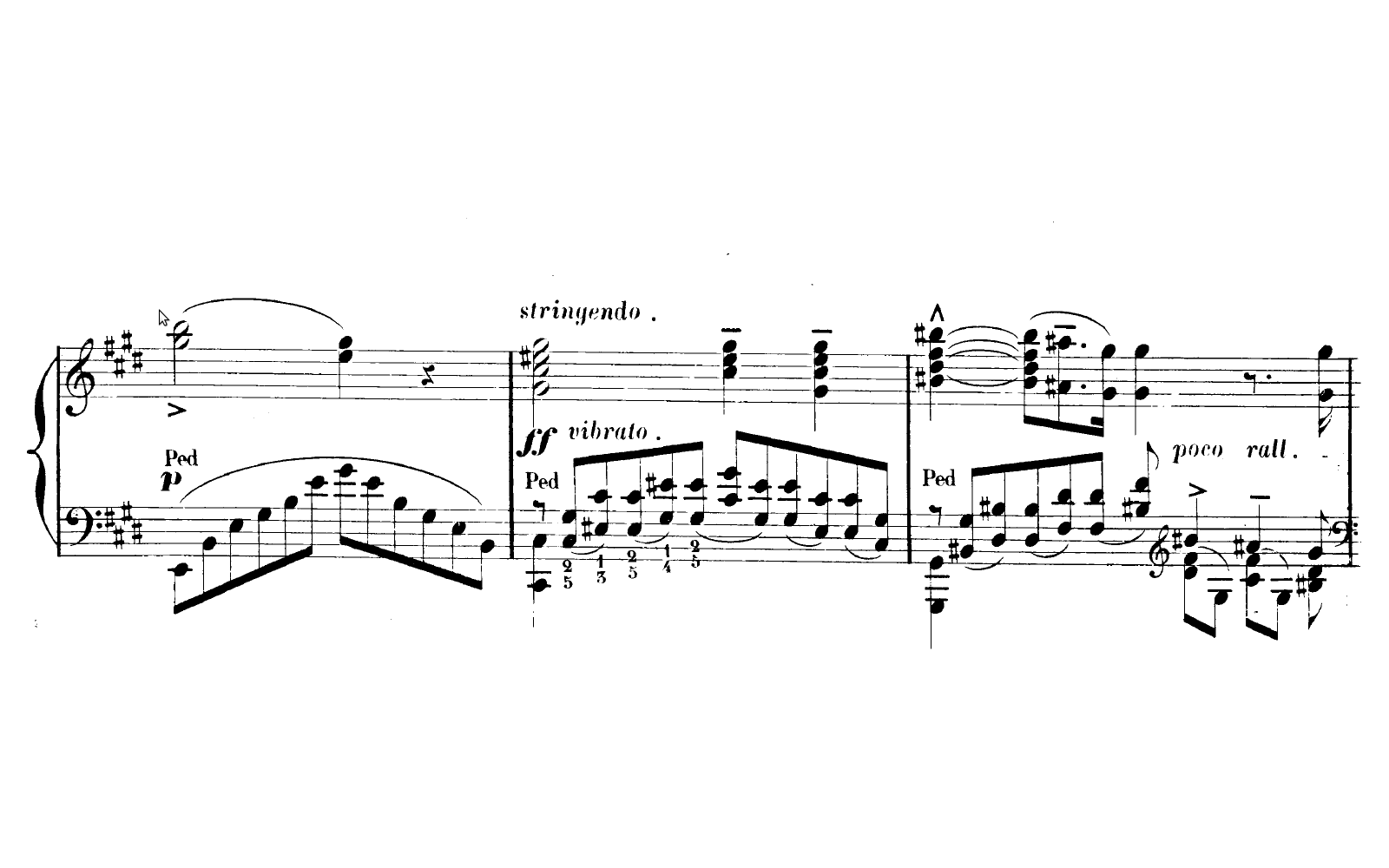
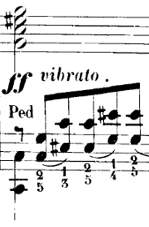
The Pidato experiment demonstrates a rather straightforward method to handle vibrato on a digital piano. It solves the age-old problem on what to do with the enigmatic "vibrato" instructions on some piano solo scores of Franz Liszt. The figure on the right is an exerpt of [*sonetto 104 del Petrarca*](http://imslp.org/wiki/3_Sonetti_del_Petrarca,_S.270_%28Liszt,_Franz%29).
Since there is no way to perform vibrato on an *analogue* piano there are all kinds of different interpretations. Interpretations of the 'vibrato' instruction include: vibrating the pedal, vibrating the key, simply ignoring it, [a vibrato like wiggling with a psychological sounding effect](http://www3.sympatico.ca/norma.barr/library/piano/tone_piano_playing.html), ... A pianist specialized in 19th century music, explains his embodied use of vibrato in a youtube video: [Brian Ganz on piano vibrato](http://www.youtube.com/watch?v=FxwBDZQslzI&feature=related). Those solutions all seem a bit halfhearted, so I created an alternative approach which resulted in the Pidato experiment.
Pidato is a portmanteau of piano and vibrato, the d, a and o hint to the use of an Arduino. Pidato is also Indonesian for speech, expression. To get a feel of what it actually does I created the video below. Please note that this is a *technical demonstration*, not an artistic performance... in any way.
Vid: The Pidato experiment - Vibrato on a Digital Piano using an Arduino.
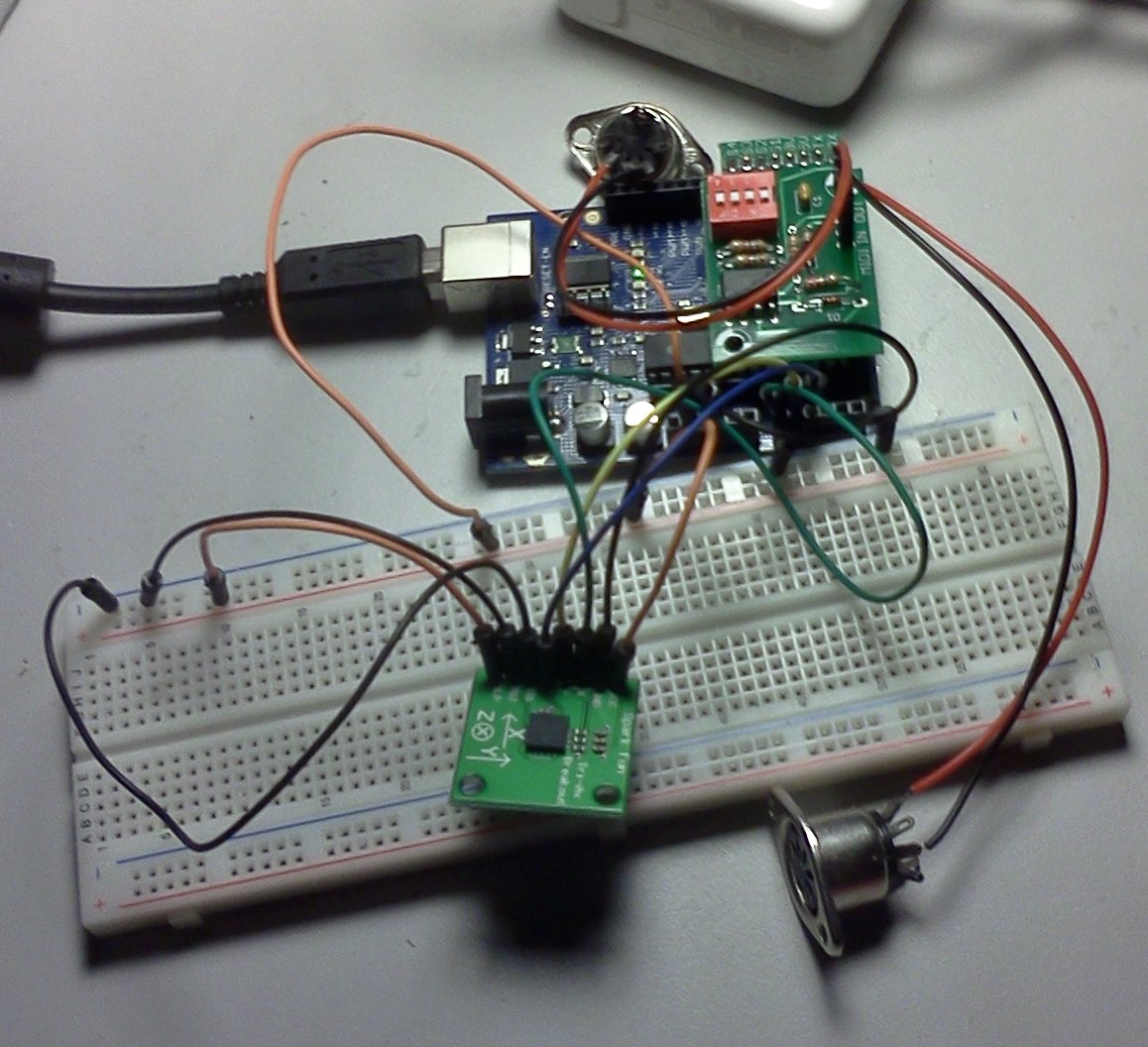
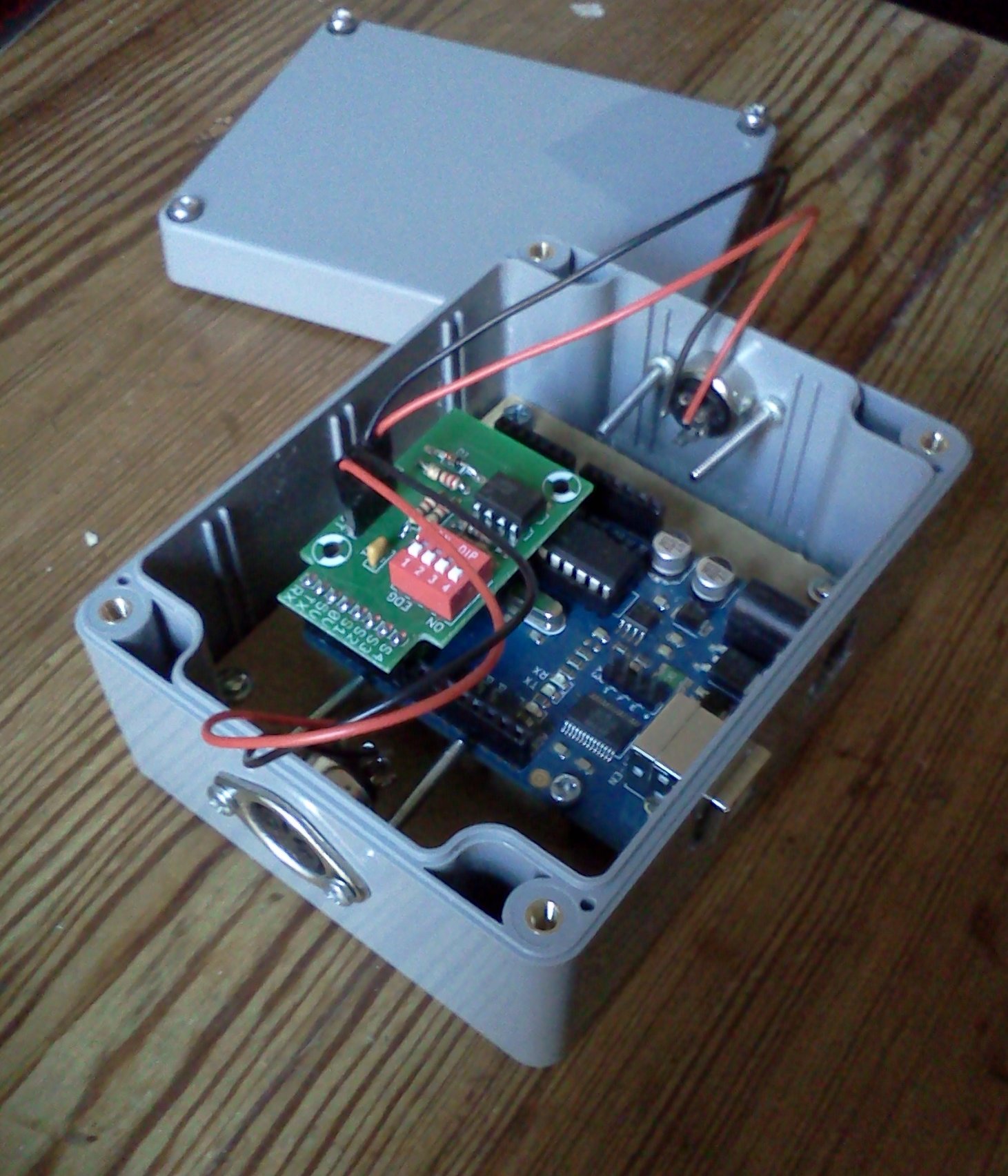
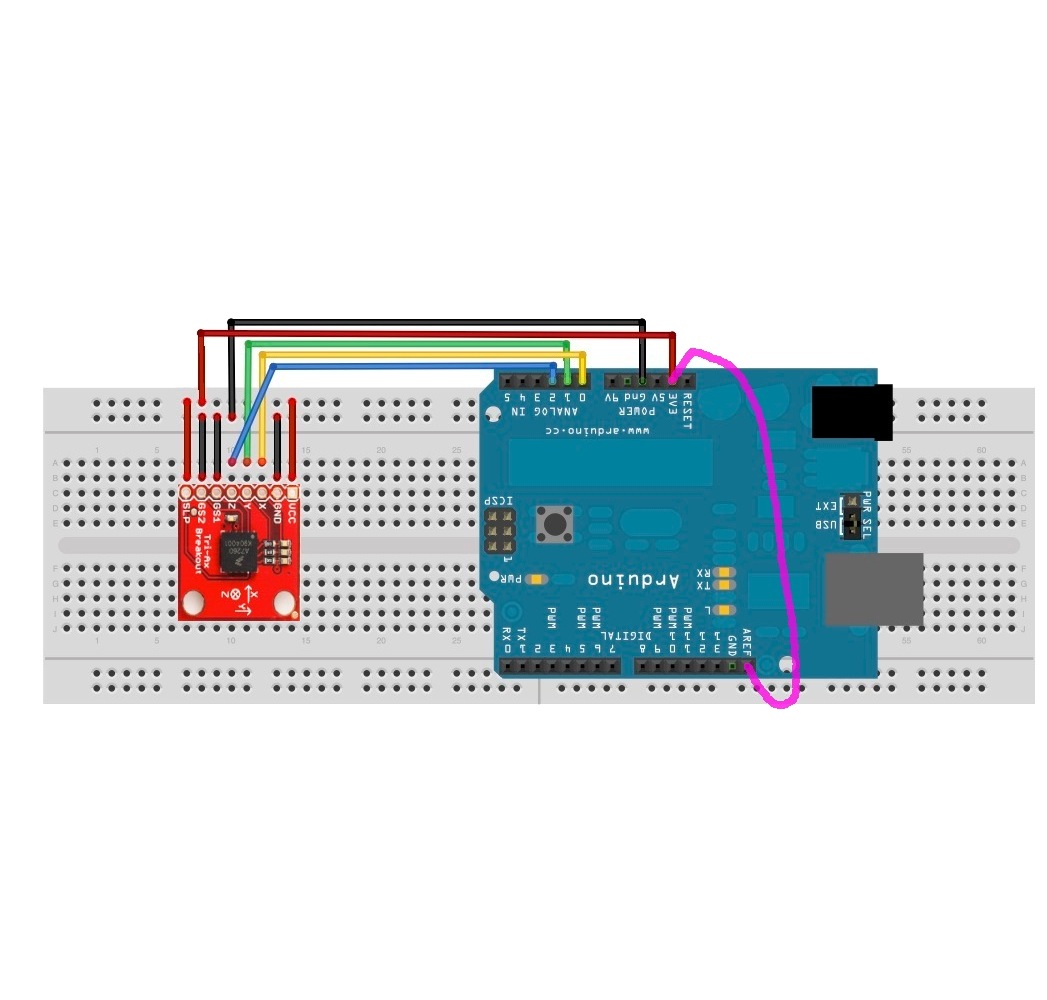
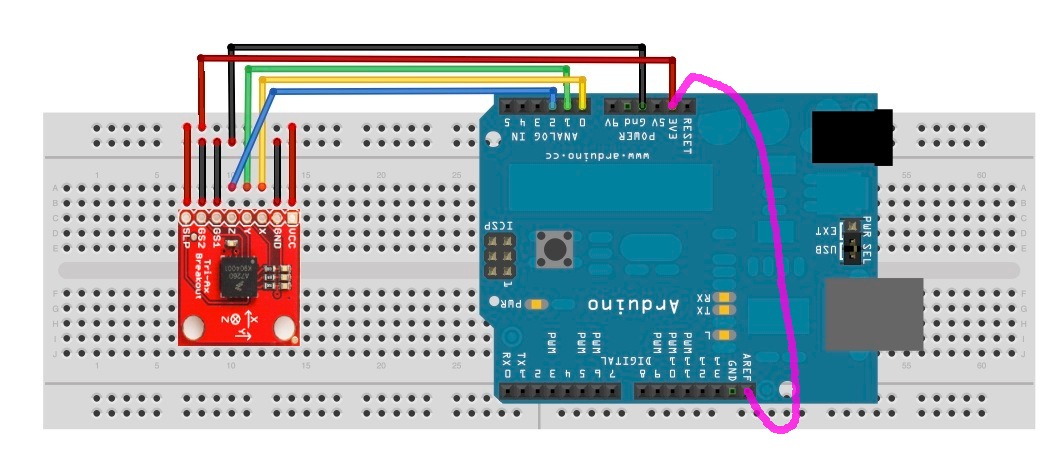
The way it works is by translating movement (accelerometer data) to MIDI messages. The hardware consists of an [Arduino](http://arduino.cc), MIDI-ports and a three axis accelerometer. The MIDI-ports are provided by this [MIDI IN & OUT Arduino shield](http://tomscarff.110mb.com/MIDI_IN_OUT_ARDUINO/midi_in_out_arduino.htm). The accelerometer is a [MMA7260Q](http://www.sparkfun.com/datasheets/Accelerometers/MMA7260Q-Rev1.pdf) from [Sparkfun](http://sparkfun.com). Attaching the MMA7260Q and the arduino is done by following the instructions [here](http://chalmersphyscomp10.wordpress.com/2010/09/17/mma7260q/). One change was made: by attaching the 3.3V output to `AREF` and executing [`analogReference(EXTERNAL);`](http://www.arduino.cc/en/Reference/AnalogReference) fluctuations in power supply cease to have an influence on accelerometer data readings. It is represented by the purple wire in the diagram below.
The software should know when a vibrato like movement is made and how to translate such movement to MIDI messages. The software therefore contains a periodicity estimator and frequency detector to detect how periodic a movement is and how fast the movement is repeated. This was done with the [YIN algorithm](http://audition.ens.fr/adc/pdf/2002_JASA_YIN.pdf) (more commonly used in audio signal analysis). A periodicity threshold was determined experimentally so the system does not yield false positives when playing the piano in the usual way. Another interesting bit of code is the interrupt setup that samples the accelerometer at a fixed sample rate and sends MIDI messages, also at a fixed rate.
MIDI messaging is done over a serial connection. From the Arduino sending a MIDI message is as simple as calling `Serial.print` with the correct data. For the task at hand (sending vibrato) [Pitch Bend messages](http://tomscarff.110mb.com/midi_analyser/pitch_bend.htm) were used. The standard Arduino UNO firmware is replaced with [Arduino MIDI firmware](http://hunt.net.nz/users/darran/weblog/5b7f8/Arduino_UNO_USB_MIDI_firmware.html). This makes the Arduino appear as a standard MIDI device when connected to a computer, which makes interfacing with it practical.
The YIN algorithm is encapsulated in a reusable Arduino library and can be used to detect periodicity and frequency for any signal. [This guy](http://www.youtube.com/watch?v=oGKE1vmAWCA) used his implementation to create a chromatic tuner. The source code for both the [Yin Arduino library](https://github.com/JorenSix/Pidato) and [Pidato experiment](https://github.com/JorenSix/Pidato) can be found on github or "here (zip)":\[Pidato.src.zip\].
The Pidato experiment was done with the help the friendly hackers at [Hackerspace Ghent](http://0x20.be).
This [piano vibrato](http://hackaday.com/2011/04/16/pidato-box-adds-vibrato-effect-to-digital-pianos/) hack was also covered by [hackaday.com](http://hackaday.com) and posted to the [Hackerspace Ghent blog](http://0x20.posterous.com/).
- [Pidato.src.zip](https://0110.be/files/attachments/410/Pidato.src.zip)
- [vibrato\_ff.png](https://0110.be/files/attachments/410/vibrato_ff.png)
- [accelerometer\_wire\_piano\_vibrato.jpg](https://0110.be/files/attachments/410/accelerometer_wire_piano_vibrato.jpg)
- [The\_Pidato\_experiment-Vibrato\_on\_a\_Digital\_Piano\_using\_an\_Arduino.mp4](https://0110.be/files/attachments/410/The_Pidato_experiment-Vibrato_on_a_Digital_Piano_using_an_Arduino.mp4)
- [The\_Pidato\_experiment-Vibrato\_on\_a\_Digital\_Piano\_using\_an\_Arduino.webp](https://0110.be/files/attachments/410/The_Pidato_experiment-Vibrato_on_a_Digital_Piano_using_an_Arduino.webp)
 The Pidato experiment demonstrates a rather straightforward method to handle vibrato on a digital piano. It solves the age-old problem on what to do with the enigmatic "vibrato" instructions on some piano solo scores of Franz Liszt. The figure on the right is an exerpt of [*sonetto 104 del Petrarca*](http://imslp.org/wiki/3_Sonetti_del_Petrarca,_S.270_%28Liszt,_Franz%29).
Since there is no way to perform vibrato on an *analogue* piano there are all kinds of different interpretations. Interpretations of the 'vibrato' instruction include: vibrating the pedal, vibrating the key, simply ignoring it, [a vibrato like wiggling with a psychological sounding effect](http://www3.sympatico.ca/norma.barr/library/piano/tone_piano_playing.html), ... A pianist specialized in 19th century music, explains his embodied use of vibrato in a youtube video: [Brian Ganz on piano vibrato](http://www.youtube.com/watch?v=FxwBDZQslzI&feature=related). Those solutions all seem a bit halfhearted, so I created an alternative approach which resulted in the Pidato experiment.
Pidato is a portmanteau of piano and vibrato, the d, a and o hint to the use of an Arduino. Pidato is also Indonesian for speech, expression. To get a feel of what it actually does I created the video below. Please note that this is a *technical demonstration*, not an artistic performance... in any way.
The Pidato experiment demonstrates a rather straightforward method to handle vibrato on a digital piano. It solves the age-old problem on what to do with the enigmatic "vibrato" instructions on some piano solo scores of Franz Liszt. The figure on the right is an exerpt of [*sonetto 104 del Petrarca*](http://imslp.org/wiki/3_Sonetti_del_Petrarca,_S.270_%28Liszt,_Franz%29).
Since there is no way to perform vibrato on an *analogue* piano there are all kinds of different interpretations. Interpretations of the 'vibrato' instruction include: vibrating the pedal, vibrating the key, simply ignoring it, [a vibrato like wiggling with a psychological sounding effect](http://www3.sympatico.ca/norma.barr/library/piano/tone_piano_playing.html), ... A pianist specialized in 19th century music, explains his embodied use of vibrato in a youtube video: [Brian Ganz on piano vibrato](http://www.youtube.com/watch?v=FxwBDZQslzI&feature=related). Those solutions all seem a bit halfhearted, so I created an alternative approach which resulted in the Pidato experiment.
Pidato is a portmanteau of piano and vibrato, the d, a and o hint to the use of an Arduino. Pidato is also Indonesian for speech, expression. To get a feel of what it actually does I created the video below. Please note that this is a *technical demonstration*, not an artistic performance... in any way.
 The software should know when a vibrato like movement is made and how to translate such movement to MIDI messages. The software therefore contains a periodicity estimator and frequency detector to detect how periodic a movement is and how fast the movement is repeated. This was done with the [YIN algorithm](http://audition.ens.fr/adc/pdf/2002_JASA_YIN.pdf) (more commonly used in audio signal analysis). A periodicity threshold was determined experimentally so the system does not yield false positives when playing the piano in the usual way. Another interesting bit of code is the interrupt setup that samples the accelerometer at a fixed sample rate and sends MIDI messages, also at a fixed rate.
MIDI messaging is done over a serial connection. From the Arduino sending a MIDI message is as simple as calling `Serial.print` with the correct data. For the task at hand (sending vibrato) [Pitch Bend messages](http://tomscarff.110mb.com/midi_analyser/pitch_bend.htm) were used. The standard Arduino UNO firmware is replaced with [Arduino MIDI firmware](http://hunt.net.nz/users/darran/weblog/5b7f8/Arduino_UNO_USB_MIDI_firmware.html). This makes the Arduino appear as a standard MIDI device when connected to a computer, which makes interfacing with it practical.
The YIN algorithm is encapsulated in a reusable Arduino library and can be used to detect periodicity and frequency for any signal. [This guy](http://www.youtube.com/watch?v=oGKE1vmAWCA) used his implementation to create a chromatic tuner. The source code for both the [Yin Arduino library](https://github.com/JorenSix/Pidato) and [Pidato experiment](https://github.com/JorenSix/Pidato) can be found on github or "here (zip)":\[Pidato.src.zip\].
The Pidato experiment was done with the help the friendly hackers at [Hackerspace Ghent](http://0x20.be).
This [piano vibrato](http://hackaday.com/2011/04/16/pidato-box-adds-vibrato-effect-to-digital-pianos/) hack was also covered by [hackaday.com](http://hackaday.com) and posted to the [Hackerspace Ghent blog](http://0x20.posterous.com/).





- [Pidato.src.zip](https://0110.be/files/attachments/410/Pidato.src.zip)
- [vibrato\_ff.png](https://0110.be/files/attachments/410/vibrato_ff.png)
- [accelerometer\_wire\_piano\_vibrato.jpg](https://0110.be/files/attachments/410/accelerometer_wire_piano_vibrato.jpg)
- [The\_Pidato\_experiment-Vibrato\_on\_a\_Digital\_Piano\_using\_an\_Arduino.mp4](https://0110.be/files/attachments/410/The_Pidato_experiment-Vibrato_on_a_Digital_Piano_using_an_Arduino.mp4)
- [The\_Pidato\_experiment-Vibrato\_on\_a\_Digital\_Piano\_using\_an\_Arduino.webp](https://0110.be/files/attachments/410/The_Pidato_experiment-Vibrato_on_a_Digital_Piano_using_an_Arduino.webp)
The software should know when a vibrato like movement is made and how to translate such movement to MIDI messages. The software therefore contains a periodicity estimator and frequency detector to detect how periodic a movement is and how fast the movement is repeated. This was done with the [YIN algorithm](http://audition.ens.fr/adc/pdf/2002_JASA_YIN.pdf) (more commonly used in audio signal analysis). A periodicity threshold was determined experimentally so the system does not yield false positives when playing the piano in the usual way. Another interesting bit of code is the interrupt setup that samples the accelerometer at a fixed sample rate and sends MIDI messages, also at a fixed rate.
MIDI messaging is done over a serial connection. From the Arduino sending a MIDI message is as simple as calling `Serial.print` with the correct data. For the task at hand (sending vibrato) [Pitch Bend messages](http://tomscarff.110mb.com/midi_analyser/pitch_bend.htm) were used. The standard Arduino UNO firmware is replaced with [Arduino MIDI firmware](http://hunt.net.nz/users/darran/weblog/5b7f8/Arduino_UNO_USB_MIDI_firmware.html). This makes the Arduino appear as a standard MIDI device when connected to a computer, which makes interfacing with it practical.
The YIN algorithm is encapsulated in a reusable Arduino library and can be used to detect periodicity and frequency for any signal. [This guy](http://www.youtube.com/watch?v=oGKE1vmAWCA) used his implementation to create a chromatic tuner. The source code for both the [Yin Arduino library](https://github.com/JorenSix/Pidato) and [Pidato experiment](https://github.com/JorenSix/Pidato) can be found on github or "here (zip)":\[Pidato.src.zip\].
The Pidato experiment was done with the help the friendly hackers at [Hackerspace Ghent](http://0x20.be).
This [piano vibrato](http://hackaday.com/2011/04/16/pidato-box-adds-vibrato-effect-to-digital-pianos/) hack was also covered by [hackaday.com](http://hackaday.com) and posted to the [Hackerspace Ghent blog](http://0x20.posterous.com/).





- [Pidato.src.zip](https://0110.be/files/attachments/410/Pidato.src.zip)
- [vibrato\_ff.png](https://0110.be/files/attachments/410/vibrato_ff.png)
- [accelerometer\_wire\_piano\_vibrato.jpg](https://0110.be/files/attachments/410/accelerometer_wire_piano_vibrato.jpg)
- [The\_Pidato\_experiment-Vibrato\_on\_a\_Digital\_Piano\_using\_an\_Arduino.mp4](https://0110.be/files/attachments/410/The_Pidato_experiment-Vibrato_on_a_Digital_Piano_using_an_Arduino.mp4)
- [The\_Pidato\_experiment-Vibrato\_on\_a\_Digital\_Piano\_using\_an\_Arduino.webp](https://0110.be/files/attachments/410/The_Pidato_experiment-Vibrato_on_a_Digital_Piano_using_an_Arduino.webp)