Fig: Advances in Speech and Music Technology book cover.
I have recently published an chapter in an academic book published by Springer. The topic of the book is of interest to me but can be perceived as rather dry: Advances in Speech and Music Technology.
The chapter I co-authored presented two case studies on detecting duplicates in music archives. The fist case study deals with segmentation reuse in an archive of early electronic music. The second with meta-data reuse in an archive of a public broadcaster containing digitized commercial shellac disc recordings with many duplicates.
Duplicate detection being the main topic, I decided to title the article Duplicate Detection for for Digital Audio Archive Management. It is easy to miss, and not much is lost if you do, but there is a duplicate‘for’ in the title. If you did detect the duplicate you have detected the duplicate in the duplicate detection article. Since I have fathered two kids I see it as an hard earned right to make dad-jokes like that. Even in academic writing.
It was surprisingly difficult to get the title published as-is. At every step of the academic publishing process (review, editorial, typesetting, lay-outing) I was asked about it and had to send an email like the one below. Every email and every explanation made my second-guess my sense of humor but I do stand by it.
From: Joren \
To: Editors ASMT \
\
Dear Editors, \
\
I have updated my submission on easychair in...\
\
I would like to keep the title however as is an attempt at word-play. These things tend to have less impact when explained but the article is about duplicate detection and is titled 'Duplicate detection for for digital audio archive management'. The reviewer, attentively, detected the duplicate 'for' but unfortunately failed to see my attempt at humor. To me, it is a rather harmless witticism.
Regards
Joren
</pre>
Anyway, I do think that humor can serve as a gateway to direct attention to rather dry, academic material. Also the message and the form of the message should not be confused. John Oliver, for example, made his whole career on delivering serious sometimes dry messages with heaps of humor: which does not make the topics less serious. I think there are a couple of things to be learned there. Anyway, now that I have your attention, please do read the author version of Duplicate Detection for for Digital Audio Archive Management: Two Case Studies.
TarsosDSP is a Java library for audio processing I have started working on more than 10 years ago. The aim of TarsosDSP is to provide an easy-to-use interface to practical music processing algorithms. Obviously, I have been using it myself over the years as my go-to library for audio-processing in Java. However, a number of gradual changes in the java ecosystem made TarsosDSP more and more difficult to use.
Since I have apparently not been the only one using it, there was a need to give it some attention. During the last couple of weeks I have found the time to give it this much needed attention. This resulted in a number of updates, some of the changes include:
Change of the build system from Apache Ant to Gradle
Make use of Java Modules to make TarsosDSP compatible with the ModulePath introduced in Java 9.
Packaged the software into a maven compatible format, which makes it easy to use as a dependency.
CI with GitHub actions to automatically build and test the software.
Updated some examples shipped with the TarsosDSP. I have still still some examples to verify.
Improved handling of errors on reading audio via ffmpeg
\
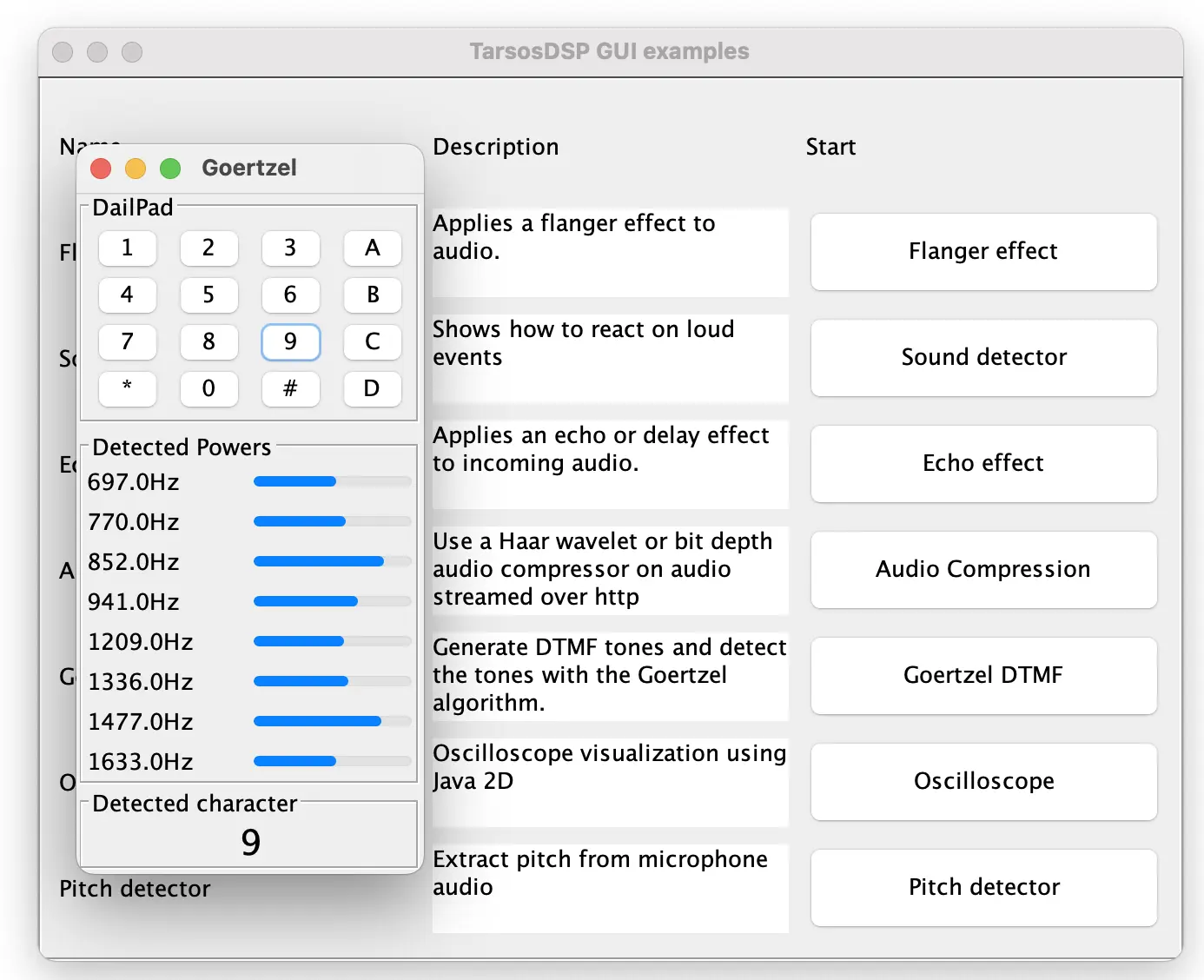
Fig: The updated TarsosDSP release contains many CLI and GUI example applications.
Notably the code of TarsosDSP has not changed much apart from some cosmetic changes. This backwards compatibility is one of the strong points of Java. With this update I am quite confident that TarsosDSP will also be usable during the next decade as well.
This blog has been running on Caddy for the last couple of months. Caddy is a http server with support for reverse proxies and automatic https. The automatic https feature takes care of requesting, installing and updating SSL certificates which means that you need much less configuration settings or maintenance compared with e.g. lighttpd or Nginx. The underlying certmagic ACME client is responsible for requesting these certificates.
Before, it was using lighttpd but the during the last decade the development of lighttpd has stalled. lighttpd version 2 has been in development for 7 years and the bump from 1.4 to 1.5 has been taking even longer. lighttpd started showing its age with limited or no support for modern features like websockets, http/3 and finicky configuration for e.g. https with virtual domains.
Caddy with Ruby on Rails
I really like Caddy’s sensible defaults and the limited lines of configuration needed to get things working. Below you can find e.g. a reusable https enabled configuration for a Ruby on Rails application. This configuration does file caching, compression, http to https redirection and load balancing for two local application servers. It also serves static files directly and only passes non-file requests to the application servers.
If you are self-hosting I think Caddy is a great match in all but the most exotic or demanding setups. I definitely am kicking myself for not checking out caddy sooner: it could have saved me countless hours installing and maintaining https certs or configuring lighttpd in general.
JNI is a way to use C or C code from Java and allows developers to reuse and integrate C/C in Java software. In contrast to the Java code, C/C code is platform dependent and needs to be compiled for each platform/architecture. Also it is generally not a good idea to make users compile a C/C library: it is best provide precompiled libraries. As a developer it is, however, a pain to provide binaries for each platform.
With the dominance of x86 processors receding the problem of having to compile software for many platforms is becoming more pressing. It is not unthinkable to want to support, for example, intel and M1 macOS, ARM and x86_64 Linux and Windows. To support these platforms you would either need access to such a machine with a compiler or configure a cross-compiler for each system: both are unpractical. Typically setting up a cross-compiler can be time consuming and finicky and virtual machines can be tough to setup. There is however an alternative.
Zig is a programming language but, thanks to its support for C/C, it also ships with an easy-to-use cross-compiler which is of interest here even if you have no intention to write a single line of Zig code. The built-in cross-compiler allows to target many platforms easily.
Cross compilation of C code is possible by simply replacing the gcc command with zig cc and adding a target argument, e.g. for targeting a Windows. There is more general information on zig as a cross-compiler here.
Cross-compiling a JNI library is not different to compiling other libraries. To make things concrete we will cross-compile a library from a typical JNI project: JGaborator packs the C/C library gaborator. In this case the C/C code does a computationally intensive spectral transformation of time domain data. The commands below create an x86_64 Windows DLL from a macOS with zig installed:
{style="overflow-x:scroll"}
<code>
bash
#wget https://aka.ms/download-jdk/microsoft-jdk-17.0.5-windows-x64.zip#unzip microsoft-jdk-17.0.5-windows-x64.zip#export JAVA_HOME=`pwd`/jdk-17.0.5+8/
git clone --depth 1https://github.com/JorenSix/JGaborator
cd JGaborator/gaborator
echo $JAVA_HOMEJNI_INCLUDES=-I"$JAVA_HOME/include"\ -I"$JAVA_HOME/include/win32"
zig cc -target x86_64-windows-gnu -c -O3 -ffast-math -fPIC pffft/pffft.c -o pffft/pffft.o
zig cc -target x86_64-windows-gnu -c -O3 -ffast-math -fPIC -DFFTPACK_DOUBLE_PRECISION pffft/fftpack.c -o pffft/fftpack.o
zig c++ -target x86_64-windows-gnu -I"pffft" -I"gaborator-1.7"$JNI_INCLUDES -O3\
-ffast-math -DGABORATOR_USE_PFFFT -o jgaborator.dll jgaborator.cc pffft/pffft.o pffft/fftpack.o
file jgaborator.dll
# jgaborator.dll: PE32+ executable (console) x86-64, for MS Windows
</code>
Note that, when cross-compiling from macOS, to target Windows a Windows JDK is needed. The windows JDK has other header files like jni.h. Some commands to download and use the JDK are commented out in the example above. Also note that targeting Linux from macOS seems to work with the standard macOS JDK. This is probably due to shared conventions regarding compilation of libraries.
To target other platforms, e.g. ARM Linux, there are only two things that need to be changed: the -target switch should be changed to aarch64-linux-gnu and the name of the output library should be (by Linux convention) changed to libjgaborator.so. During the build step of JGaborator a list of target platforms it iterated and a total of 9 builds are packaged into a single Jar file. There is also a bit of supporting code to load the correct version of the library.
Using a GitHub action or similar CI tools this cross compilation with zig can be automated to run on a software release. For Github the Setup Zig action is practical.
Loading the correct library
In a first attempt I tried to detect the operating system and architecture of the environment to then load the library but eventually decided against this approach. Mainly because you then need to keep an exhaustive list of supporting platforms and this is difficult, error prone and decidedly not future-proof.
In my second attempt I simply try to load each precompiled library limited to the sensible ones - only dll’s on windows - until a matching one is loaded. The rationale here is that the system itself knows best which library works and failing to load a library is computationally cheap. There is some code to iterate all precompiled libraries in a JAR-file so supporting an additional platform amounts to adding a precompiled library in the JAR folder: there is no need to be explicit in the Java code about architectures or OSes.
Trying multiple libraries has an additional advantage: this allows to ship multiple versions targeting the same architecture: e.g. one with additional acceleration libraries enabled and one without. By sorting the libraries alphabetically the first, then, should be the one with acceleration and the fallback without. In the case of JGaborator for mac aarch64 there is one compiled with -framework Accelerate and one compiled by the Zig cross-compiler without.
Takehome messages
If you find yourself cross-compiling C or C for many platforms, consider the Zig cross-compiler. Even when you have no intention to write a single line of Zig code.
For JNI and Java the JGaborator source code might offer some inspiration to pre-compile and load libraries for many platforms with little effort.
CI tools can help to verify builds and automate Zig cross-compilation.
If you build for Windows make sure to include windows header-files even when there are no compilation errors using UNIX-header files.
\
\
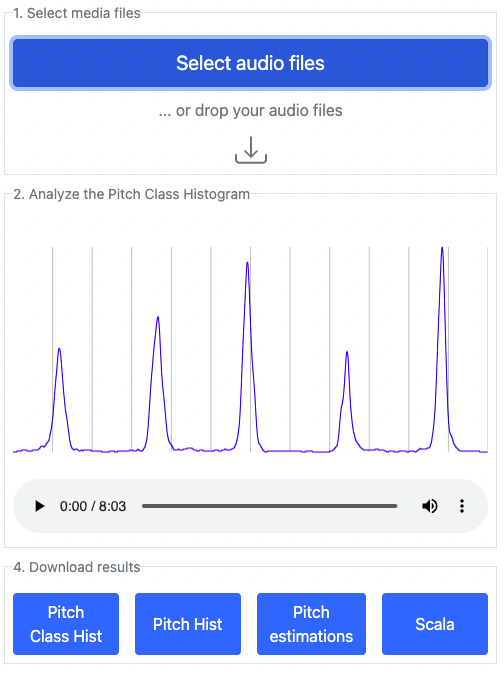
Fig: Screenshot of *Emotopa*: a browser based tool to extract pitch organization from audio.
A couple of days ago I participated in the Music Hack Day - India. The event was organized the 10th and 11th of December in Bangaluru, India. During the event a representative of Smule suggested a task to evaluate the performance of karaoke-singers in terms of intonation. The idea was to employ pitch histogram like features to estimate pitch use of singers.
I offered to build a browser based application to extract pitch histograms from audio. At the end of the hack day I presented the first release of Emotopa with some limited functionality:
Next, a pitch detector runs on the audio and returns a list of pitch estimates.
Finally a histogram (technically a kernel density estimate) is constructed using the pitch estimates.
The user can export the pitch histogram, the pitch class histogram and the pitch annotations. These features successfully show the intonation quality of singers but the applications are much broader. Some potential applications have been described in (amongst others) the Tarsos article.
The Emotopa name alludes to the Apotome browser based app where, starting from a scale you can make music. With Emotopa you do the reverse. Also very much of interest are Leimma and the rationale behind both Apotome and Leimma
This year the ISMIR 2022 conference is organized from 4 to 9 December 2022 in Bengaluru, India. ISMIR is the main music technology and music information retrieval (MIR) conference. It is a relief to experience a conference in physical form and not through a screen.
I have contributed to the following work which is in the main paper track of ISMIR 2022:
BAF: An Audio Fingerprinting Dataset For Broadcast Monitoring (version of record)\
Guillem Cortès, Alex Ciurana, Emilio Molina, Marius Miron, Owen Meyers, Joren Six, Xavier Serra\
Abstract: Audio Fingerprinting (AFP) is a well-studied problem in music information retrieval for various use-cases e.g. content-based copy detection, DJ-set monitoring, and music excerpt identification. However, AFP for continuous broadcast monitoring (e.g. for TV & Radio), where music is often in the background, has not received much attention despite its importance to the music industry. In this paper (1) we present BAF, the first public dataset for music monitoring in broadcast. It contains 74 hours of production music from Epidemic Sound and 57 hours of TV audio recordings. Furthermore, BAF provides cross-annotations with exact matching timestamps between Epidemic tracks and TV recordings. Approximately, 80% of the total annotated time is background music. (2) We benchmark BAF with public state-of-the-art AFP systems, together with our proposed baseline PeakFP: a simple, non-scalable AFP algorithm based on spectral peak matching. In this benchmark, none of the algorithms obtain a F1-score above 47%, pointing out that further research is needed to reach the AFP performance levels in other studied use cases. The dataset, baseline, and benchmark framework are open and available for research.
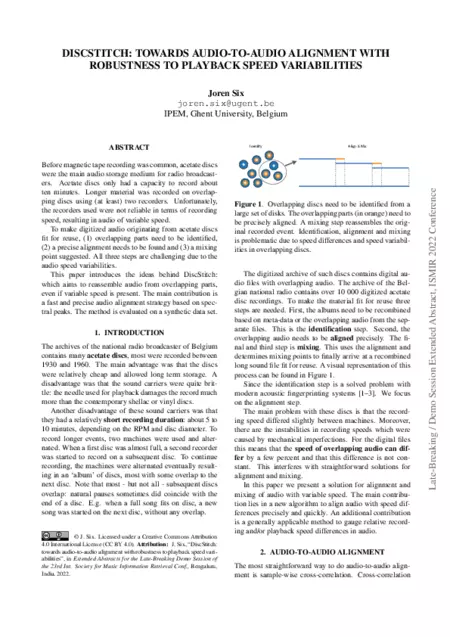
I have also presented a first version of DiscStitch, an audio-to-audio alignment algorithm. This contribution is in the ISMIR 2022 late breaking demo session:
DiscStitch: towards audio-to-audio alignment with robustness to playback speed variabilities (version of record)\
Joren Six\
Abstract: Before magnetic tape recording was common, acetate discs were the main audio storage medium for radio broadcasters. Acetate discs only had a capacity to record about ten minutes. Longer material was recorded on overlapping discs using (at least) two recorders. Unfortunately, the recorders used were not reliable in terms of recording speed, resulting in audio of variable speed. To make digitized audio originating from acetate discs fit for reuse, (1) overlapping parts need to be identified, (2) a precise alignment needs to be found and (3) a mixing point suggested. All three steps are challenging due to the audio speed variabilities. This paper introduces the ideas behind DiscStitch: which aims to reassemble audio from overlapping parts, even if variable speed is present. The main contribution is a fast and precise audio alignment strategy based on spectral peaks. The method is evaluated on a synthetic data set.
Next to my own contributions, the ISMIR conference program is the best overview of the state-of-the art of MIR.
This contribution was made possible thanks to travel funds by the FWO travel grant K1D2222N and the Ghent University BOF funded project PaPiOM.
The research output tracking system of Ghent University (biblio) and Flanders FWO’s academic profile are not built to track software as research output. The focus is still solely on papers, even when custom developed research software has become a fundamental aspect in many research areas. My role is somewhere between that of a ‘pure’ researcher and that of a research software engineer which makes this focus on papers quite relevant to me.
The paper aims to make the recent development on Panako‘count’. Thanks to the JOSS review process the Panako software was improved considerably: CI, unit tests, documentation, containerization,… The paper was a good reason to improve on all these areas which are all too easy to neglect. The paper itself is a short, rather general overview of Panako:
“Panako solves the problem of finding short audio fragments in large digital audio archives. The content based audio search algorithm implemented in Panako is able to identify a short audio query in a large database of thousands of hours of audio using an acoustic fingerprinting technique.”
I have been lucky to have been involved in an interdisciplinary research project around the low impact runner: a music based bio-feedback system to reduce tibial shock in over-ground running. In the beginning of October 2022 the PhD defence of Rud Derie takes place so it is a good moment to look back to this collaboration between several branches of Ghent University: IPEM , movement and sports science and IDLab.
The idea behind the project was to first select runners with a high foot-fall impact. Then an intervention would slightly nudge these runner to a running style with lower impact. A lower repetitive impact is expected to reduce the chance on injuries common for runners. A system was invented in which musical bio-feedback was given on the measured impact. The schema to the right shows the concept.
I was involved in development of the first hardware prototypes which measured acceleration on the legs of the runner and the development of software to receive and handle these measurement on a tablet strapped to a backpack the runner was wearing. This software also logged measurements, had real-time visualisation capabilities and allowed remote control and monitoring over the network. Finally measurements were send to a Max/MSP sonification engine. These prototypes of software and hardware were replaced during a valorization project but some parts of the software ended up in the final Android application.
Video: the left screen shows the indoor positioning system via UWB (ultra-wide-band) and the right screen shows the music feedback system and the real time monitoring of impact of the runner. Video by Pieter Van den Berghe
Over time the first wired sensors were replaced with wireless Bluetooth versions. This made the sensors easy to use and also to visualize sensor values in the browser thanks to the Web Bluetooth API. I have experimented with this and made two demos: a low impact runner visualizer and one with the conceptual schema.
Vid: Visualizing the Bluetooth Low Impact Runner sensor in the browser.
The following three studies shows a part of the trajectory of the project. The first paper is a validation of the measurement system. Secondly a proof-of-concept study is done which finally greenlights a larger scale intervention study.
Van den Berghe, P., Six, J., Gerlo, J., Leman, M., & De Clercq, D. (2019). Validity and reliability of peak tibial accelerations as real-time measure of impact loading during over-ground rearfoot running at different speeds. Journal of Biomechanics, 86, 238-242.
Van den Berghe, P., Lorenzoni, V., Derie, R., Six, J., Gerlo, J., Leman, M., & De Clercq, D. (2021). Music-based biofeedback to reduce tibial shock in over-ground running: A proof-of-concept study. Scientific reports, 11(1), 1-12.
Van den Berghe, P., Derie, R., Bauwens, P., Gerlo, J., Segers, V., Leman, M., & De Clercq, D. (2022). Reducing the peak tibial acceleration of running by music‐based biofeedback: A quasi‐randomized controlled trial. Scandinavian Journal of Medicine & Science in Sports
There are quite a number of other papers but I was less involved in those. The project also resulted in two PhD’s:
Motor retraining by real-time sonic feedback: understanding strategies of low impact running (2021) by Pieter Van den Berghe
Running on good vibes: music induced running-style adaptations for lower impact running (2022) by Rud Derie
I am also recognized as co-inventor on the low impact runner system patent and there are concrete plans for a commercial spin-off. To be continued…
I have created a web application to LTC.wasm decodes SMPTE timecodes from an LTC encoded audio signal.
To synchronize multiple music and video recordings a shared SMPTE timecode signal is often used. For practical purposes the timecode signal is encoded in an audio stream. The timecode can then be recorded in sync with microphone inputs or added to a video recording. The timecode is encoded in audio with LTC, linear timecode. A special decoder is needed to extract SMPTE timecode from the audio. This is exactly what the LTC.wasm application does.
Using the [web based SMTE decoder](https://0110.be/attachment/cors/ltc.wasm/ltc_decoder.html
Try out the SMPTE decoder with your own SMPTE files.
The advantage of the web-based version versus the command line ltc-tools is that it does not need to be installed separately and that ffmpeg decodes audio. This means that almost any multimedia format is supported automatically. The command line version only supports a limited number of audio formats.
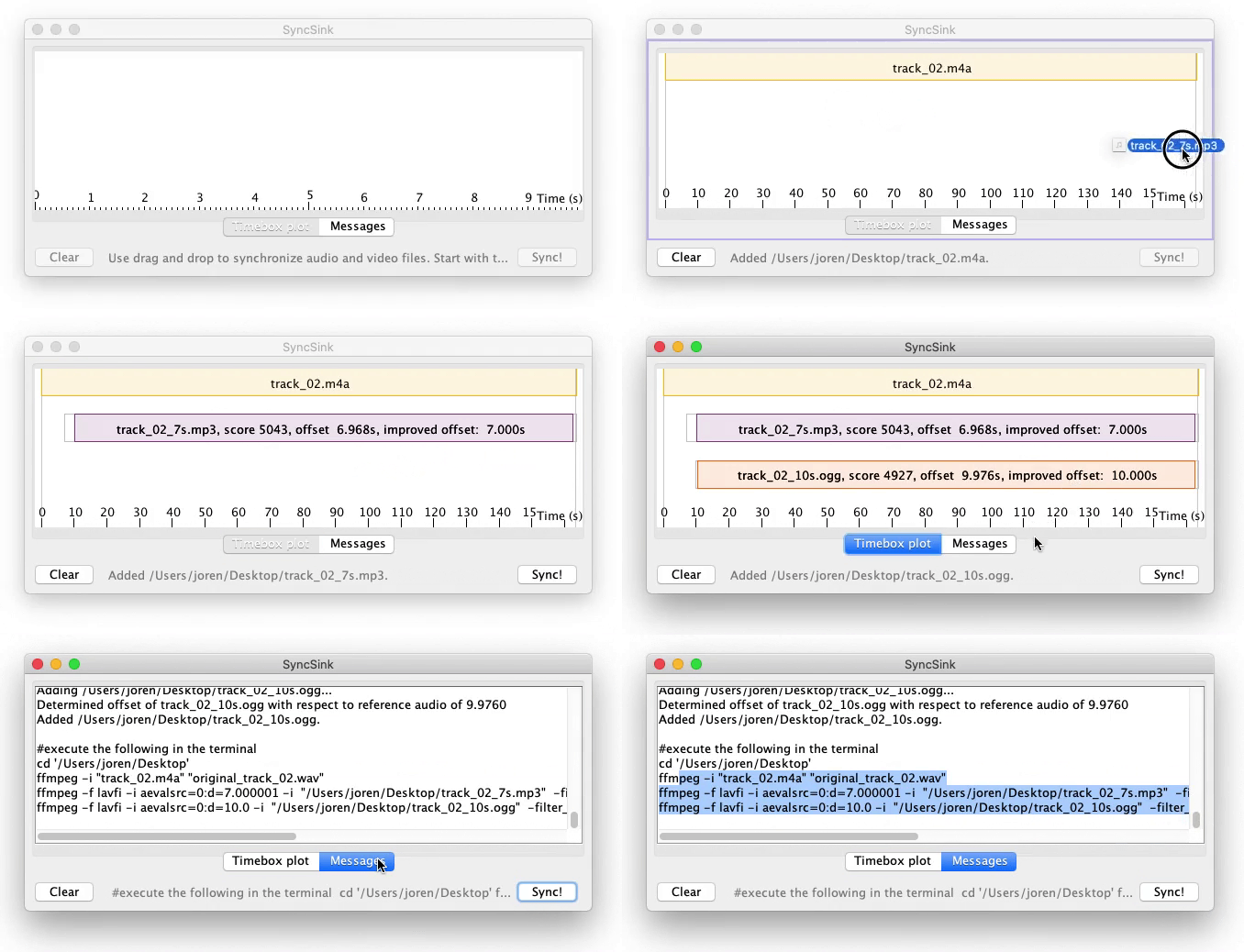
I have built a tool for audio-to-audio alignment. It has applications for synchronization of media files. It works in the browser and you can synchronize your media files here with SyncSink.wasm. SyncSink.wasm does the following:
From an incoming media-file audio is extracted, downmixed to mono and and resampled. This is done with ffmpeg.audio.wasm a wasm version of ffmpeg.
For each audio track, fingerprints are extracted. These fingerprints reduce the the search space for alignment drastically.
Each list of fingerprints is aligned with the list of fingerprints from the reference. Resulting in a rough alignment
Cross correlation is done to refine the alignment resulting in sample accurate results.
Fig: media synchronization with audio-to-audio alignment.
It supports small time-scale adjustments of around 5%: audio alignment can still be found if audio speed differs a bit.
Some potential use cases where it might be of use:
To stitch partially overlapping audio recordings together resulting in a single long audio recording.
To synchronize multiple independent video recordings of the same event each with an audio recording of the environment.
To align a high quality microphone recording with video/low-quality audio recording of the same event. The low quality audio recorded with a camera can then be replaced with the high quality microphone audio.
Fig: stable diffusion imagining a networked music performance
This post describes how to send audio over a network using the ffmpeg suite. Ffmpeg is the Swiss army knife for working with audio and video formats. It is a command line tool that supports almost all audio formats known to man and woman. ffmpeg also supports streaming media over networks.
Here, we want to send audio recorded by a microphone, over a network to a single receiver on the other end. We are not aiming for low latency. Also the audio is going only in a single direction. This can be of interest for, for example, a networked music performance. Note that ffmpeg needs to be installed on your system.
The receiver - Alice
For the receiver we use ffplay, which is part of the ffmpeg tools. The command instructs the receiver to listen to TCP connections on a randomly chosen port 12345. The \?listen is important since this keeps the program waiting for new connections. For streaming media over a network the stateless UDP protocol is often used. When UDP packets go missing they are simply dropped. If only a few packets are dropped this does not cause much harm for the audio quality. For TCP missing packets are resent which can cause delays and stuttering of audio. However, TCP is much more easy to tunnel and the stuttering can be compensated with a buffer. Using TCP it is also immediately clear if a connection can be made. With UDP packets are happily sent straight to the void and you need to resort to wiresniffing to know whether packets actually arrive.
In this example we use MPEGTS over a plain TCP socket connection. Alteratively RTMP could be used (which also works over TCP). RTP , however is usually delivered over UDP.
The shorthand address 0.0.0.0 is used to bind the port to all available interfaces. Make sure that you are listening to the correct interface if you change the IP address.
The sender - Björn
Björn, aka Bob, sends the audio. First we need to know from which microphone to use. To that end there is a way to list audio devices. In this example the macOS avfoundation system is used. For other operating systems there are similar provisions.
ffmpeg -f avfoundation -list_devices true -i ""
Once the index of the device is determined the command below sends incoming audio to the receiver (which should already be listening on the other end). The audio format used here is MP3 which can be safely encapsulated into mpegts.
Note that the IP address 192.168.x.x needs to be changed to the address of the receiver. Now if both devices are on the same network the incoming audio from Bob should arrive at the side of Alice.
The tunnel
If sender and receiver are not on the same network it might be needed to do Network Addres Translation (NAT) and port forwarding. Alternatively an ssh tunnel can be used to forward local tcp connections to a remote location. So on the sender the following command would send the incoming audio to a local port:
The connection to the receiver can be made using a local port forwarding tunnel. With ssh the TCP traffic on port 12345 is forwarded to the remote receiver via an intermediary (remote) host using the following command:
LMDB is a fast key value store, ideal to store and query sorted data with small keys and values. LMDB is a pure C library but often used from other programming languages via some type of bindings. These bindings are ‘bridges’ between languages and are automatically present on supported platform. On new or unsupported platforms, however, you need to build a this bridge yourself.
This blog post is about getting java-lmdb working on such unsupported platform: arm64. The arm64 platform is much more popular since the introduction of the Apple silicon - M1 platform. On Apple M1 the default architecture of Docker images is also aarch64.
Next you need to build the lmdb library for your platform and copy it to a location where Java looks for it. This only works when compilers are already available on your system. In macOS you might need to install the XCode command line tools:
#xcode-select --install
git clone --depth 1 https://git.openldap.org/openldap/openldap.git
cd openldap/libraries/liblmdb
make -e SOEXT=.dylib
cp  liblmdb.dylib ~/Library/Java/Extensions
On Debian aarch64 the procedure is similar but a different extension is used (.so):
#apt install build-essential
git clone --depth 1 https://git.openldap.org/openldap/openldap.git
cd openldap/libraries/liblmdb
make
mv liblmdb.so /lib
Finally, to use the library in a JAR-file is might be needed to allow lmdbjava to access some parts of the JRE:
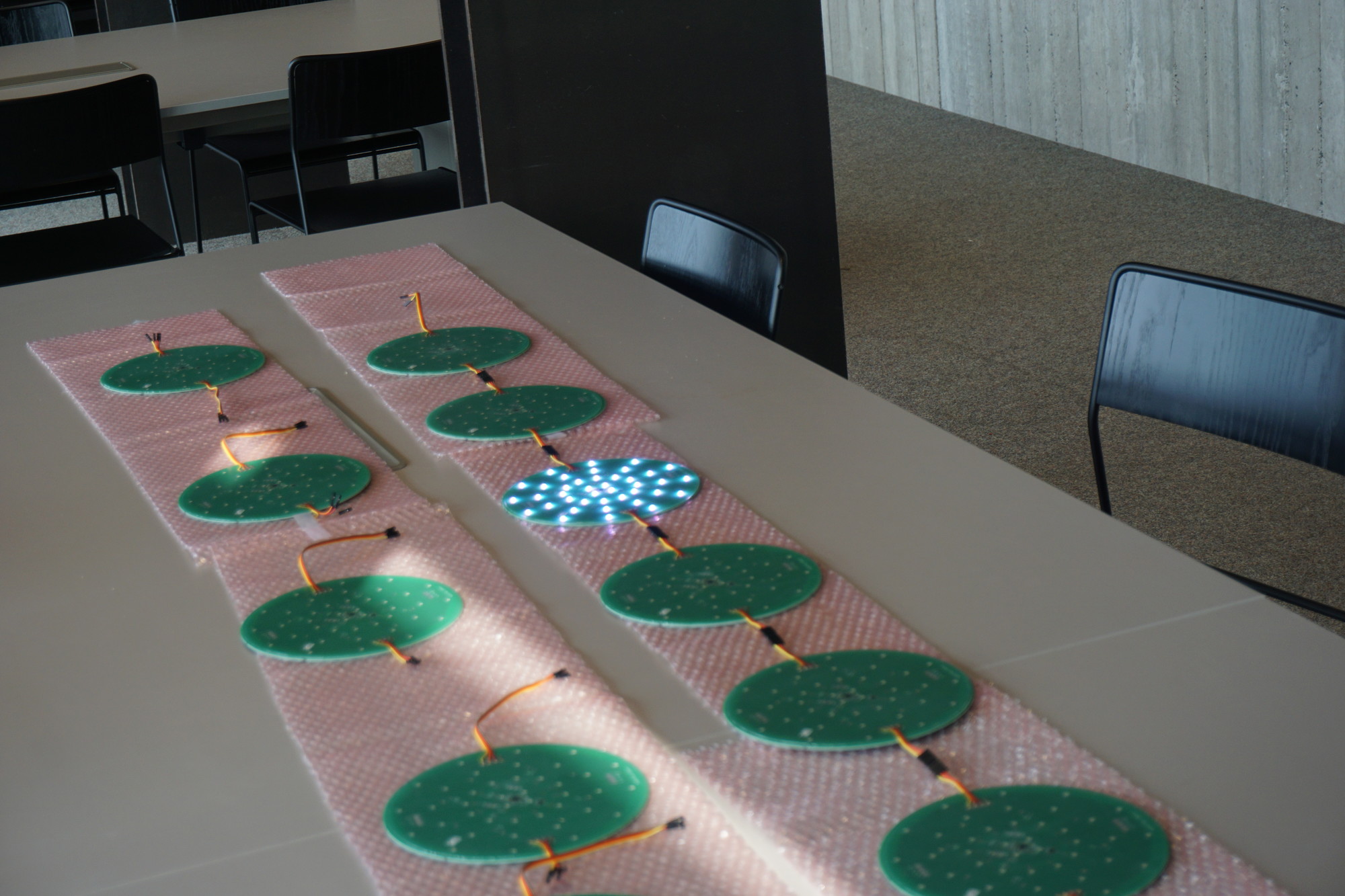
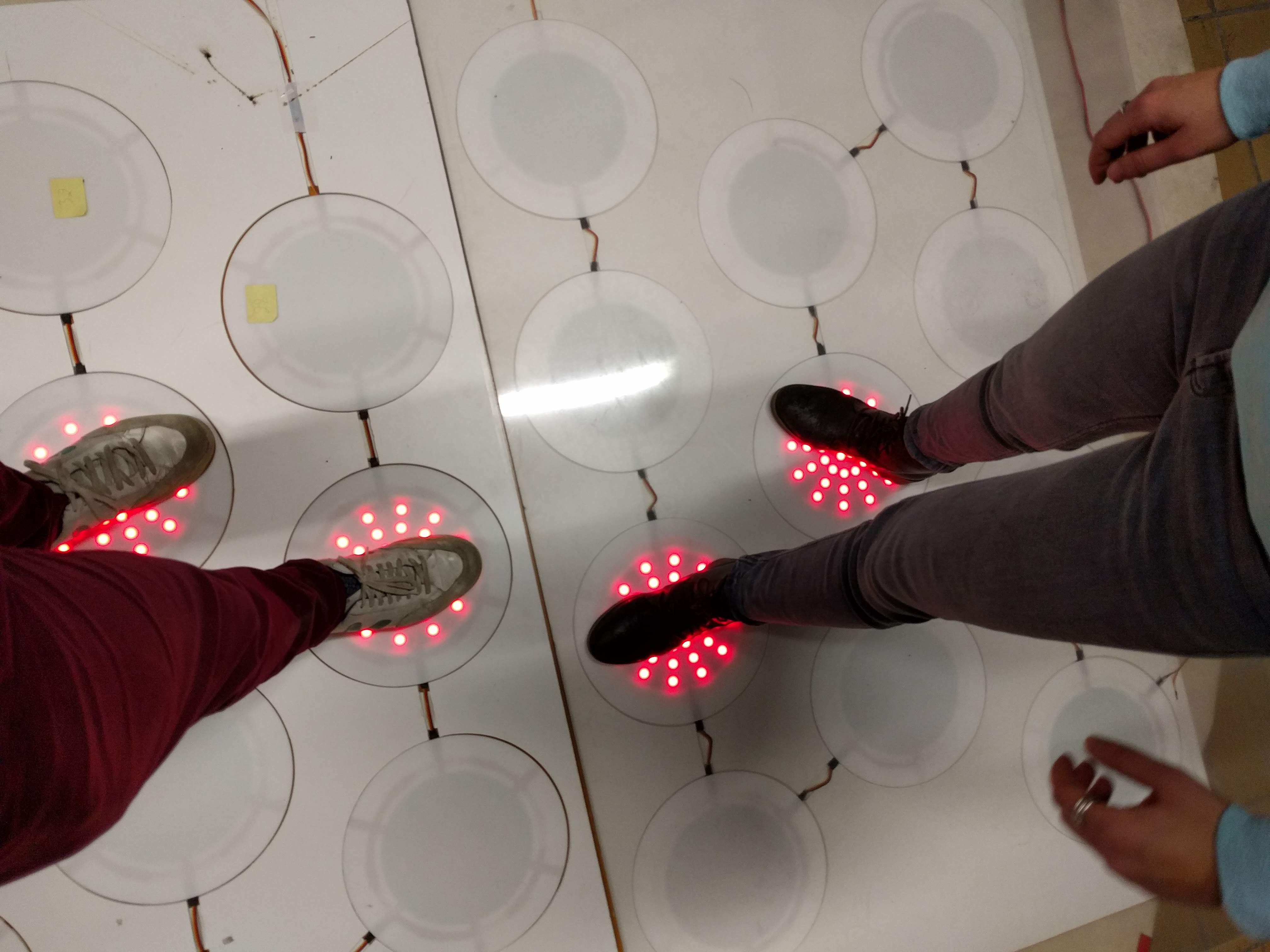
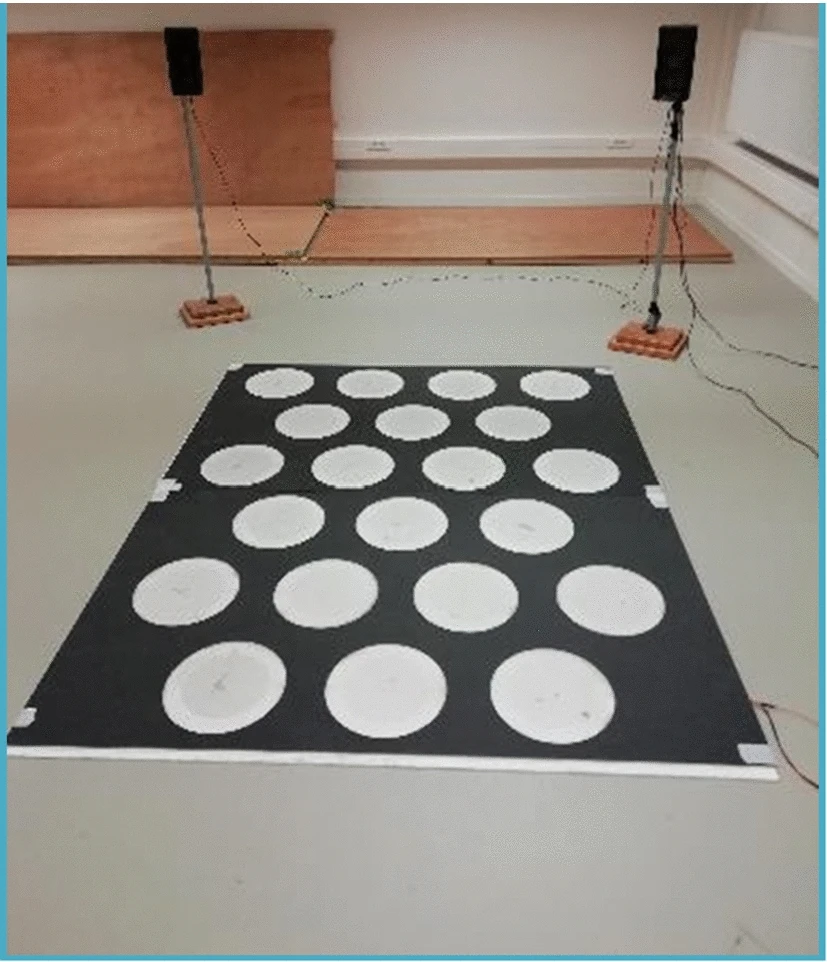
I have been lucky to be part of a fruitful interdisciplinary scientific collaboration around AMPEL: ‘The Augmented Movement Platform For Embodied Learning’. The recent publication of an article is an ideal occasion to give a glimpse behind the scenes.
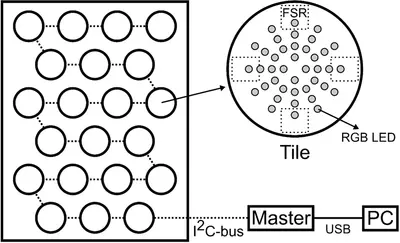
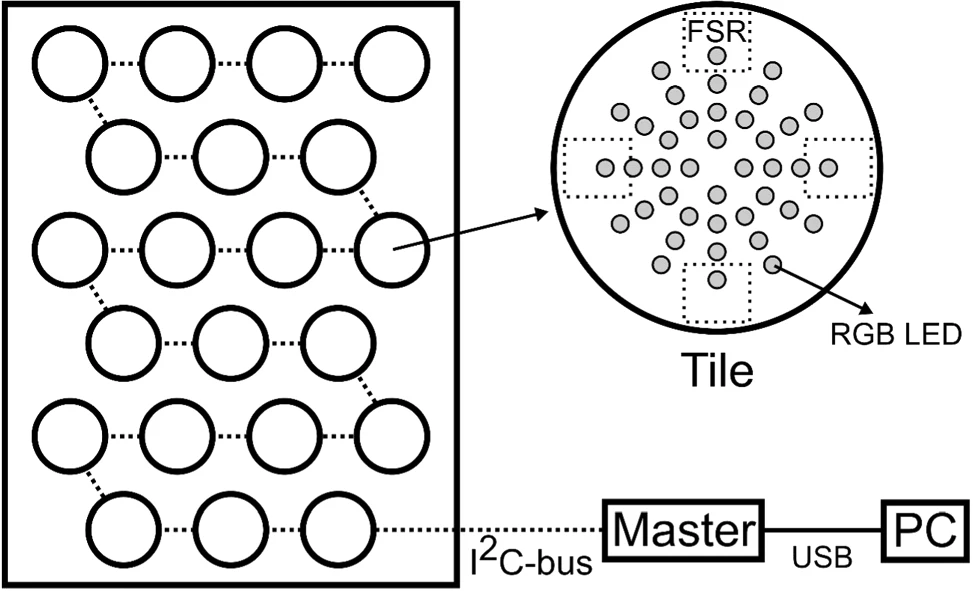
Fig: Schematic representation of AMPEL, a floor with interactive tiles.
Around 2016 the idea arose to search for new potential rehabilitation approaches for persons with multiple sclerosis. Multiple sclerosis causes problems, in varying degrees, with both motor and cognitive function. Common rehabilitation approaches either work on motor or cognitive function. The idea (by Lousin Moumdjian, Marc Leman, Peter Feys) was to combine both motor and cognitive rehabilitation in a single combined ‘embodied learning’ paradigm.
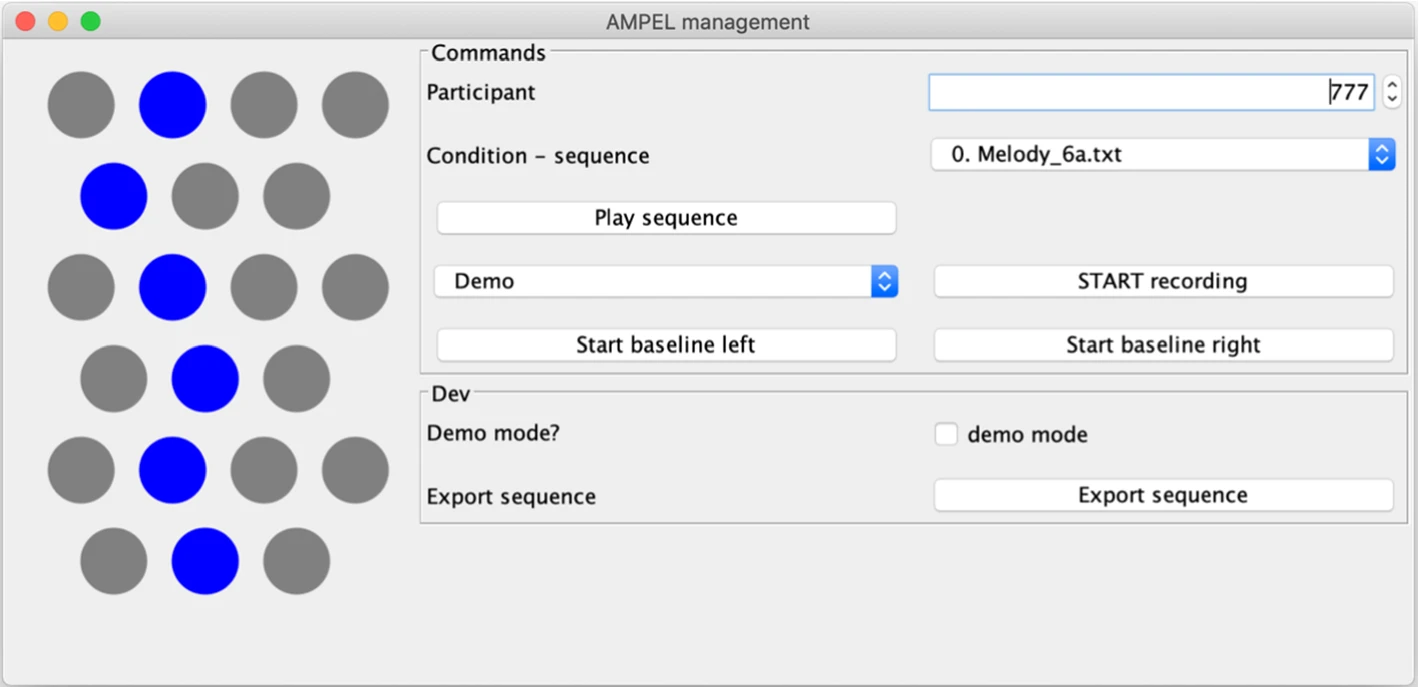
After some discussion we wanted to perform a combined short-term memory and walking task. First the participants would be presented with a target trajectory which would then be performed by walking. During walking we would modulate feedback types (melodic, sounds or visual). To this end, an ‘intelligent floor’ device was needed that was able to present a target trajectory, register a performed trajectory and provide several types of feedback. After a search for off-the-shelf solutions it became clear that a custom hard-and-software platform was required.
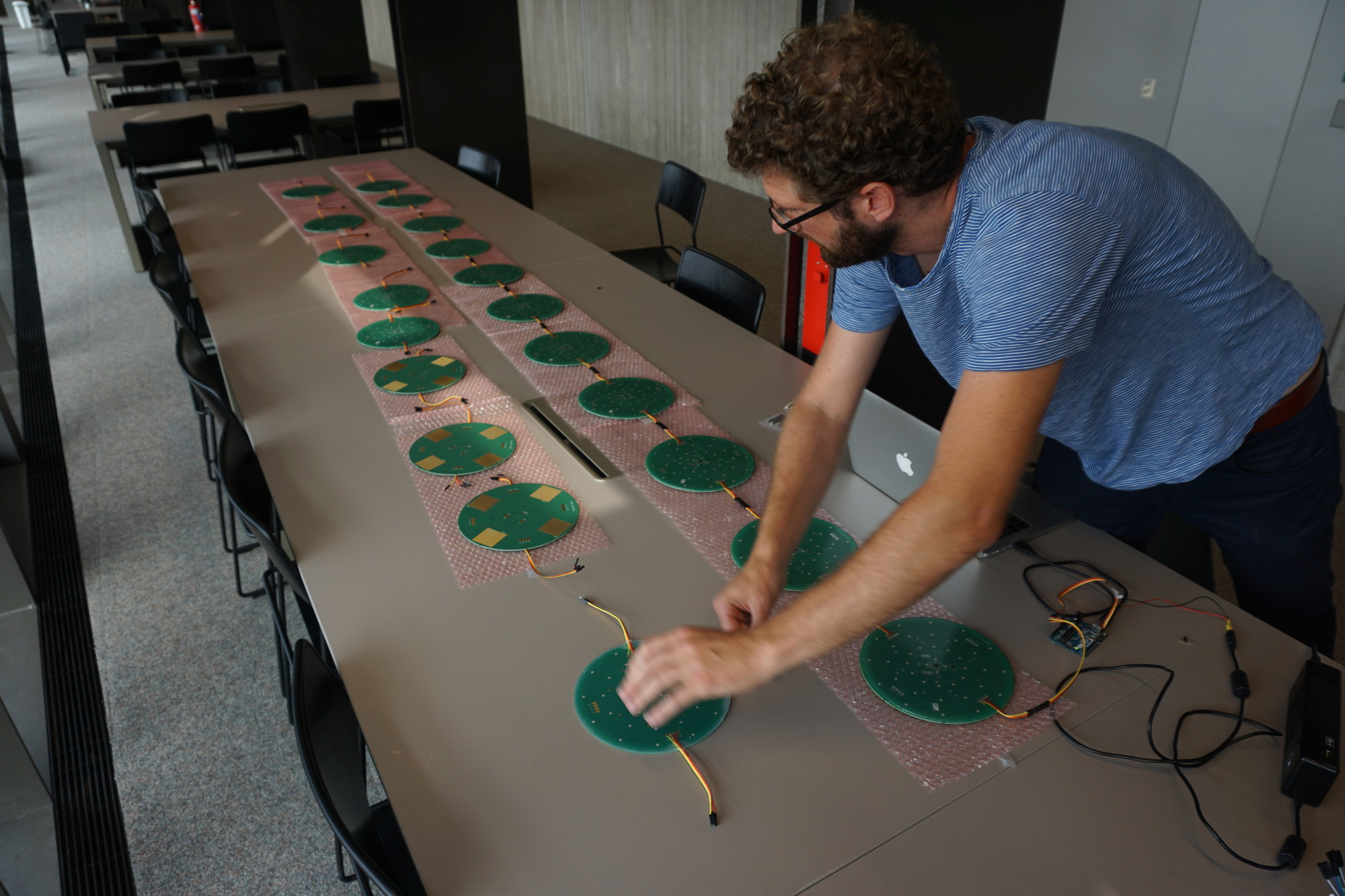
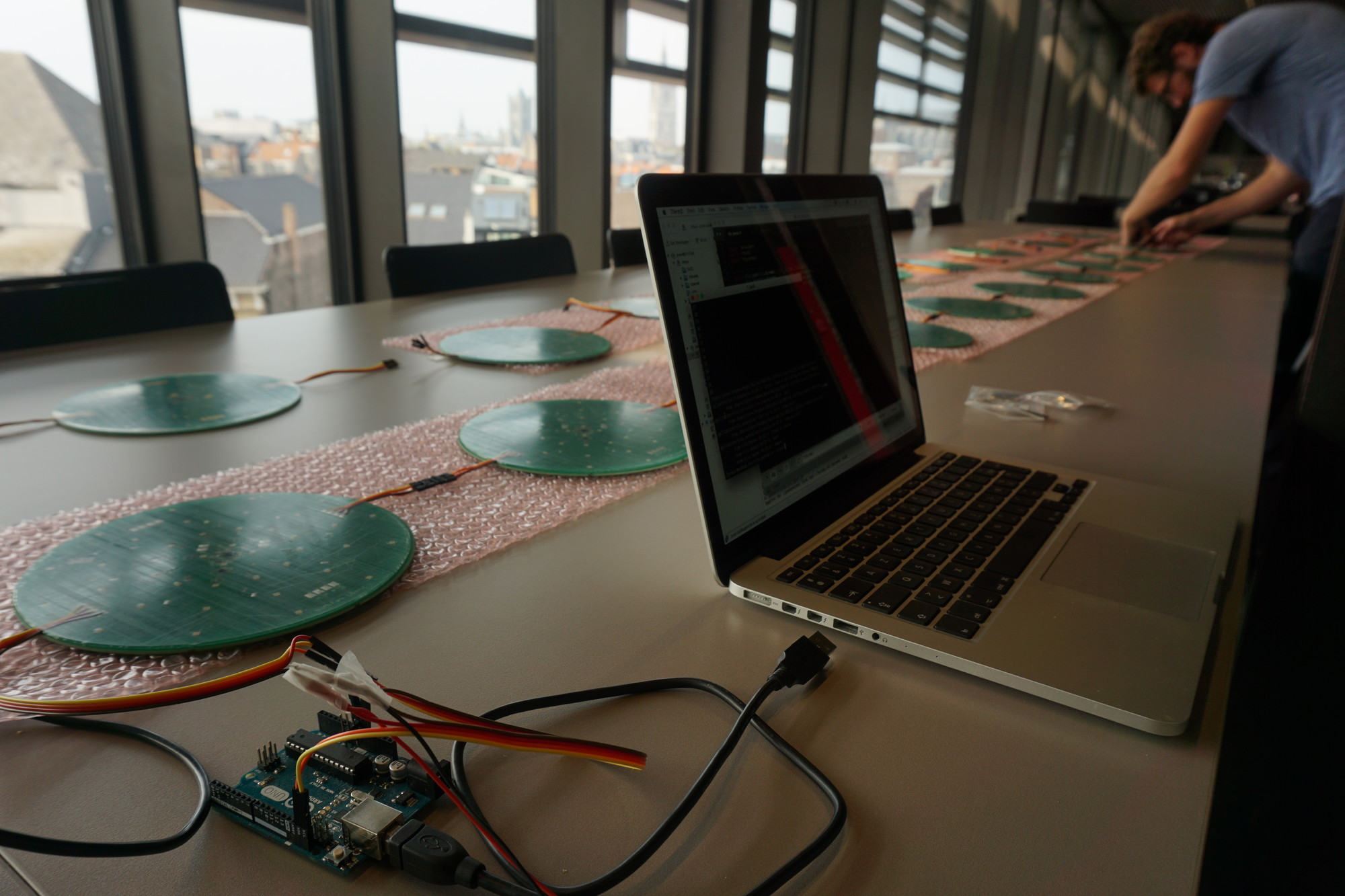
After a great deal of cardboard prototyping we settled on a design consisting of interactive tiles. Thomas Vervust of UGhent NamiFab designed a PCB with force sensitive resistors (FSR) on the bottom and RGB LED’s on top. Ivan Schepers provided practical insights during prototyping and developed the hardware around the interactive tiles. I was responsible for programming the system. Custom software was developed for the tiles, a controller to drive the tiles and to run and record experiments. Finally the system was moved to a hospital where the experiments took place. To know more about the exact experiments, please read the following three publications on AMPEL:
[Motor sequence learning in a goal-directed stepping task in persons with multiple sclerosis: a pilot study\
2022](https://nyaspubs.onlinelibrary.wiley.com/doi/10.1111/nyas.14702) Veldkamp, R., Moumdjian, L., van Dun, K., Six, J., Vanbeylen, A., Kos, D. and Feys, P. For this study AMPEL was slightly modified for a reaction time task, showing its flexibility. The participants were asked to step on a tile as quickly as possible after it lit up. They were either knowledgable of the tile trajectory or not. This work was also published in the Annals of the New York Academy of Sciences.
Basic media info: gives information about the streams and encodings used in a media file.
Fig: [audio transcodinging in the browser](/attachment/cors/ffmpeg.audio.wasm/transcode.html). A `wav` file is converted to an `mp3`.
A bit more about the rationale behind this effort: Browsers have become practical platforms for audio processing applications thanks to the combination of Web Audio API , performant Javascript environment and WebAssembly. Have a look, for example, at essentia.JS.
However, browsers only support a small subset of audio formats and container formats. Dealing with many (legacy) audio formats is often a rather painful experience since there are so many media container formats which can contain a surprising variation of audio (and video) encodings. In short, decoding audio for in-browser analysis or playback is often problematic.
Luckily there is FFmpeg which claims to be ‘a complete, cross-platform solution to record, convert and stream audio and video’. It is, indeed, capable to decode almost any audio encoding known to man from about any container. Additionally, it also contains tools to filter, manipulate, resample, stretch, … audio. FFmpeg is a must-have when working with audio. It would be ideal to have FFmpeg running in a browser…
Thanks to WebAssembly ffmpeg can be compiled for use in the browser. There have been effortstoget ffmpeg working in the browser. These efforts have been focusing on the complete ffmpeg suite. Now I have prepared an audio focused ffmpeg build for the web based on these efforts. I have selected only audio parts which makes the resulting .wasm binary four to five times smaller (from \~20MB to \~5MB). I also provided a simplified Javascript wrapper. The project brings audio decoding to the browser but also audio filtering, transcoding, pitch-shifting, sample rate conversions, audio channel manipulation, and so forth. It is also capable to extract audio streams from video container formats.
Next to the pure functionality of ffmpeg there are general advantages to run audio analysis software in the browser at client-side:
Ease-of-use: no software needs to be installed. The runtime comes with a compatible browser.
Privacy: Since media files are not transferred it is impossible for the system running the service to make unauthorised copies of these files. There is no need to trust the service since all processing happens locally, in the browser.
Speed: Downloading and especially uploading large media files takes a while. When files are kept locally, processing can start immediately and no time is wasted sending bytes over the internet. This results in a snappy user experience.
Computational load: the computational load of transcoding is distributed over the clients and not centralised on a (single) server. The server does not do any computing and only serves static files, so it can handle as many concurrent clients as its bandwidth allows.
PFFFT is a small, pretty fast FFT library programmed in C with a BSD-like license. I have taken it upon myself to compile a WebAssembly version of PFFFT to make it available for browsers and node.js environments. It is called pffft.wasm and available on GitHub.
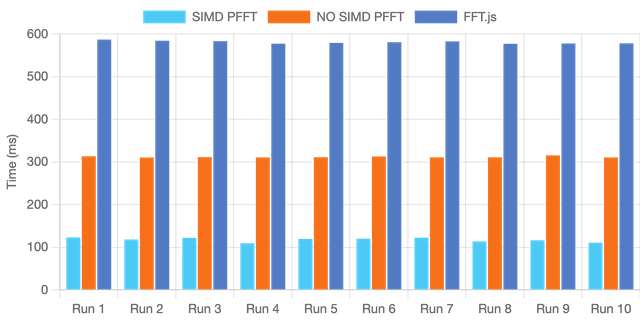
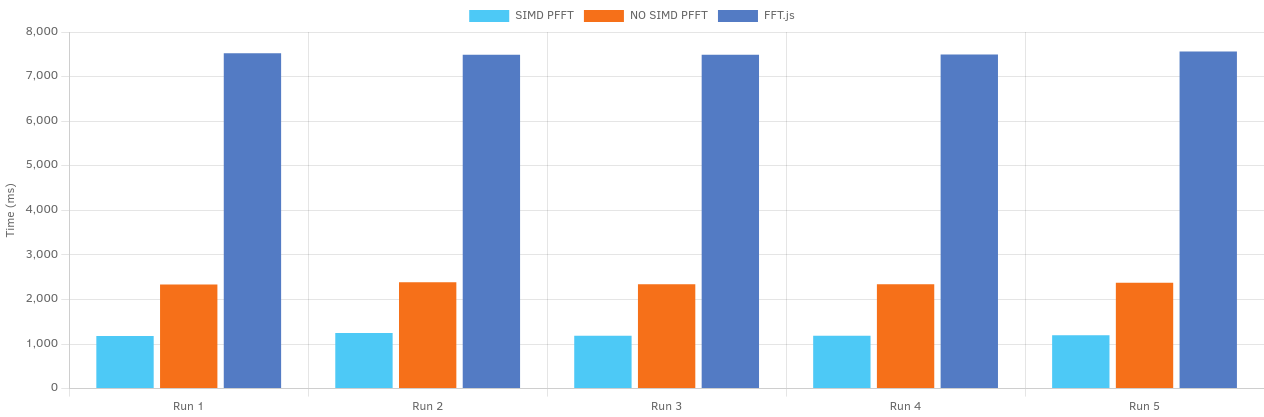
The pffft.wasm library comes in two flavours. One is compiled with SIMD instructions while the other comes without these instructions. SIMD stands for ‘single instruction, multiple data’ and does what it advertises: in a single step it processes multiple datapoints. The aim of SIMD is to make calculations several times faster. Especially for workloads where the same calculations are repeated over and over again on similar data, SIMD optimisation is relevant. FFT calculation is such a workload.
Evidently the SIMD version is much faster but there is no need to take my word for it. Below you can benchmark the SIMD version of pffft.wasm and compare it with the non-SIMD version on your machine. A pure Javascript FFT library called FFT.js serves as a baseline.
When running the same benchmark on Firefox and on Chrome it becomes clear that FFT.js on Chrome is about twice as fast thanks to its superior Javascript engine for this workload. The performance of the WebAssembly versions in Chrome and Firefox is nearly identical. Safari unfortunately does not (yet) support SIMD WebAssembly binaries and fails to complete the benchmark.
This work presents updates to Panako, an acoustic fingerprinting system that was introduced at ISMIR 2014. The notable feature of Panako is that it matches queries even after a speedup, time-stretch or pitch-shift. It is freely available and has no problems indexing and querying 100k sea shanties. The updates presented here improve query performance significantly and allow a wider range of time-stretch, pitch-shift and speed-up factors: e.g. the top 1 true positive rate for 20s query that were sped up by 10 percent increased from 18% to 83% from the 2014 version of Panako to the new version. The aim of this short write-up is to reintroduce Panako, evaluate the improvements and highlight two techniques with wider applicability. The first of the two techniques is the use of a constant-Q non-stationary Gabor transform: a fast, reversible, fine-grained spectral transform which can be used as a front-end for many MIR tasks. The second is how near-exact hashing is used in combination with a persistent B-Tree to allow some margin of error while maintaining reasonable query speeds.
Together with the paper there is also a poster and a short video presentation which explains the work:
Have you ever found yourself wondering how to build an accurate, low-latency LTC decoder with a common micro-controller? Well! Wonder no more and read on! Or, stop reading and do go read something that is more appealing to your predispositions.
SMPTE timecodes were originally used to synchronize audio and video material. SMPTE timecode data is often encoded into audio using LTC or linear time code. This special audio stream can be recorded together with other audio and video material. By decoding the LTC audio afterwards and working back to SMPTE timecodes, synchronization of multiple camera angles and audio material becomes straightforward. This concept tagging data streams with SMPTE timecodes is also used for other types of data.
\
Fig: LTC is a 'self-clocking' protocol for which a period can be found automatically. Once the period is found, transitions within the period are counted. A period with a transition translates to a 1, a period without any transitions to a 0.
SMPTE timecodes supports up to 30 frames per second and this resolution might not be sufficient for some data streams. It helps if the frames could be split up and 60 or 120 frames per second could be generated. With a low latency LTC decoder it would be possible to support this case and, for example, provide four pulses for every SMPTE frame. To be more precise: a SMPTE frame consists of 80 bits and in this case we would send a pulse exactly when decoding bit 0, bit 20, bit 40 and bit 60. We would then be able to sample at 120Hz while staying in sync with the SMPTE.
My first attempt was to treat the signal like audio and use a ready built library for LTC audio decoding The problem there is that sampling is done which might not exactly match the SMPTE bit transition period and relatively large buffers are used to decode LTC. The bit exact decoding is not possible using this method: the latency is too large, the method also uses excessive computational power and memory.
Fig: Biasing circuit to offset voltages
In my second attempt, the current iteration, interrupts are used to detect rising and falling edges in the LTC stream. By counting the number of microseconds between these edges a bit string is constructed. Effectively decoding LTC without any wasted computational power or memory and at a very low latency. If the LTC stream is well-formed, following each incoming bit and reacting to it becomes straightforward. Finally, after gently massaging the LTC bit string, SMPTE timecodes ooze out of the system at a low latency.
I have implemented a low latency LTC and SMPTE timecode data decoder for a Teensy microcontroller. One of the current limitations is that only 30fps SMPTE without skipped frames is supported. Another limitation is that the precision of the derived 120Hz clock is dependent on the sampling rate of the encoded audio signal: if e.g. only 8000Hz is used, transitions can only be precise up until 125µs. The derived clock will jitter slightly but will not drift.
There is still a slight problem with audio and Teensy input: audio is generally transmitted from ~~1.8V to +1.8V and not~~ as a Teensy would expect - from 0 to 3.3V. To make this change a small biasing circuit is placed before the Teensy input. In my case two 100k resistors and a 0.1uF capacitor worked best. The interrupt is relatively robust against signals that are a clipping (outside the 0 - 3.3V) or slightly too silent. If the signal becomes too small LTC decoding obviously fails.
Panako is an acoustic fingerprinting system I developed a couple of years ago. With acoustic fingerprinting systems it is possible to find duplicates in digital music archives and compare meta-data or identify unlabelled audio fragments. In the margins of my post-doc project working with large music archives, I have found the time to update Panako significantly. The updates simplify, improve and speed up Panako.
\
Fig. General content based audio search scheme.
The main algorithms are simplified. There is also a reduction of dependencies and a refocus to core functionality. This also simplifies building the software. The retrieval characteristics are improved, mainly thanks to the use of a fine-grained Gabor transform. Also new is the near-exact hashing construct which helps with off-by-one issues when matching time bins. The key-value store used is now LMDB, which speeds up the query performance of Panako significantly. The updates should make Panako stand the test of time somewhat better.
\
Fig. The top one true positive rate for 20s query fragments. The audio playback is speed modified from 84 to 116% with respect to the indexed reference audio. The original query length is 20s, if it is slowed down by 10% it takes, evidently, 22s. Note the improvement of the 2021 version of Panako (blue) vs the 2014 version (light-gray). As a baseline the standard algorithm (wang 2003) is included as well. For the 2021 Panako algorithm, audio recognition performance suffers (below 80) when playback speed is changed more than 10.
- The number of dependencies has been drastically cut by removing support for multiple key-value stores.
- The key-value store has been changed to a faster and simpler system (from [MapDB](https://mapdb.org) to [LMDB](http://www.lmdb.tech/doc)).
- The SyncSink functionality has been moved to another project (with Panako as dependency).
- The main algorithms have been replaced with simpler and better working versions:
- Olaf is a new implementation of the classic Shazam algorithm.
- The algoritm described in the Panako paper was also replaced. The core ideas are still the same. The main change is the use of a [Gabor transform](https://en.wikipedia.org/wiki/Gabor_transform) to go from time domain to the spectral domain (previously a constant-q transform was used). The gabor transform is implemented by [JGaborator](https://github.com/JorenSix/JGaborator) which in turn relies on [The Gaborator](https://gaborator.com/) C library via JNI.
- Folder structure has been simplified.
- The UI which was mainly used for debugging has been removed.
- A new set of helper scripts are added in the `scripts` directory. They help with evaluation, parsing results, checking results, building panako, creating documentation,...
- Changed the default panako location to \~/.panako, so users can install and use panako more easily (without need for sudo rights)
I have just released a new version of SyncSink. SyncSink is a tool to synchronize media files with shared audio. It is ideal to synchronize video captured by multiple cameras or audio captured by many microphones. It finds a rough alignment between audio captured from the same event and subsequently refines that offset with a crosscorrelation step. Below you can see SyncSink in action or you can try out SyncSink (you will need ffmpeg and Java installed on your system).
SyncSink used to be part of the Panako acoustic fingerprinting system but I decided that it was better to keep the Panako package focused and made a separate repository for SyncSink. More information can be found at the SyncSink GiHub repo
SyncSink is a tool to synchronize media files with shared audio. SyncSink matches and aligns shared audio and determines offsets in seconds. With these precise offsets it becomes trivial to sync files. SyncSink is, for example, used to synchronize video files: when you have many video captures of the same event, the audio attached to these video captures is used to align and sync multiple (independently operated) cameras.
Evidently, SyncSink can also synchronize audio captured from many (independent) microphones if some environmental sound is shared (leaked in) the each recording.
This post deals with the problem of using stateful C code from multiple Java threads. With JNI (Java Native Interface) it is possible to glue C code to a Java environment. There are many helpful tutorials on how to call C code and receive results. JNI helps to reuse existing, often highly complex and computationally expensive, C code.
The introductory tutorials often stop once it is made clear how to repackage (simple) datatypes and do not mention threads. It is, however, reasonable to expect JNI code to take into account thread-safety and proper multi-threading. In all but the simplest cases it is not that straightforward to share state at the C side and allow JNI code to be called from multiple Java threads. Incorrectly sharing state can lead to memory leaks and segmentation faults (segfaults) and crashes the application. In what follows, a way to share thread-local state is presented.
It is quite common to have an init, work and dispose method to create a state, use that state and do some work and finally dispose of used resources. Each Java thread independently calls these methods and expects results. These results should not change if multiple Java threads are calling the same methods. In other words: the state should remain Java thread-local. A typical Java class could look like the code below.
With the Java code in mind, the C code should know which Java thread is used and which state needs to be used for the work. Luckily there is a way to find out: The JNI specification states that each JNIEnv is local to a Java thread. So we can use the JNIEnv pointer to identify a thread. This is the idea that is used below.
The code maps a JNIEnv pointer to a structure with (any) state information. An unordered map is used for this mapping. There is, however, still a problem: multiple threads can call the init method at once. So multiple threads potentially write to the unordered_map at the same time which leads to problems. To prevent this from happening a mutex is used. The mutex, together with a unique lock, makes sure that only a single thread writes to the unordered map. The same holds for the dispose method.
The work method does not need a unique lock since it does not write to the unordered map and reading from multiple threads is no problem.
#include<unordered_map>#include<mutex>constint DATA_ARRAY_SIZE = 300000 * 2;
struct BridgeState {
jfloat *data;
};
//A hash map with a JNIEnv * as key and a BridgeState * as value
std::unordered_map<uintptr_t, uintptr_t> stateMap;
//A mutex to ensure that writes to the stateMap are synchronized.
std::mutex stateMutex;
JNIEXPORT jint JNICALL Java_init(JNIEnv *env, jobject object) {
//Makes sure only one thread writes to the stateMap
std::unique_lock<std::mutex> lck(stateMutex);
BridgeState *state = new BridgeState();
uintptr_t env_addresss = reinterpret_cast<uintptr_t>(env);
state->data = new jfloat[DATA_ARRAY_SIZE];
uintptr_t state_addresss = reinterpret_cast<uintptr_t>(state);
stateMap[env_addresss] = state_addresss;
return1;
}
JNIEXPORT jint JNICALL Java_work(JNIEnv *env, jobject object) {
//get a ref to the state pointer
uintptr_t env_addresss = reinterpret_cast<uintptr_t>(env);
BridgeState *state = reinterpret_cast<BridgeState *>(stateMap[env_addresss]);
//do something with state->data, e.g. calculate the sumint sum = 0;
for (int i = 0; i < DATA_ARRAY_SIZE; i++) {
state->data[i] = state->data[i] + 1;
sum += (int)state->data[i];
}
return sum;
}
JNIEXPORT jint JNICALL Java_dispose(JNIEnv *env, jobject object) {
//Makes sure only one thread writes to the stateMap
std::unique_lock<std::mutex> lck(stateMutex);
uintptr_t env_addresss = reinterpret_cast<uintptr_t>(env);
BridgeState *state = reinterpret_cast<BridgeState *>(stateMap[env_addresss]);
stateMap.erase(env_addresss);
//cleanup memory
delete[] state->data;
delete state;
return0;
}
This conceptual code has been lifted from a JNI library doing actual work: The JGaborator JNI bridge . If you need more information on how to compile and use this construct in actual code, please have a look at the JGaborator GitHub repository

 Poging tot humor, Research papers, and UGent




 ismir_tab_icon.png, BAF_broadcast_audio_fingerprinting.mp4, discstitch_static_poster.pdf, 2022_DiscStitch__towards_audio-to-audio_alignment_with_robustness_to_playback_speed_variabilities_ISMIR_2022_Late_Breaking___Demo_abstracts.webp, and baf_broadcast_audio_fingerprinting_thumb.jpg
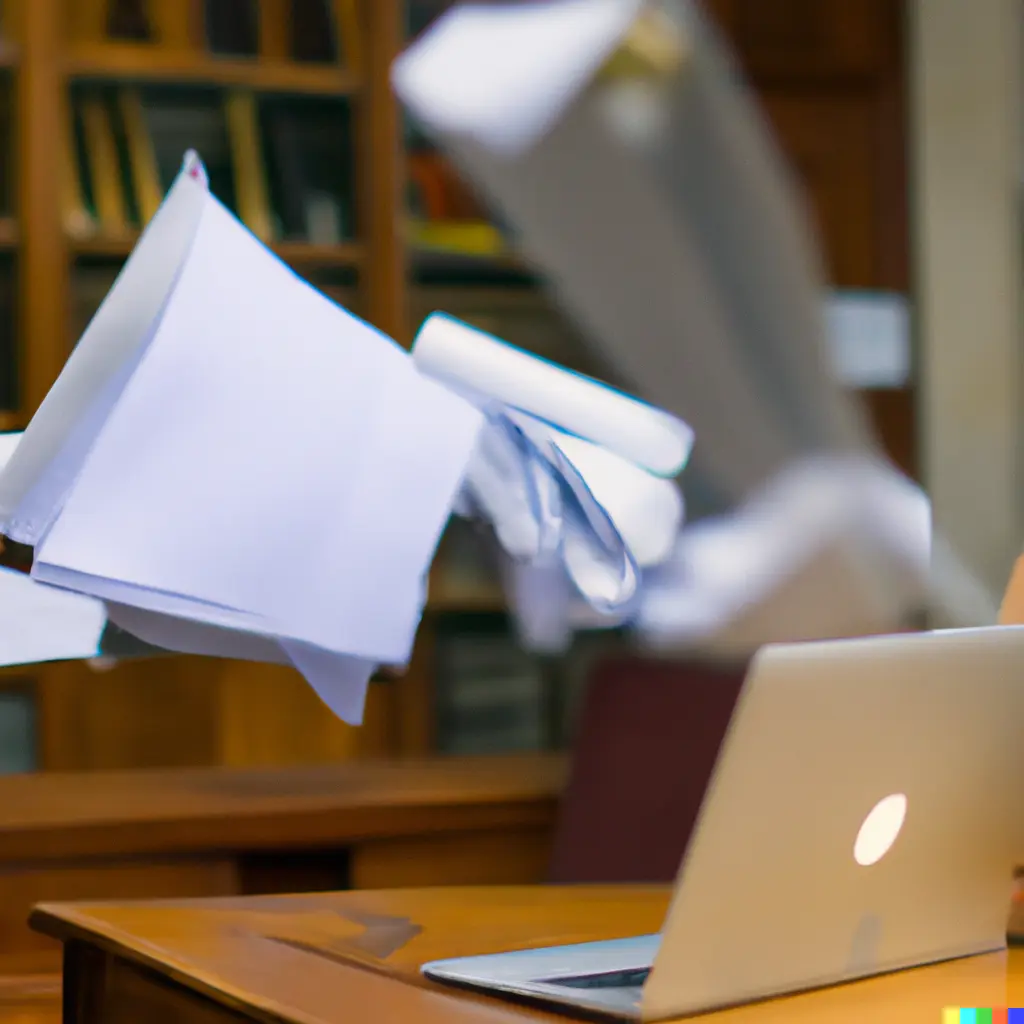 Fig: DALL.E 2 imagining a fight between papers and software.
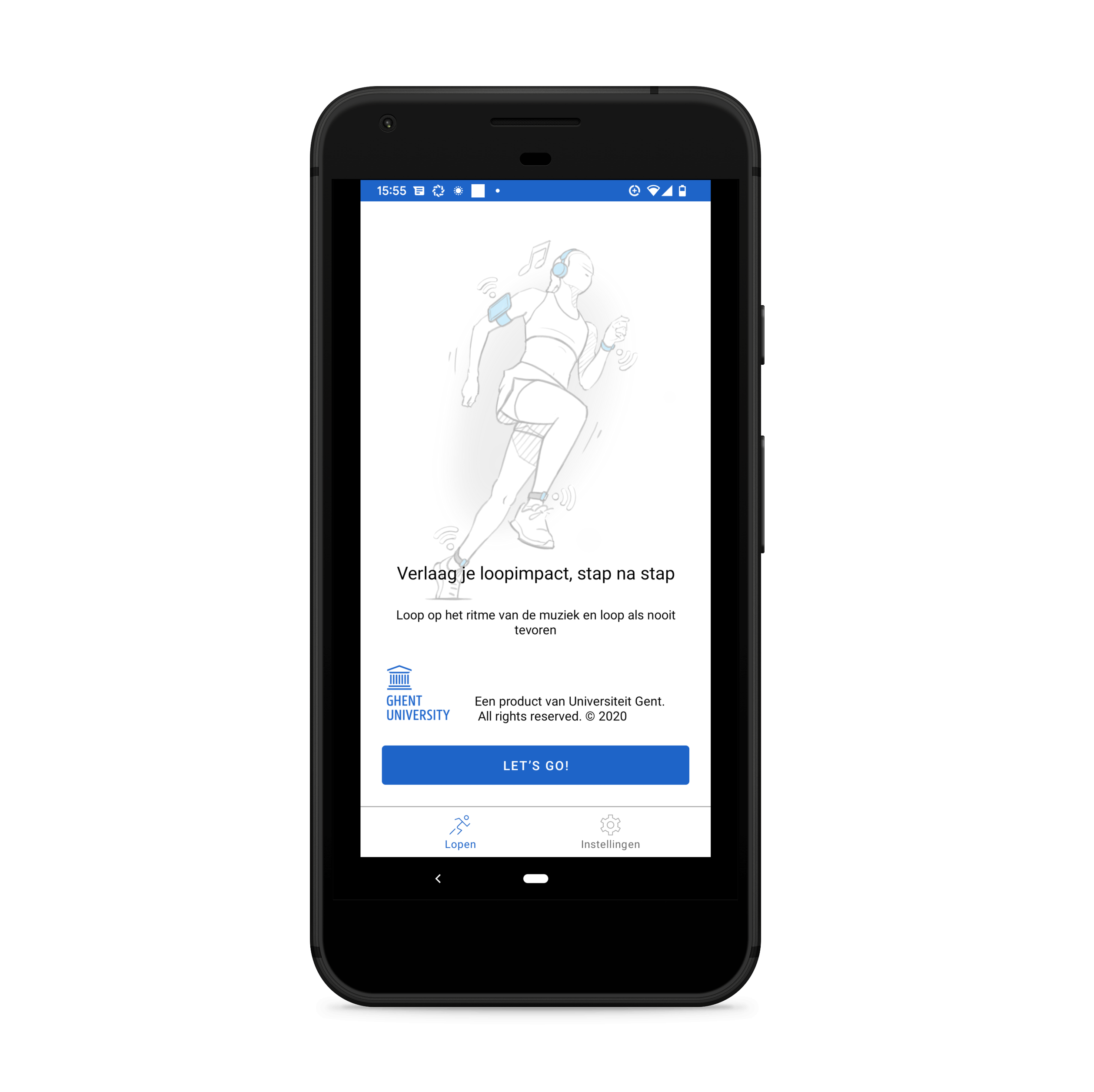
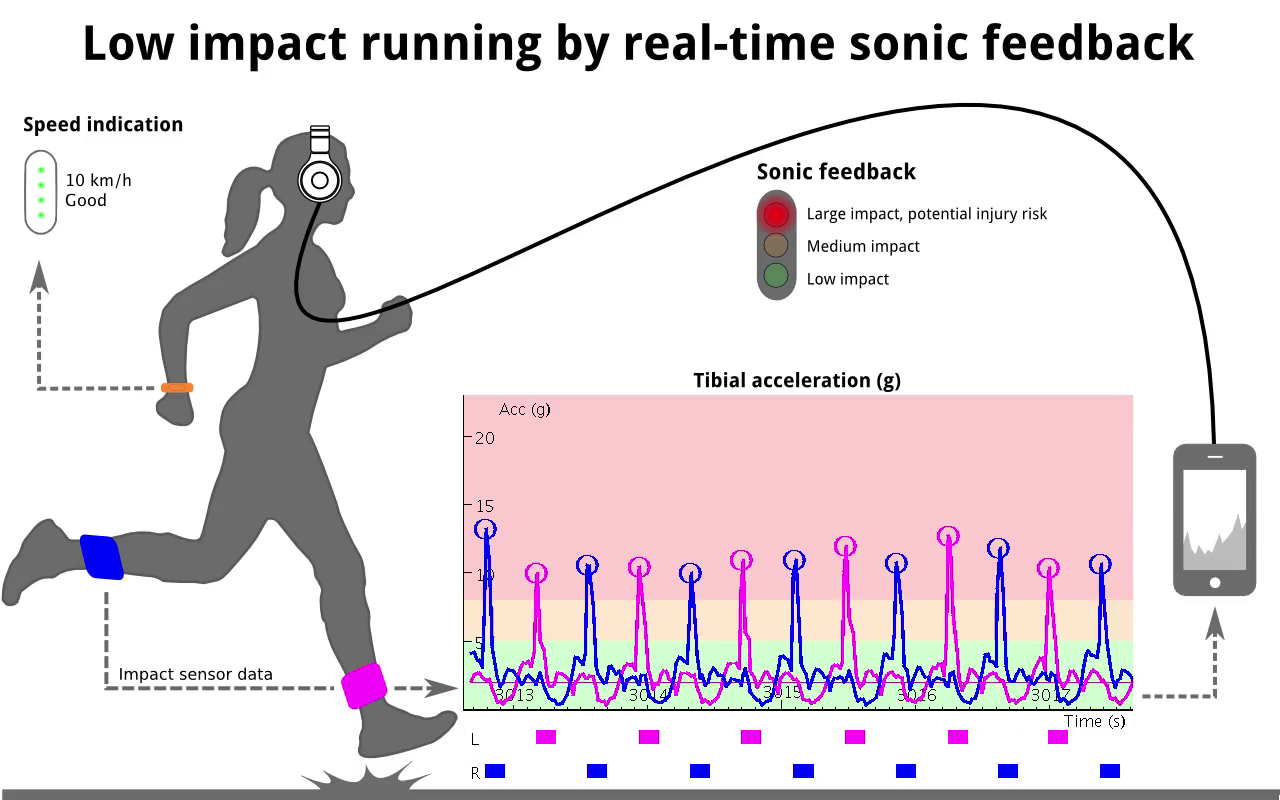

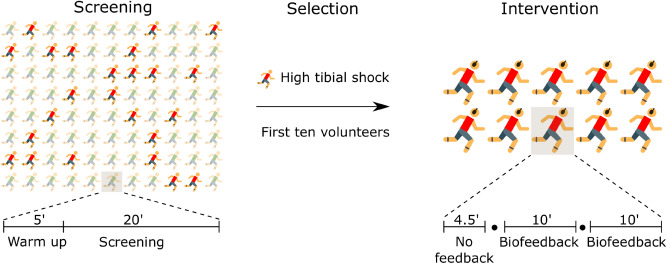
 Fig: stable diffusion imagining a networked music performance





 \
Fig. General content based audio search scheme.
\
Fig. General content based audio search scheme.
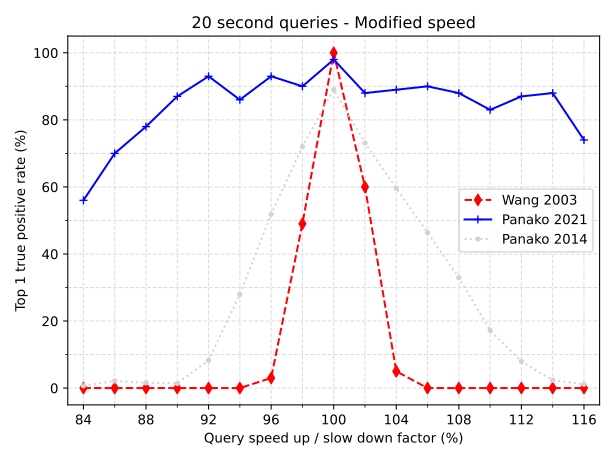 \
Fig. The top one true positive rate for 20s query fragments. The audio playback is speed modified from 84 to 116% with respect to the indexed reference audio. The original query length is 20s, if it is slowed down by 10% it takes, evidently, 22s. Note the improvement of the 2021 version of Panako (blue) vs the 2014 version (light-gray). As a baseline the standard algorithm (wang 2003) is included as well. For the 2021 Panako algorithm, audio recognition performance suffers (below 80) when playback speed is changed more than 10.
\
Fig. The top one true positive rate for 20s query fragments. The audio playback is speed modified from 84 to 116% with respect to the indexed reference audio. The original query length is 20s, if it is slowed down by 10% it takes, evidently, 22s. Note the improvement of the 2021 version of Panako (blue) vs the 2014 version (light-gray). As a baseline the standard algorithm (wang 2003) is included as well. For the 2021 Panako algorithm, audio recognition performance suffers (below 80) when playback speed is changed more than 10.